ShortcutPosters

4 art directions — pick one below, click to zoom & compare.
Layout
MICROKEYBOARD SHORTCUTS · WINDOWS · 48 ESSENTIAL1234567890QCtrlQuitWCtrlSwitch t…ECtrlOpen com…RCtrlToggle l…TCtrlOpen new…YCtrlRedoUCtrlToggle m…IOCtrlOpen filePAltRemove l…ACtrlSelect a…SCtrlSaveDCtrlDuplicat…FAltFind lit…GAltToggle k…HJCtrlPlay rec…KCtrlCut curr…LCtrlJump to …ZCtrlUndoXAltSkip cur…CAltRemove a…VCtrlPasteBCtrlRun shel…NCtrlFind nextMMORE SHORTCUTSPrevious para…Alt{Next paragraphAlt}Select to sta…CtrlShiftUPSelect to end…CtrlShiftDOWNPrevious tabAlt,Next tabAlt.Delete word t…AltBkspIndent / auto…TabOutdentShiftTabPage upPgUpPage downPgDnSelect word t…CtrlShiftRIGHTSelect word t…CtrlShiftLEFTSpawn cursor …AltShiftUPSpawn cursor …AltShiftDOWNMove lines upAltUPMove lines do…AltDOWNFind previousCtrlPCursor to sta…CtrlUPCursor to end…CtrlDOWNStart of line…HOMEEnd of lineENDSpawn multi-c…AltNToggle helpCtrlGCopy (or copy…CtrlCshortcutposters.comUPDATED JAN 2026 · COMPATIBLE WITH MICRO · WINDOWS
SELECTIONSelect to start of bufferCtrlShiftUPSelect to end of bufferCtrlShiftDOWNSelect word to the rightCtrlShiftRIGHTSelect word to the leftCtrlShiftLEFTSelect allCtrlAFILEPrevious tabAlt,Next tabAlt.Open new tabCtrlTOpen fileCtrlOSaveCtrlSQuitCtrlQMULTI-CURSORSpawn cursor on line aboveAltShiftUPSpawn cursor on line belowAltShiftDOWNSkip current multi-cursor …AltXRemove last multi-cursorAltPRemove all multi-cursorsAltCSpawn multi-cursor on next…AltNNAVIGATIONPrevious paragraphAlt{Next paragraphAlt}Page upPgUpPage downPgDnJump to line (goto)CtrlLCursor to start of bufferCtrlUPCursor to end of bufferCtrlDOWNStart of line / textHOMEEnd of lineENDSEARCHFind literal (no regex)AltFFind nextCtrlNFind previousCtrlPFindCtrlFMISCToggle macro recordingCtrlUPlay recorded macroCtrlJToggle key menuAltGToggle line numbers (ruler)CtrlRRun shell commandCtrlBSwitch to next splitCtrlWToggle helpCtrlGOpen command barCtrlEEDITINGDelete word to the leftAltBkspIndent / autocompleteTabOutdentShiftTabCut current lineCtrlKDuplicate selection or lineCtrlDMove lines upAltUPMove lines downAltDOWNUndoCtrlZRedoCtrlYCopy (or copy line if no s…CtrlCCut (or cut line if no sel…CtrlXPasteCtrlVmicroKEYBOARD SHORTCUTS · WINDOWS · 50BOTH LAYOUTSQWERTYQWERTYAZERTYAZERTYshortcutposters.comUPDATED JAN 2026 · COMPATIBLE WITH MICRO · WINDOWS
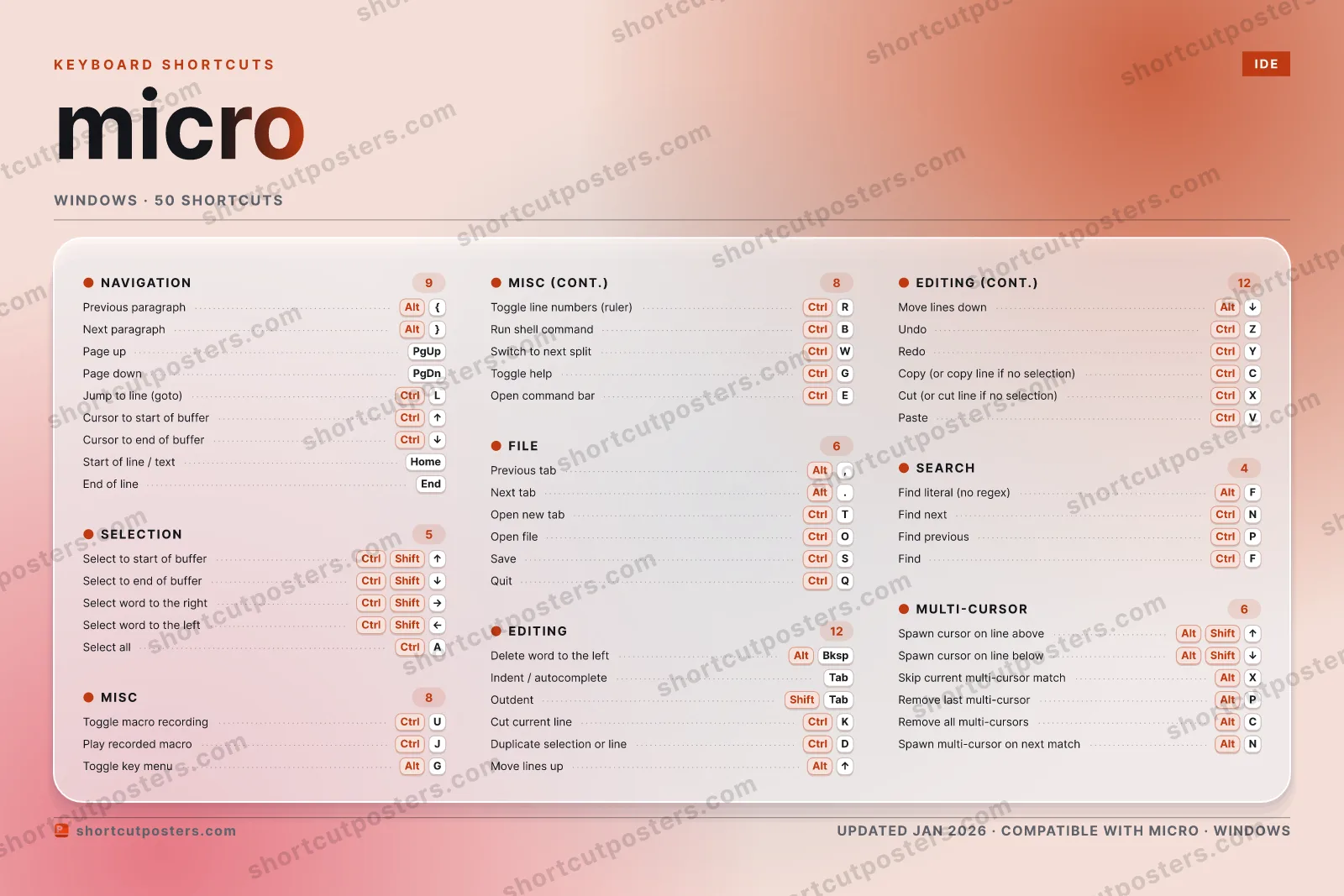
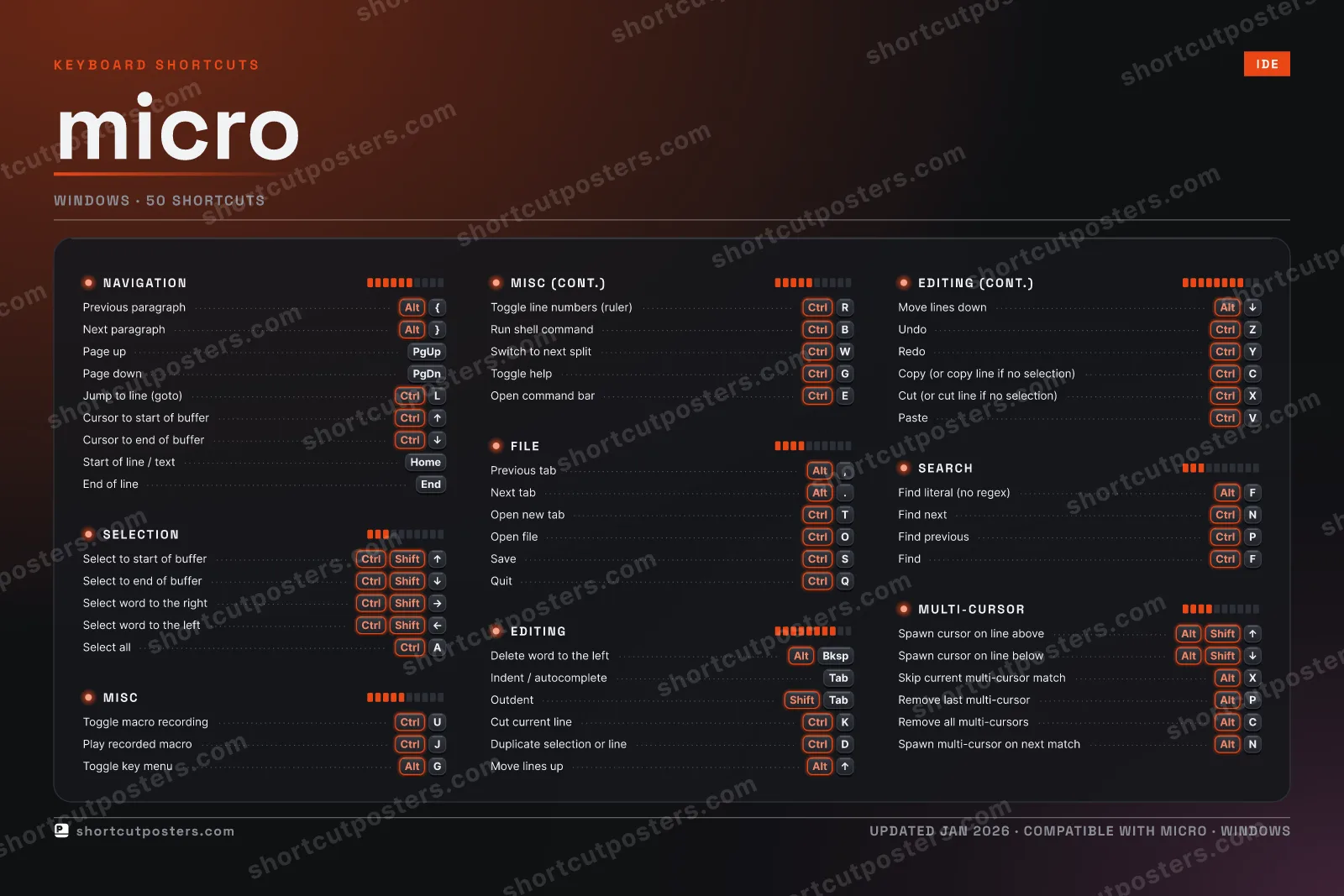
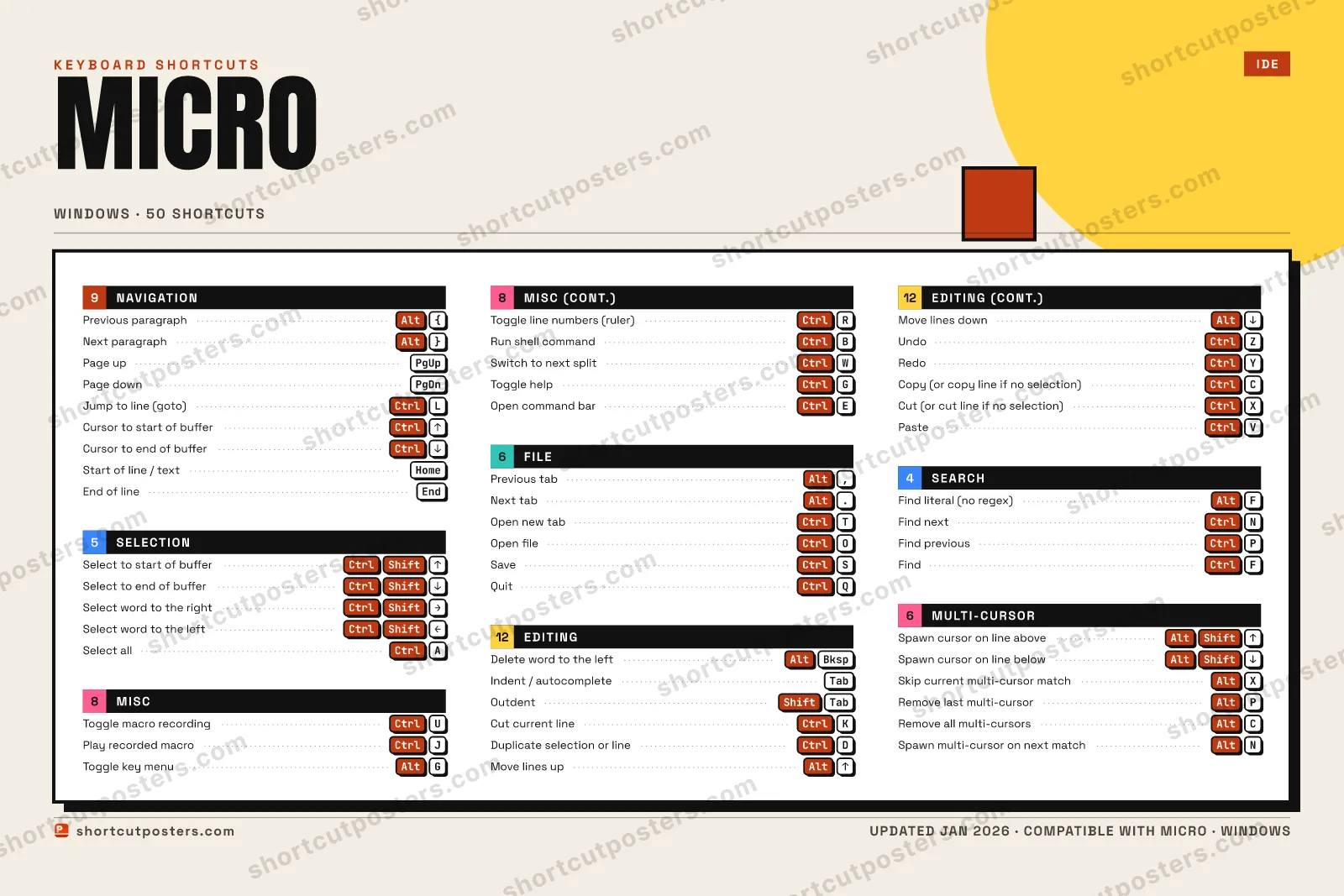
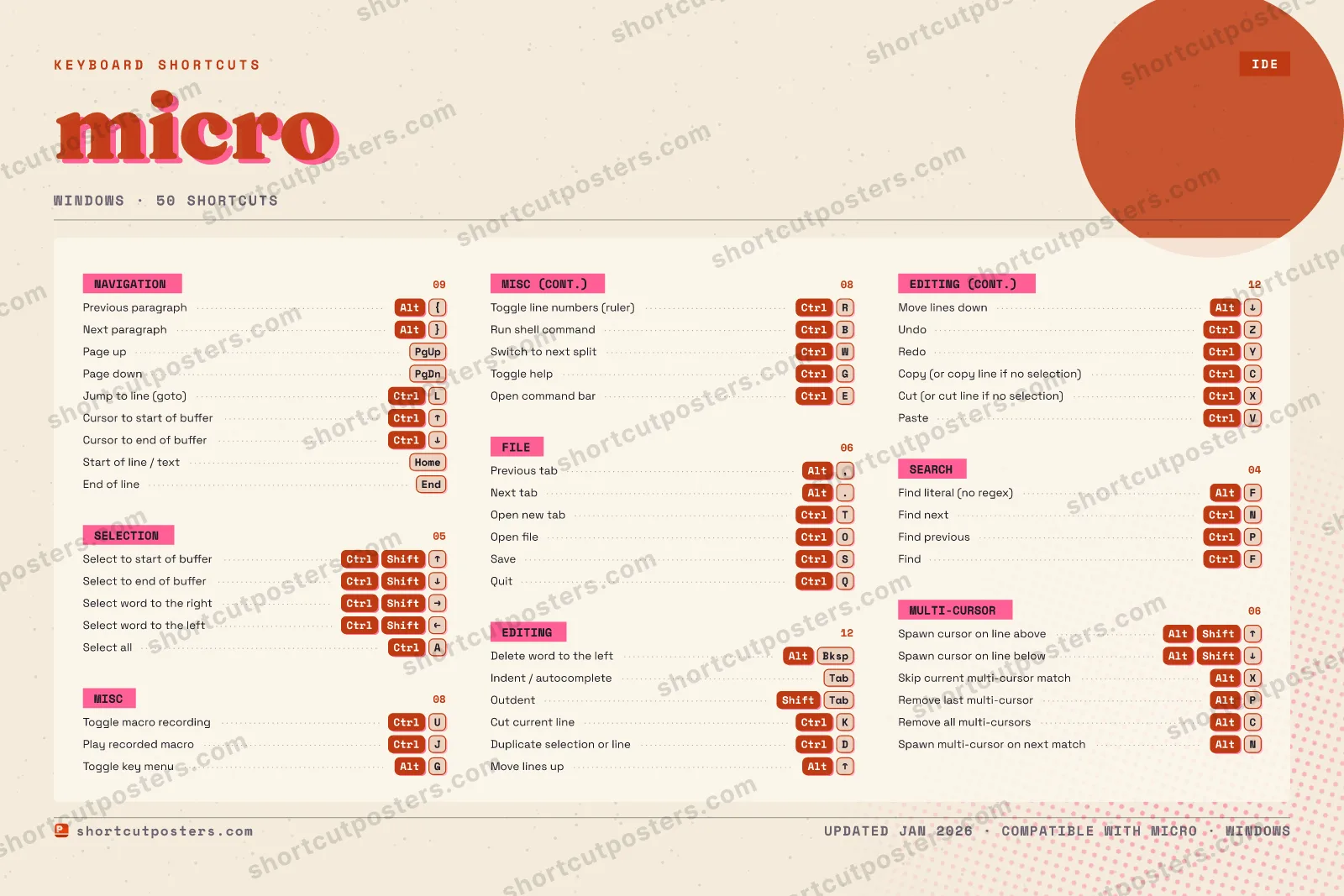
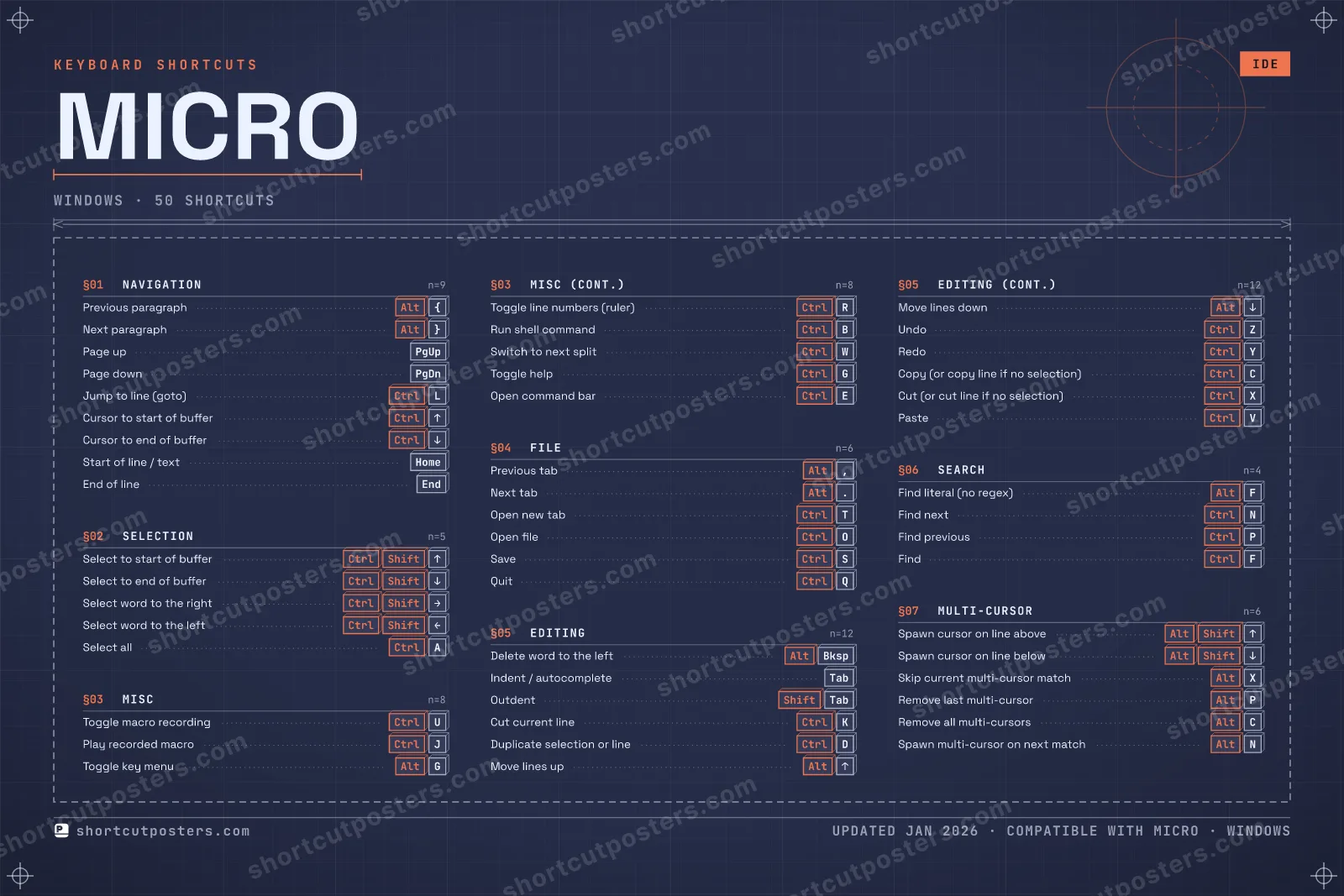
SELECTION05Select to start of bufferCtrlShiftUPSelect to end of bufferCtrlShiftDOWNSelect word to the rightCtrlShiftRIGHTSelect word to the leftCtrlShiftLEFTSelect allCtrlAFILE06Previous tabAlt,Next tabAlt.Open new tabCtrlTOpen fileCtrlOSaveCtrlSQuitCtrlQMULTI-CURSOR06Spawn cursor on line aboveAltShiftUPSpawn cursor on line belowAltShiftDOWNSkip current multi-cursor …AltXRemove last multi-cursorAltPRemove all multi-cursorsAltCSpawn multi-cursor on next…AltNNAVIGATION09Previous paragraphAlt{Next paragraphAlt}Page upPgUpPage downPgDnJump to line (goto)CtrlLCursor to start of bufferCtrlUPCursor to end of bufferCtrlDOWNStart of line / textHOMEEnd of lineENDSEARCH04Find literal (no regex)AltFFind nextCtrlNFind previousCtrlPFindCtrlFMISC08Toggle macro recordingCtrlUPlay recorded macroCtrlJToggle key menuAltGToggle line numbers (ruler)CtrlRRun shell commandCtrlBSwitch to next splitCtrlWToggle helpCtrlGOpen command barCtrlEEDITING12Delete word to the leftAltBkspIndent / autocompleteTabOutdentShiftTabCut current lineCtrlKDuplicate selection or lineCtrlDMove lines upAltUPMove lines downAltDOWNUndoCtrlZRedoCtrlYCopy (or copy line if no s…CtrlCCut (or cut line if no sel…CtrlXPasteCtrlVmicroKEYBOARD SHORTCUTS · WINDOWS · 50BOTH LAYOUTSQWERTYQWERTYAZERTYAZERTYshortcutposters.comUPDATED JAN 2026 · COMPATIBLE WITH MICRO · WINDOWS
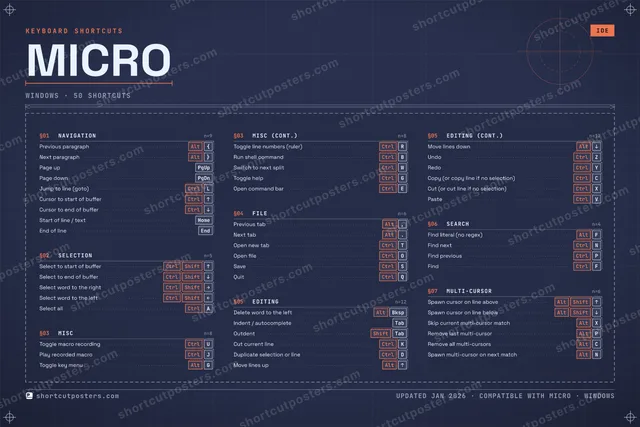
MICRO · KEYBOARD SHORTCUTSWindows · 7 SETS · No.01MICROTOTAL50SHORTCUTSFOR WINDOWS · SHIPPED COMBOSSETSNAVIGATION09SELECTION05MISC08FILE06EDITING12SEARCH04MULTI-CURSOR06REF. EDITION · JAN 2026shortcutposters.comPrevious paragraphAlt{Next paragraphAlt}Page upPgUpPage downPgDnJump to line (goto)CtrlLCursor to start of bufferCtrlUPCursor to end of bufferCtrlDOWNStart of line / textHOMEEnd of lineENDSelect to start of bufferCtrlShiftUPSelect to end of bufferCtrlShiftDOWNSelect word to the rightCtrlShiftRIGHTSelect word to the leftCtrlShiftLEFTSelect allCtrlAToggle macro recordingCtrlUPlay recorded macroCtrlJToggle key menuAltGToggle line numbers (ruler)CtrlRRun shell commandCtrlBSwitch to next splitCtrlWToggle helpCtrlGOpen command barCtrlEPrevious tabAlt,Next tabAlt.Open new tabCtrlTOpen fileCtrlOSaveCtrlSQuitCtrlQDelete word to the leftAltBkspIndent / autocompleteTabOutdentShiftTabCut current lineCtrlKDuplicate selection or lineCtrlDMove lines upAltUPMove lines downAltDOWNUndoCtrlZRedoCtrlYCopy (or copy line if no selection)CtrlCCut (or cut line if no selection)CtrlXPasteCtrlVFind literal (no regex)AltFFind nextCtrlNFind previousCtrlPFindCtrlFSpawn cursor on line aboveAltShiftUPSpawn cursor on line belowAltShiftDOWNSkip current multi-cursor matchAltXRemove last multi-cursorAltPRemove all multi-cursorsAltCSpawn multi-cursor on next matchAltN

Windows edition · 50 shortcuts

micro Keyboard Shortcuts Poster

A printable, framed-quality poster of the essential micro shortcuts for Windows — the keys worth keeping in view, designed to stay readable on a wall.

Edition
Apple Mac Windows Windows

Free PNG is web-resolution & lightly watermarked.

Customise this poster Pick the shortcuts, restyle the colours — download free. Get the framed-quality print Full 300 DPI, print-ready — at home or shipped to your door.

micro is a modern, intuitive terminal-based text editor that works out of the box with familiar CUA-style shortcuts. These are its default keybindings, which are identical across macOS, Windows, and Linux.

All micro keyboard shortcuts (Windows)

Layout
`
1
2
3
4
5
6
7
8
9
0
-
=
⌫ Back
Tab
Q
W
E
R
T
Y
U
I
O
P
[
]
\
Caps
A
S
D
F
G
H
J
K
L
;
'
Enter ⏎
Shift
Z
X
C
V
B
N
M
,
.
/
Shift
Ctrl
Win
Alt
Space
Alt
Win
Menu
Ctrl

+ 6 more controls in the table below

Editing 12

Action Shortcut
Delete word to the left AltBksp
Indent / autocomplete Tab
Outdent ShiftTab
Cut current line CtrlK
Duplicate selection or line CtrlD
Move lines up AltUP
Move lines down AltDOWN
Undo CtrlZ
Redo CtrlY
Copy (or copy line if no selection) CtrlC
Cut (or cut line if no selection) CtrlX
Paste CtrlV

Navigation 9

Action Shortcut
Previous paragraph Alt{
Next paragraph Alt}
Page up PgUp
Page down PgDn
Jump to line (goto) CtrlL
Cursor to start of buffer CtrlUP
Cursor to end of buffer CtrlDOWN
Start of line / text HOME
End of line END

Misc 8

Action Shortcut
Toggle macro recording CtrlU
Play recorded macro CtrlJ
Toggle key menu AltG
Toggle line numbers (ruler) CtrlR
Run shell command CtrlB
Switch to next split CtrlW
Toggle help CtrlG
Open command bar CtrlE

File 6

Action Shortcut
Previous tab Alt,
Next tab Alt.
Open new tab CtrlT
Open file CtrlO
Save CtrlS
Quit CtrlQ

Multi-cursor 6

Action Shortcut
Spawn cursor on line above AltShiftUP
Spawn cursor on line below AltShiftDOWN
Skip current multi-cursor match AltX
Remove last multi-cursor AltP
Remove all multi-cursors AltC
Spawn multi-cursor on next match AltN

Selection 5

Action Shortcut
Select to start of buffer CtrlShiftUP
Select to end of buffer CtrlShiftDOWN
Select word to the right CtrlShiftRIGHT
Select word to the left CtrlShiftLEFT
Select all CtrlA

Search 4

Action Shortcut
Find literal (no regex) AltF
Find next CtrlN
Find previous CtrlP
Find CtrlF

Sourced from github.com , micro-editor.github.io Last verified

Unofficial reference. ShortcutPosters is not affiliated with, endorsed by, or sponsored by micro. All product names, logos, and trademarks are property of their respective owners. See our licensing & trademark notice.

Frequently asked questions

Does the poster include every micro shortcut?
micro has 50 keyboard shortcuts in total — the complete list is free to read on this page. The poster features the most essential ones, curated to stay readable on a wall.
Can I print it at home?
Yes. The digital download is a high-resolution 300 DPI file you can print at home or at any print shop, in standard frame sizes.
Does it cover both Mac and Windows?
We sell separate Mac and Windows editions so every key matches your keyboard exactly. This page is the Windows edition.
Is this an official micro product?
No. This is an unofficial reference poster and is not affiliated with or endorsed by micro. All trademarks belong to their respective owners.
For app makers

Promote your app

Built an app with great keyboard shortcuts? Get it into the database — a free, searchable reference page, and an optional printable poster your power users will pin to the wall.

  • Free shortcut reference page
  • Indexed & searchable
  • Optional framed poster