ShortcutPosters

Poster maker

Make your Zoom shortcuts poster

Pick the shortcuts that matter, add your own, tune the colours and style — then download a free personalized PNG, or order the print-ready PDF.

Making a poster for:
Style
Accent
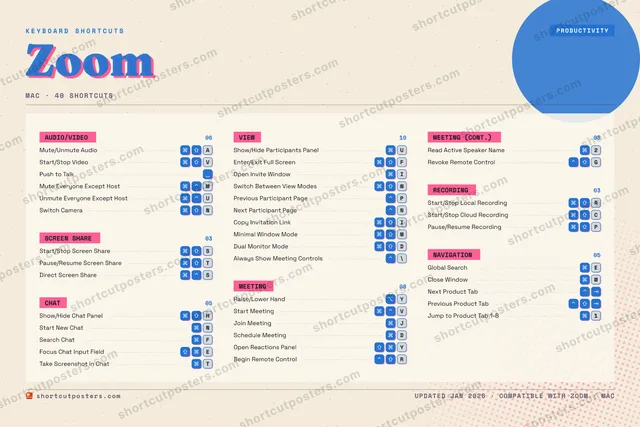
ZOOMKEYBOARD SHORTCUTS · MAC · 401Jump to …2Read Act…34567890QW⌘ ⇧Switch B…EGlobal S…R⌘ ⇧Start/St…T⌘ ⇧Pause/Re…YRaise/Lo…UShow/Hid…IOpen Inv…OP⌘ ⇧Pause/Re…A⌘ ⇧Mute/Unm…S⌘ ⇧Start/St…DSchedule…F⌘ ⇧Enter/Ex…G⌃ ⇧Revoke R…H⌘ ⇧Show/Hid…JJoin Mee…KLZXC⌘ ⇧Start/St…V⌘ ⇧Start/St…BN⌘ ⇧Switch C…M⌘ ⌃Mute Eve…MORE SHORTCUTSPush to TalkStart MeetingVUnmute Everyone E…UOpen Reactions Pa…YStart New ChatNSearch ChatFPrevious Particip…PNext Participant …NClose WindowWBegin Remote Cont…RDirect Screen Sha…SFocus Chat Input …ETake Screenshot i…TCopy Invitation L…IMinimal Window Mo…MDual Monitor ModeDAlways Show Meeti…\Next Product TabPrevious Product …shortcutposters.comUPDATED JAN 2026 · COMPATIBLE WITH ZOOM · MAC

Hover to locate · click on the poster to disable · drag to reorder categories & shortcuts · to rename a category

Free PNG $0
  • Web resolution (1600 px)
  • Light watermark
  • Instant download
Made to order
Custom print-ready PDF $2.99
  • 300 DPI, framed-quality — no watermark
  • Every standard print size
  • Built to order from the poster above — checkout link emailed to you

Trouble ordering? Email business@shortcutposters.com.

How it works

  1. 1

    Choose a style

    Pick from four layouts: isometric keys, a typewriter list, a labelled keyboard map, or a bold editorial print.

  2. 2

    Make it yours

    Set the accent colour and palette, rename categories, and reorder anything.

  3. 3

    Pick the shortcuts

    Toggle exactly which shortcuts appear — or add your own custom ones.

  4. 4

    Download or print

    Export a free high-resolution PNG instantly, or order a print-ready PDF.

Four styles to choose from

ZOOMKEYBOARD SHORTCUTS · MAC · 20 ESSENTIAL1234567890QWEGlobal S…R⌘ ⇧Start/St…T⌘ ⇧Pause/Re…YRaise/Lo…UShow/Hid…IOP⌘ ⇧Pause/Re…A⌘ ⇧Mute/Unm…S⌘ ⇧Start/St…DSchedule…F⌘ ⇧Enter/Ex…GH⌘ ⇧Show/Hid…JJoin Mee…KLZXC⌘ ⇧Start/St…V⌘ ⇧Start/St…BN⌘ ⇧Switch C…M⌘ ⌃Mute Eve…MORE SHORTCUTSPush to TalkStart MeetingVUnmute Everyone E…UOpen Reactions Pa…Yshortcutposters.comUPDATED JAN 2026 · COMPATIBLE WITH ZOOM · MAC
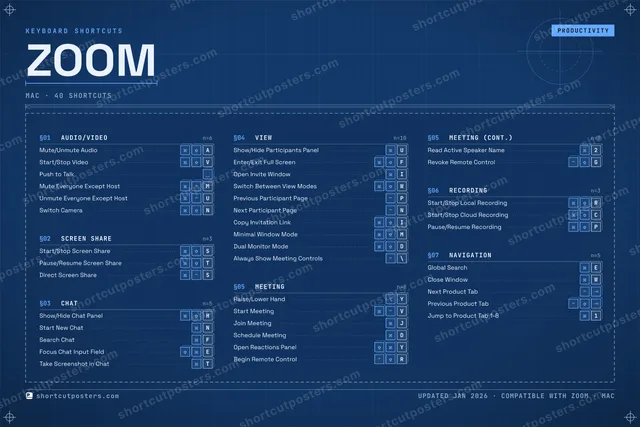
Keyboard map Every binding labelled on a realistic QWERTY or AZERTY keyboard.
SCREEN SHAREStart/Stop Screen ShareSPause/Resume Screen ShareTCHATShow/Hide Chat PanelHMEETINGRaise/Lower HandYStart MeetingVJoin MeetingJSchedule MeetingDOpen Reactions PanelYNAVIGATIONGlobal SearchEAUDIO/VIDEOMute/Unmute AudioAStart/Stop VideoVPush to TalkMute Everyone Except HostMUnmute Everyone Except HostUSwitch CameraNVIEWShow/Hide Participants PanelUEnter/Exit Full ScreenFRECORDINGStart/Stop Local RecordingRStart/Stop Cloud RecordingCPause/Resume RecordingPZoomKEYBOARD SHORTCUTS · MAC · 20 ESSENTIALBOTH LAYOUTSQWERTYQWERTYAZERTYAZERTYshortcutposters.comUPDATED JAN 2026 · COMPATIBLE WITH ZOOM · MAC
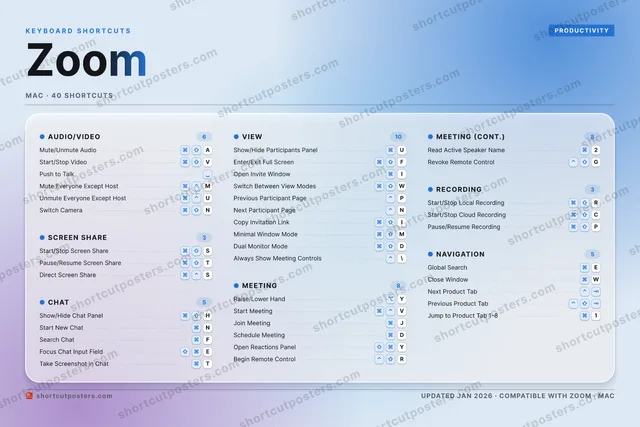
Isometric Shortcuts on a 3D isometric keyboard — bold and poster-like.
AUDIO/VIDEO06Mute/Unmute AudioAStart/Stop VideoVPush to TalkMute Everyone Except HostMUnmute Everyone Except HostUSwitch CameraNMEETING05Raise/Lower HandYStart MeetingVJoin MeetingJSchedule MeetingDOpen Reactions PanelYNAVIGATION01Global SearchESCREEN SHARE02Start/Stop Screen ShareSPause/Resume Screen ShareTCHAT01Show/Hide Chat PanelHVIEW02Show/Hide Participants PanelUEnter/Exit Full ScreenFRECORDING03Start/Stop Local RecordingRStart/Stop Cloud RecordingCPause/Resume RecordingPZoomKEYBOARD SHORTCUTS · MAC · 20 ESSENTIALBOTH LAYOUTSQWERTYQWERTYAZERTYAZERTYshortcutposters.comUPDATED JAN 2026 · COMPATIBLE WITH ZOOM · MAC
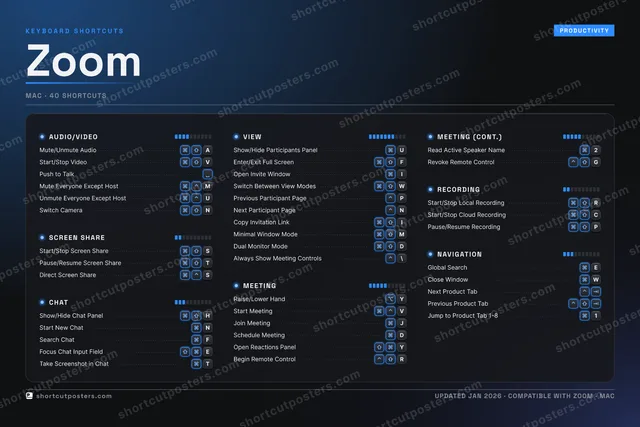
Typewriter A clean printed list, grouped by category — dense and legible.
ZOOM · KEYBOARD SHORTCUTSMac · 7 SETS · No.01ZOOMTOTAL20SHORTCUTSFOR MAC · SHIPPED COMBOSSETSAUDIO/VIDEO06SCREEN SHARE02CHAT01VIEW02MEETING05RECORDING03NAVIGATION01REF. EDITION · JAN 2026shortcutposters.comMute/Unmute AudioAStart/Stop VideoVPush to TalkMute Everyone Except HostMUnmute Everyone Except HostUSwitch CameraNStart/Stop Screen ShareSPause/Resume Screen ShareTShow/Hide Chat PanelHShow/Hide Participants PanelUEnter/Exit Full ScreenFRaise/Lower HandYStart MeetingVJoin MeetingJSchedule MeetingDOpen Reactions PanelYStart/Stop Local RecordingRStart/Stop Cloud RecordingCPause/Resume RecordingPGlobal SearchE
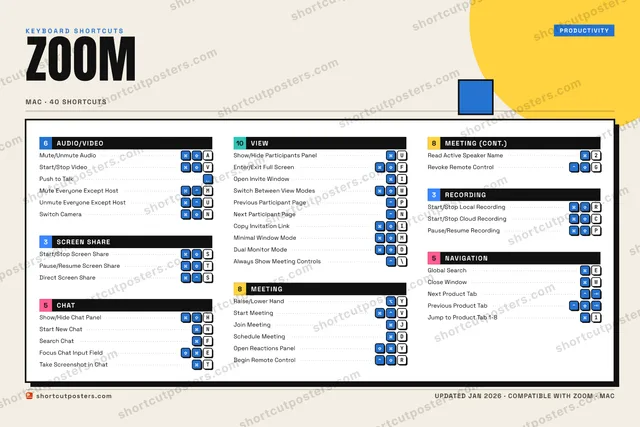
Editorial A bold Swiss-style print: giant wordmark, dense keycap columns, and a totals rail.

Frequently asked questions

Is the Zoom poster maker free?

Yes — you can design and download a high-resolution PNG of your Zoom shortcuts poster for free. A print-ready PDF is an optional paid upgrade.

Can I choose which Zoom shortcuts appear?

Yes. Toggle any shortcut on or off, reorder them, rename categories, and even add your own custom shortcuts.

Can I change the colours and style?

Yes. Pick an accent colour, choose a palette, and switch between the isometric, typewriter, and keyboard-map styles.

Which keyboard layout and operating system are supported?

Choose QWERTY or AZERTY, and switch the edition between the operating systems Zoom supports (macOS, Windows, Linux).

How do I get a printed poster?

Download the free PNG to print yourself, or order the print-ready, framed-quality PDF directly from the maker.