ShortcutPosters

Poster maker

Make your Microsoft PowerToys shortcuts poster

Pick the shortcuts that matter, add your own, tune the colours and style — then download a free personalized PNG, or order the print-ready PDF.

Making a poster for:
Style
Accent
MICROSOFT POWERTOYSKEYBOARD SHORTCUTS · WINDOWS · 161234567890QWERTWin CtrlToggle A…YUIOPASDFGHWin ShiftToggle M…JKLZXCWin ShiftActivate…VWin ShiftOpen the…BNMWin Ctrl ShiftActivate…MORE SHORTCUTSShow or hide Powe…AltSpaceOpen Command Pale…WinAltSpaceOpen the FancyZon…WinShift`Activate Text Ext…WinShiftTPreview selected …SpaceOpen Shortcut Gui…WinShift?Open or launch a …WinCtrl`Activate Find My …CtrlCtrlCycle to the next…WinPgUpCycle to the prev…WinPgDnActivate gliding …WinAlt.shortcutposters.comUPDATED JAN 2026 · COMPATIBLE WITH MICROSOFT POWERTOYS · WINDOWS

Hover to locate · click on the poster to disable · drag to reorder categories & shortcuts · to rename a category

Free PNG $0
  • Web resolution (1600 px)
  • Light watermark
  • Instant download
Made to order
Custom print-ready PDF $2.99
  • 300 DPI, framed-quality — no watermark
  • Every standard print size
  • Built to order from the poster above — checkout link emailed to you

Trouble ordering? Email business@shortcutposters.com.

How it works

  1. 1

    Choose a style

    Pick from four layouts: isometric keys, a typewriter list, a labelled keyboard map, or a bold editorial print.

  2. 2

    Make it yours

    Set the accent colour and palette, rename categories, and reorder anything.

  3. 3

    Pick the shortcuts

    Toggle exactly which shortcuts appear — or add your own custom ones.

  4. 4

    Download or print

    Export a free high-resolution PNG instantly, or order a print-ready PDF.

Four styles to choose from

MICROSOFT POWERTOYSKEYBOARD SHORTCUTS · WINDOWS · 161234567890QWERTWin CtrlToggle A…YUIOPASDFGHWin ShiftToggle M…JKLZXCWin ShiftActivate…VWin ShiftOpen the…BNMWin Ctrl ShiftActivate…MORE SHORTCUTSShow or hide Powe…AltSpaceOpen Command Pale…WinAltSpaceOpen the FancyZon…WinShift`Activate Text Ext…WinShiftTPreview selected …SpaceOpen Shortcut Gui…WinShift?Open or launch a …WinCtrl`Activate Find My …CtrlCtrlCycle to the next…WinPgUpCycle to the prev…WinPgDnActivate gliding …WinAlt.shortcutposters.comUPDATED JAN 2026 · COMPATIBLE WITH MICROSOFT POWERTOYS · WINDOWS
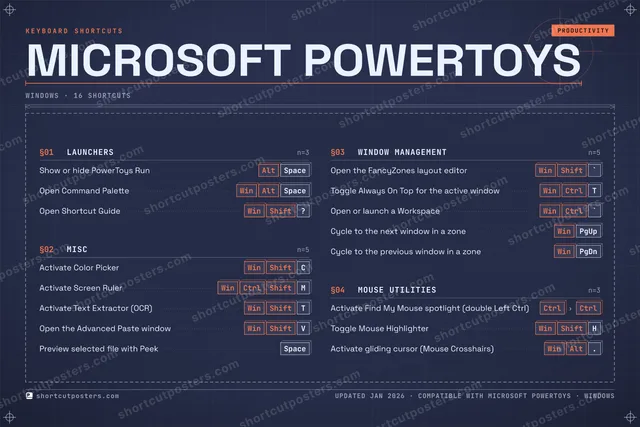
Keyboard map Every binding labelled on a realistic QWERTY or AZERTY keyboard.
MISCActivate Color PickerWinShiftCActivate Screen RulerWinCtrlShiftMActivate Text Extractor (OCR)WinShiftTOpen the Advanced Paste windowWinShiftVPreview selected file with PeekSpaceMOUSE UTILITIESActivate Find My Mouse spotlight (…CtrlCtrlToggle Mouse HighlighterWinShiftHActivate gliding cursor (Mouse Cro…WinAlt.LAUNCHERSShow or hide PowerToys RunAltSpaceOpen Command PaletteWinAltSpaceOpen Shortcut GuideWinShift?WINDOW MANAGEMENTOpen the FancyZones layout editorWinShift`Toggle Always On Top for the activ…WinCtrlTOpen or launch a WorkspaceWinCtrl`Cycle to the next window in a zoneWinPgUpCycle to the previous window in a …WinPgDnMicrosoft PowerToysKEYBOARD SHORTCUTS · WINDOWS · 16BOTH LAYOUTSQWERTYQWERTYAZERTYAZERTYshortcutposters.comUPDATED JAN 2026 · COMPATIBLE WITH MICROSOFT POWERTOYS · WINDOWS
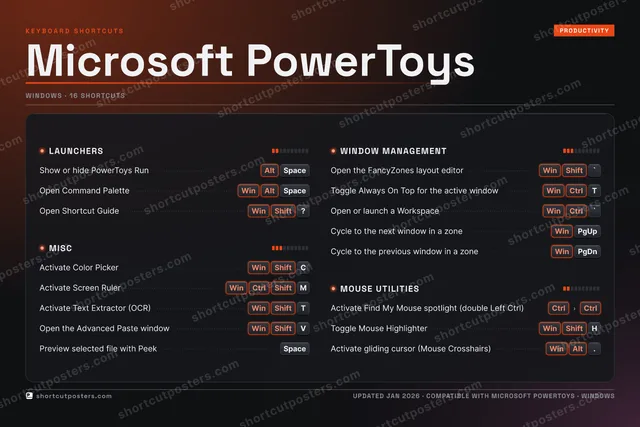
Isometric Shortcuts on a 3D isometric keyboard — bold and poster-like.
MISC05Activate Color PickerWinShiftCActivate Screen RulerWinCtrlShiftMActivate Text Extractor (OCR)WinShiftTOpen the Advanced Paste windowWinShiftVPreview selected file with PeekSpaceMOUSE UTILITIES03Activate Find My Mouse spotlight (…CtrlCtrlToggle Mouse HighlighterWinShiftHActivate gliding cursor (Mouse Cro…WinAlt.LAUNCHERS03Show or hide PowerToys RunAltSpaceOpen Command PaletteWinAltSpaceOpen Shortcut GuideWinShift?WINDOW MANAGEMENT05Open the FancyZones layout editorWinShift`Toggle Always On Top for the activ…WinCtrlTOpen or launch a WorkspaceWinCtrl`Cycle to the next window in a zoneWinPgUpCycle to the previous window in a …WinPgDnMicrosoft PowerToysKEYBOARD SHORTCUTS · WINDOWS · 16BOTH LAYOUTSQWERTYQWERTYAZERTYAZERTYshortcutposters.comUPDATED JAN 2026 · COMPATIBLE WITH MICROSOFT POWERTOYS · WINDOWS
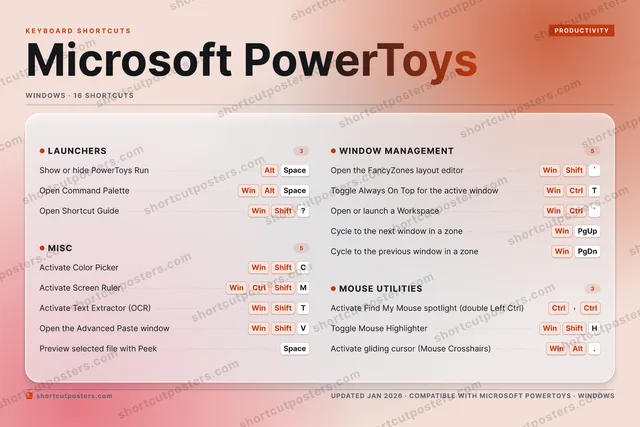
Typewriter A clean printed list, grouped by category — dense and legible.
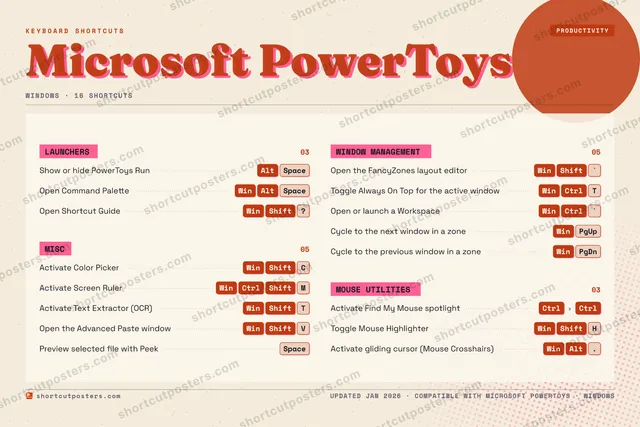
MICROSOFT POWERTOYS · KEYBOARD SHORTCUTSWindows · 4 SETS · No.01MICROSOFT POWERTOYSTOTAL16SHORTCUTSFOR WINDOWS · SHIPPED COMBOSSETSLAUNCHERS03MISC05WINDOW MANAGE05MOUSE UTILITI03REF. EDITION · JAN 2026shortcutposters.comShow or hide PowerToys RunAltSpaceOpen Command PaletteWinAltSpaceOpen Shortcut GuideWinShift?Activate Color PickerWinShiftCActivate Screen RulerWinCtrlShiftMActivate Text Extractor (OCR)WinShiftTOpen the Advanced Paste windowWinShiftVPreview selected file with PeekSpaceOpen the FancyZones layout editorWinShift`Toggle Always On Top for the active windowWinCtrlTOpen or launch a WorkspaceWinCtrl`Cycle to the next window in a zoneWinPgUpCycle to the previous window in a zoneWinPgDnActivate Find My Mouse spotlight (double Left Ctrl)CtrlCtrlToggle Mouse HighlighterWinShiftHActivate gliding cursor (Mouse Crosshairs)WinAlt.
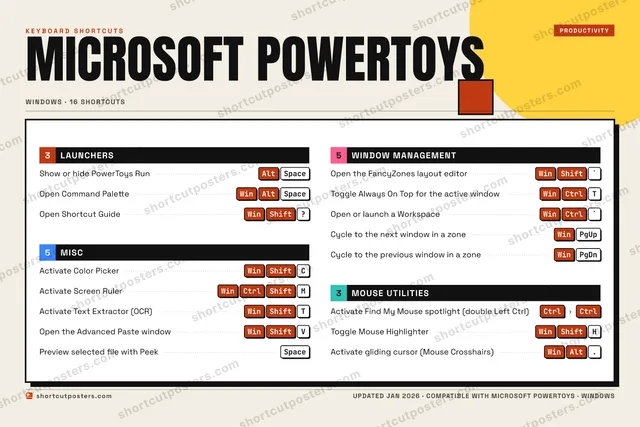
Editorial A bold Swiss-style print: giant wordmark, dense keycap columns, and a totals rail.

Frequently asked questions

Is the Microsoft PowerToys poster maker free?

Yes — you can design and download a high-resolution PNG of your Microsoft PowerToys shortcuts poster for free. A print-ready PDF is an optional paid upgrade.

Can I choose which Microsoft PowerToys shortcuts appear?

Yes. Toggle any shortcut on or off, reorder them, rename categories, and even add your own custom shortcuts.

Can I change the colours and style?

Yes. Pick an accent colour, choose a palette, and switch between the isometric, typewriter, and keyboard-map styles.

Which keyboard layout and operating system are supported?

Choose QWERTY or AZERTY, and switch the edition between the operating systems Microsoft PowerToys supports (macOS, Windows, Linux).

How do I get a printed poster?

Download the free PNG to print yourself, or order the print-ready, framed-quality PDF directly from the maker.