ShortcutPosters
iPhone appBeta

Make your Planet Zoo 2 controls poster

Pick the keybinds that matter, add your own, tune the colours and style — then download a free personalized PNG.

Making a poster for:
Style
Accent
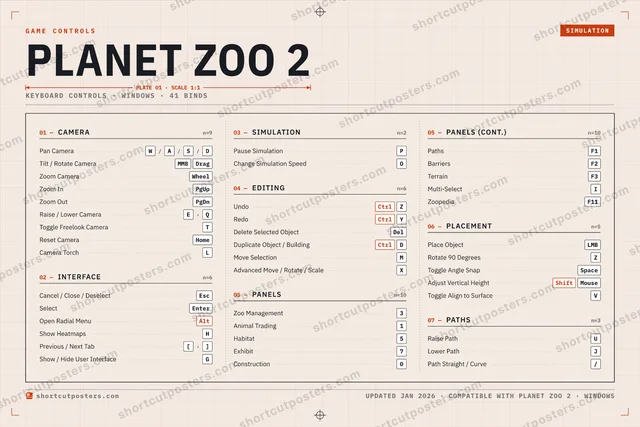
01 —CAMERAn=9Pan CameraW/A/S/DTilt / Rotate CameraMMBDragZoom CameraWheelZoom InPgUpZoom OutPgDnRaise / Lower CameraE›QToggle Freelook CameraTReset CameraHomeCamera TorchL02 —INTERFACEn=6Cancel / Close / DeselectEscSelectEnterOpen Radial MenuAltShow HeatmapsHPrevious / Next Tab[›]Show / Hide User InterfaceG03 —SIMULATIONn=2Pause SimulationPChange Simulation SpeedO04 —EDITINGn=6UndoCtrlZRedoCtrlYDelete Selected ObjectDelDuplicate Object / BuildingCtrlDMove SelectionMAdvanced Move / Rotate / ScaleX05 —PANELSn=10Zoo Management3Animal Trading1Habitat5Exhibit7Construction005 —PANELS (CONT.)n=10PathsF1BarriersF2TerrainF3Multi-SelectIZoopediaF1106 —PLACEMENTn=5Place ObjectLMBRotate 90 DegreesZToggle Angle SnapSpaceAdjust Vertical HeightShiftMouseToggle Align to SurfaceV07 —PATHSn=3Raise PathULower PathJPath Straight / Curve/GAME CONTROLSSIMULATIONPLANET ZOO 2PLATE 01 · SCALE 1:1KEYBOARD CONTROLS · WINDOWS · 41 BINDSshortcutposters.comUPDATED JAN 2026 · COMPATIBLE WITH PLANET ZOO 2 · WINDOWSshortcutposters.comshortcutposters.comshortcutposters.comshortcutposters.comshortcutposters.comshortcutposters.comshortcutposters.comshortcutposters.comshortcutposters.comshortcutposters.comshortcutposters.comshortcutposters.comshortcutposters.comshortcutposters.comshortcutposters.comshortcutposters.comshortcutposters.comshortcutposters.comshortcutposters.comshortcutposters.comshortcutposters.comshortcutposters.comshortcutposters.comshortcutposters.comshortcutposters.comshortcutposters.comshortcutposters.comshortcutposters.comshortcutposters.comshortcutposters.comshortcutposters.comshortcutposters.comshortcutposters.comshortcutposters.comshortcutposters.comshortcutposters.comshortcutposters.comshortcutposters.comshortcutposters.comshortcutposters.comshortcutposters.comshortcutposters.comshortcutposters.comshortcutposters.comshortcutposters.comshortcutposters.comshortcutposters.comshortcutposters.comshortcutposters.comshortcutposters.comshortcutposters.comshortcutposters.comshortcutposters.comshortcutposters.comshortcutposters.comshortcutposters.comshortcutposters.comshortcutposters.comshortcutposters.comshortcutposters.comshortcutposters.comshortcutposters.comshortcutposters.comshortcutposters.comshortcutposters.comshortcutposters.comshortcutposters.comshortcutposters.comshortcutposters.comshortcutposters.comshortcutposters.comshortcutposters.comshortcutposters.comshortcutposters.comshortcutposters.comshortcutposters.comshortcutposters.comshortcutposters.comshortcutposters.comshortcutposters.comshortcutposters.comshortcutposters.comshortcutposters.comshortcutposters.comshortcutposters.comshortcutposters.comshortcutposters.comshortcutposters.comshortcutposters.comshortcutposters.comshortcutposters.comshortcutposters.comshortcutposters.comshortcutposters.comshortcutposters.comshortcutposters.comshortcutposters.comshortcutposters.comshortcutposters.comshortcutposters.comshortcutposters.comshortcutposters.comshortcutposters.comshortcutposters.comshortcutposters.comshortcutposters.comshortcutposters.comshortcutposters.comshortcutposters.comshortcutposters.comshortcutposters.com

Hover to locate · click on the poster to disable · drag to reorder categories & shortcuts · ✎ to rename a category

Free PNG $0
  • Web resolution (1600 px)
  • Light watermark
  • Instant download
Made to order
Custom print-ready PDF $2.99
  • 300 DPI, framed-quality — no watermark
  • Every standard print size
  • Built to order from the poster above — checkout link emailed to you

Trouble ordering? Email business@shortcutposters.com.

How it works

  1. 1

    Choose a style

    Start from the generative Arcade art, or switch to isometric keys, a typewriter list, a keyboard map, or an editorial print.

  2. 2

    Make it yours

    Set the accent colour, rename categories, and reorder anything.

  3. 3

    Pick the controls

    Toggle exactly which keybinds appear — or add your own custom ones.

  4. 4

    Download or print

    Export a free high-resolution PNG instantly, or order a print-ready PDF.

Five styles to choose from
Planet Zoo 2 controls poster preview
Arcade Generative art drawn from the game's genre and colour — pure geometry, zero spoilers.
PLANET ZOO 2KEYBOARD SHORTCUTS · WINDOWS · 20 ESSENTIAL1Animal Tra…23Zoo Mana…4567890QWPan CameraERaise / Lo…RTYCtrlRedoUIOChange Si…PPause Sim…ASDCtrlDuplicate…FGHShow Heat…JKLZCtrlUndoXCVBNMMORE SHORTCUTSCancel / Close / Desel…EscTilt / Rotate CameraMMBDragZoom CameraWheelPlace ObjectLMBSelectEnterOpen Radial MenuAltDelete Selected ObjectDelRotate 90 DegreesZZoom InPgUpZoom OutPgDnshortcutposters.comUPDATED JAN 2026 · COMPATIBLE WITH PLANET ZOO 2 · WINDOWS
Keyboard map Every binding labelled on a realistic QWERTY or AZERTY keyboard.
CAMERAPan CameraW/A/S/DTilt / Rotate CameraMMBDragZoom CameraWheelZoom InPgUpZoom OutPgDnRaise / Lower CameraE›QEDITINGUndoCtrlZRedoCtrlYDelete Selected ObjectDelDuplicate Object / BuildingCtrlDPLACEMENTPlace ObjectLMBRotate 90 DegreesZINTERFACECancel / Close / DeselectEscSelectEnterOpen Radial MenuAltShow HeatmapsHSIMULATIONPause SimulationPChange Simulation SpeedOPANELSZoo Management3Animal Trading1Planet Zoo 2KEYBOARD SHORTCUTS · WINDOWS · 20 ESSENTIALBOTH LAYOUTSQWERTYQWERTYAZERTYAZERTYshortcutposters.comUPDATED JAN 2026 · COMPATIBLE WITH PLANET ZOO 2 · WINDOWS
Isometric Shortcuts on a 3D isometric keyboard — bold and poster-like.
CAMERA06Pan CameraW/A/S/DTilt / Rotate CameraMMBDragZoom CameraWheelZoom InPgUpZoom OutPgDnRaise / Lower CameraE›QEDITING04UndoCtrlZRedoCtrlYDelete Selected ObjectDelDuplicate Object / BuildingCtrlDPLACEMENT02Place ObjectLMBRotate 90 DegreesZINTERFACE04Cancel / Close / DeselectEscSelectEnterOpen Radial MenuAltShow HeatmapsHSIMULATION02Pause SimulationPChange Simulation SpeedOPANELS02Zoo Management3Animal Trading1Planet Zoo 2KEYBOARD SHORTCUTS · WINDOWS · 20 ESSENTIALBOTH LAYOUTSQWERTYQWERTYAZERTYAZERTYshortcutposters.comUPDATED JAN 2026 · COMPATIBLE WITH PLANET ZOO 2 · WINDOWS
Typewriter A clean printed list, grouped by category — dense and legible.
PLANET ZOO 2 · KEYBOARD SHORTCUTSWindows · 6 SETS · No.01PLANET ZOO 2TOTAL20SHORTCUTSFOR WINDOWS · SHIPPED COMBOSSETSCAMERA06INTERFACE04SIMULATION02EDITING04PANELS02PLACEMENT02REF. EDITION · JAN 2026shortcutposters.comPan CameraW›A›S›DTilt / Rotate CameraMMBDragZoom CameraWheelZoom InPgUpZoom OutPgDnRaise / Lower CameraE›QCancel / Close / DeselectEscSelectEnterOpen Radial MenuAltShow HeatmapsHPause SimulationPChange Simulation SpeedOUndoCtrlZRedoCtrlYDelete Selected ObjectDelDuplicate Object / BuildingCtrlDZoo Management3Animal Trading1Place ObjectLMBRotate 90 DegreesZ
Editorial A bold Swiss-style print: giant wordmark, dense keycap columns, and a totals rail.

Frequently asked questions

Is the Planet Zoo 2 controls poster maker free?

Yes — design your Planet Zoo 2 keybinds poster and download it as a free, watermarked PNG. A print-ready PDF (PC / keyboard edition) is an optional paid upgrade.

Can I choose which Planet Zoo 2 controls appear?

Yes. Toggle any keybind on or off, reorder them, rename categories, and add your own custom binds.

Which styles can I use?

Start from the Arcade style — generative art based on the game's genre — or switch to the isometric, typewriter, keyboard-map or editorial layouts, and pick your accent colour.

Does the poster use official Planet Zoo 2 artwork?

No. The poster is built only from the keybinds, text and abstract generated shapes — never logos, covers, screenshots or key art.