ShortcutPosters
iPhone appBeta

Make your Phantom Blade Zero controls poster

Pick the keybinds that matter, add your own, tune the colours and style — then download a free personalized PNG.

Making a poster for:
Style
Accent
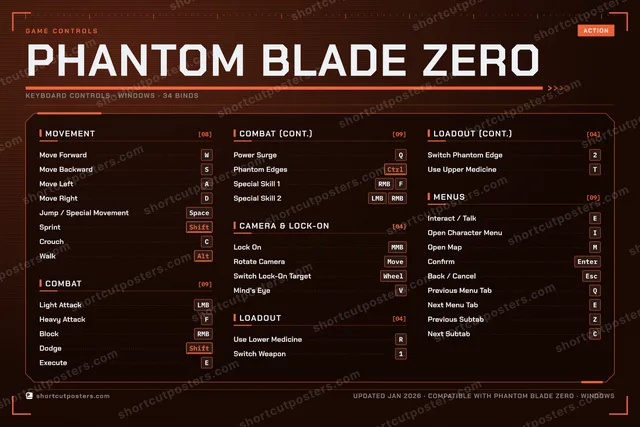
MOVEMENT[08]Move ForwardWMove BackwardSMove LeftAMove RightDJump / Special MovementSpaceSprintShiftCrouchCWalkAltCOMBAT[09]Light AttackLMBHeavy AttackFBlockRMBDodgeShiftExecuteECOMBAT (CONT.)[09]Power SurgeQPhantom EdgesCtrlSpecial Skill 1RMBFSpecial Skill 2LMBRMBCAMERA & LOCK-ON[04]Lock OnMMBRotate CameraMoveSwitch Lock-On TargetWheelMind's EyeVLOADOUT[04]Use Lower MedicineRSwitch Weapon1LOADOUT (CONT.)[04]Switch Phantom Edge2Use Upper MedicineTMENUS[09]Interact / TalkEOpen Character MenuIOpen MapMConfirmEnterBack / CancelEscPrevious Menu TabQNext Menu TabEPrevious SubtabZNext SubtabCGAME CONTROLSACTIONPHANTOM BLADE ZEROKEYBOARD CONTROLS · WINDOWS · 34 BINDSshortcutposters.comUPDATED JAN 2026 · COMPATIBLE WITH PHANTOM BLADE ZERO · WINDOWSshortcutposters.comshortcutposters.comshortcutposters.comshortcutposters.comshortcutposters.comshortcutposters.comshortcutposters.comshortcutposters.comshortcutposters.comshortcutposters.comshortcutposters.comshortcutposters.comshortcutposters.comshortcutposters.comshortcutposters.comshortcutposters.comshortcutposters.comshortcutposters.comshortcutposters.comshortcutposters.comshortcutposters.comshortcutposters.comshortcutposters.comshortcutposters.comshortcutposters.comshortcutposters.comshortcutposters.comshortcutposters.comshortcutposters.comshortcutposters.comshortcutposters.comshortcutposters.comshortcutposters.comshortcutposters.comshortcutposters.comshortcutposters.comshortcutposters.comshortcutposters.comshortcutposters.comshortcutposters.comshortcutposters.comshortcutposters.comshortcutposters.comshortcutposters.comshortcutposters.comshortcutposters.comshortcutposters.comshortcutposters.comshortcutposters.comshortcutposters.comshortcutposters.comshortcutposters.comshortcutposters.comshortcutposters.comshortcutposters.comshortcutposters.comshortcutposters.comshortcutposters.comshortcutposters.comshortcutposters.comshortcutposters.comshortcutposters.comshortcutposters.comshortcutposters.comshortcutposters.comshortcutposters.comshortcutposters.comshortcutposters.comshortcutposters.comshortcutposters.comshortcutposters.comshortcutposters.comshortcutposters.comshortcutposters.comshortcutposters.comshortcutposters.comshortcutposters.comshortcutposters.comshortcutposters.comshortcutposters.comshortcutposters.comshortcutposters.comshortcutposters.comshortcutposters.comshortcutposters.comshortcutposters.comshortcutposters.comshortcutposters.comshortcutposters.comshortcutposters.comshortcutposters.comshortcutposters.comshortcutposters.comshortcutposters.comshortcutposters.comshortcutposters.comshortcutposters.comshortcutposters.comshortcutposters.comshortcutposters.comshortcutposters.comshortcutposters.comshortcutposters.comshortcutposters.comshortcutposters.comshortcutposters.comshortcutposters.comshortcutposters.comshortcutposters.comshortcutposters.comshortcutposters.com

Hover to locate · click on the poster to disable · drag to reorder categories & shortcuts · ✎ to rename a category

Free PNG $0
  • Web resolution (1600 px)
  • Light watermark
  • Instant download
Made to order
Custom print-ready PDF $2.99
  • 300 DPI, framed-quality — no watermark
  • Every standard print size
  • Built to order from the poster above — checkout link emailed to you

Trouble ordering? Email business@shortcutposters.com.

How it works

  1. 1

    Choose a style

    Start from the generative Arcade art, or switch to isometric keys, a typewriter list, a keyboard map, or an editorial print.

  2. 2

    Make it yours

    Set the accent colour, rename categories, and reorder anything.

  3. 3

    Pick the controls

    Toggle exactly which keybinds appear — or add your own custom ones.

  4. 4

    Download or print

    Export a free high-resolution PNG instantly, or order a print-ready PDF.

Five styles to choose from
Phantom Blade Zero controls poster preview
Arcade Generative art drawn from the game's genre and colour — pure geometry, zero spoilers.
PHANTOM BLADE ZEROKEYBOARD SHORTCUTS · WINDOWS · 20 ESSENTIAL1234567890QPower Sur…WMove Forw…EExecuteRUse Lower…TYUIOPAMove LeftSMove Back…DMove RightFHeavy Atta…GHJKLZXCVBNMMORE SHORTCUTSLight AttackLMBJump / Special Move…SpaceLock OnMMBBlockRMBDodgeShiftSprintShiftInteract / TalkERotate CameraMoveSwitch Lock-On Targ…WheelPhantom EdgesCtrlSpecial Skill 1RMBFSpecial Skill 2LMBRMBshortcutposters.comUPDATED JAN 2026 · COMPATIBLE WITH PHANTOM BLADE ZERO · WINDOWS
Keyboard map Every binding labelled on a realistic QWERTY or AZERTY keyboard.
MOVEMENTMove ForwardWMove BackwardSMove LeftAMove RightDJump / Special MovementSpaceSprintShiftCAMERA & LOCK-ONLock OnMMBRotate CameraMoveSwitch Lock-On TargetWheelMENUSInteract / TalkECOMBATLight AttackLMBHeavy AttackFBlockRMBDodgeShiftExecuteEPower SurgeQPhantom EdgesCtrlSpecial Skill 1RMBFSpecial Skill 2LMBRMBLOADOUTUse Lower MedicineRPhantom Blade ZeroKEYBOARD SHORTCUTS · WINDOWS · 20 ESSENTIALBOTH LAYOUTSQWERTYQWERTYAZERTYAZERTYshortcutposters.comUPDATED JAN 2026 · COMPATIBLE WITH PHANTOM BLADE ZERO · WINDOWS
Isometric Shortcuts on a 3D isometric keyboard — bold and poster-like.
MOVEMENT06Move ForwardWMove BackwardSMove LeftAMove RightDJump / Special MovementSpaceSprintShiftCAMERA & LOCK-ON03Lock OnMMBRotate CameraMoveSwitch Lock-On TargetWheelMENUS01Interact / TalkECOMBAT09Light AttackLMBHeavy AttackFBlockRMBDodgeShiftExecuteEPower SurgeQPhantom EdgesCtrlSpecial Skill 1RMBFSpecial Skill 2LMBRMBLOADOUT01Use Lower MedicineRPhantom Blade ZeroKEYBOARD SHORTCUTS · WINDOWS · 20 ESSENTIALBOTH LAYOUTSQWERTYQWERTYAZERTYAZERTYshortcutposters.comUPDATED JAN 2026 · COMPATIBLE WITH PHANTOM BLADE ZERO · WINDOWS
Typewriter A clean printed list, grouped by category — dense and legible.
PHANTOM BLADE ZERO · KEYBOARD SHORTCUTSWindows · 5 SETS · No.01PHANTOM BLADE ZEROTOTAL20SHORTCUTSFOR WINDOWS · SHIPPED COMBOSSETSMOVEMENT06COMBAT09CAMERA & LOCK03LOADOUT01MENUS01REF. EDITION · JAN 2026shortcutposters.comMove ForwardWMove BackwardSMove LeftAMove RightDJump / Special MovementSpaceSprintShiftLight AttackLMBHeavy AttackFBlockRMBDodgeShiftExecuteEPower SurgeQPhantom EdgesCtrlSpecial Skill 1RMBFSpecial Skill 2LMBRMBLock OnMMBRotate CameraMoveSwitch Lock-On TargetWheelUse Lower MedicineRInteract / TalkE
Editorial A bold Swiss-style print: giant wordmark, dense keycap columns, and a totals rail.

Frequently asked questions

Is the Phantom Blade Zero controls poster maker free?

Yes — design your Phantom Blade Zero keybinds poster and download it as a free, watermarked PNG. A print-ready PDF (PC / keyboard edition) is an optional paid upgrade.

Can I choose which Phantom Blade Zero controls appear?

Yes. Toggle any keybind on or off, reorder them, rename categories, and add your own custom binds.

Which styles can I use?

Start from the Arcade style — generative art based on the game's genre — or switch to the isometric, typewriter, keyboard-map or editorial layouts, and pick your accent colour.

Does the poster use official Phantom Blade Zero artwork?

No. The poster is built only from the keybinds, text and abstract generated shapes — never logos, covers, screenshots or key art.