ShortcutPosters
iPhone appNew

Make your Over the Hill controls poster
Pick the keybinds that matter, add your own, tune the colours and style — then download a free personalized PNG.

Making a poster for:
Style
Accent
01 —DRIVINGn=8AccelerateWBrake / ReverseSSteer LeftASteer RightDHandbrakeSpaceEngage 4L / 4HTabShift Up (Manual)ShiftShift Down (Manual)Ctrl02 —VEHICLEn=4InteractEnterIgnitionIHeadlightHHonk HornZ03 —WINCHn=3Quick Winch / Pull WinchOExtend WinchLRelease WinchP04 —MENUSn=5Radial MenuQOpen MapM04 —MENUS (CONT.)n=5PauseEscExit CampingEFeedback / Bug ReportCtrlF05 —CAMERAn=3Orbit CameraRMBMoveZoom InWheel ↑Zoom OutWheel ↓06 —MAPn=3Respawn / Place or Remove PinLMBNavigate MapWASDBack (Map)EscGAME CONTROLSSIMULATIONOVER THE HILLPLATE 01 · SCALE 1:1KEYBOARD CONTROLS · WINDOWS · 26 BINDSshortcutposters.comUPDATED JAN 2026 · COMPATIBLE WITH OVER THE HILL · WINDOWSshortcutposters.comshortcutposters.comshortcutposters.comshortcutposters.comshortcutposters.comshortcutposters.comshortcutposters.comshortcutposters.comshortcutposters.comshortcutposters.comshortcutposters.comshortcutposters.comshortcutposters.comshortcutposters.comshortcutposters.comshortcutposters.comshortcutposters.comshortcutposters.comshortcutposters.comshortcutposters.comshortcutposters.comshortcutposters.comshortcutposters.comshortcutposters.comshortcutposters.comshortcutposters.comshortcutposters.comshortcutposters.comshortcutposters.comshortcutposters.comshortcutposters.comshortcutposters.comshortcutposters.comshortcutposters.comshortcutposters.comshortcutposters.comshortcutposters.comshortcutposters.comshortcutposters.comshortcutposters.comshortcutposters.comshortcutposters.comshortcutposters.comshortcutposters.comshortcutposters.comshortcutposters.comshortcutposters.comshortcutposters.comshortcutposters.comshortcutposters.comshortcutposters.comshortcutposters.comshortcutposters.comshortcutposters.comshortcutposters.comshortcutposters.comshortcutposters.comshortcutposters.comshortcutposters.comshortcutposters.comshortcutposters.comshortcutposters.comshortcutposters.comshortcutposters.comshortcutposters.comshortcutposters.comshortcutposters.comshortcutposters.comshortcutposters.comshortcutposters.comshortcutposters.comshortcutposters.comshortcutposters.comshortcutposters.comshortcutposters.comshortcutposters.comshortcutposters.comshortcutposters.comshortcutposters.comshortcutposters.comshortcutposters.comshortcutposters.comshortcutposters.comshortcutposters.comshortcutposters.comshortcutposters.comshortcutposters.comshortcutposters.comshortcutposters.comshortcutposters.comshortcutposters.comshortcutposters.comshortcutposters.comshortcutposters.comshortcutposters.comshortcutposters.comshortcutposters.comshortcutposters.comshortcutposters.comshortcutposters.comshortcutposters.comshortcutposters.comshortcutposters.comshortcutposters.comshortcutposters.comshortcutposters.comshortcutposters.comshortcutposters.comshortcutposters.comshortcutposters.comshortcutposters.com

Hover to locate · click on the poster to disable · drag to reorder categories & shortcuts · ✎ to rename a category

Free PNG $0
  • Web resolution (1600 px)
  • Light watermark
  • Instant download
Made to order
Custom print-ready PDF $2.99
  • 300 DPI, framed-quality — no watermark
  • Every standard print size
  • Built to order from the poster above — checkout link emailed to you

Trouble ordering? Email business@shortcutposters.com.

How it works

  1. 1

    Choose a style

    Start from the generative Arcade art, or switch to isometric keys, a typewriter list, a keyboard map, or an editorial print.

  2. 2

    Make it yours

    Set the accent colour, rename categories, and reorder anything.

  3. 3

    Pick the controls

    Toggle exactly which keybinds appear — or add your own custom ones.

  4. 4

    Download or print

    Export a free high-resolution PNG instantly, or order a print-ready PDF.

Five styles to choose from
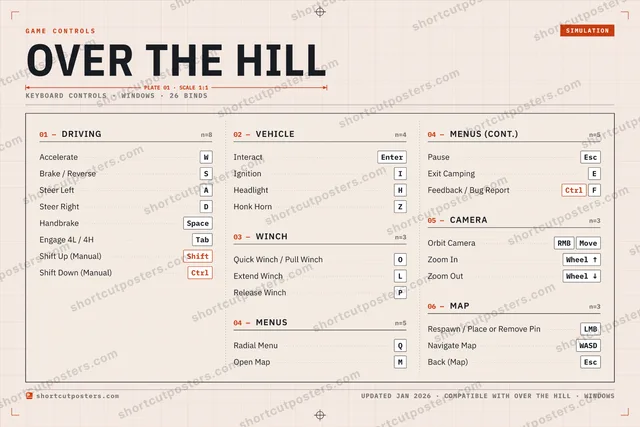
Over the Hill controls poster preview
Arcade Generative art drawn from the game's genre and colour — pure geometry, zero spoilers.
OVER THE HILLKEYBOARD SHORTCUTS · WINDOWS · 20 ESSENTIAL1234567890QRadial MenuWAccelerateERTYUIIgnitionOQuick Win…PRelease Wi…ASteer LeftSBrake / Re…DSteer RightFGHHeadlightJKLExtend Wi…ZXCVBNMOpen MapMORE SHORTCUTSHandbrakeSpaceEngage 4L / 4HTabInteractEnterOrbit CameraRMBMovePauseEscShift Up (Manual)ShiftShift Down (Manual)CtrlZoom InWheel ↑Zoom OutWheel ↓shortcutposters.comUPDATED JAN 2026 · COMPATIBLE WITH OVER THE HILL · WINDOWS
Keyboard map Every binding labelled on a realistic QWERTY or AZERTY keyboard.
VEHICLEInteractEnterIgnitionIHeadlightHWINCHQuick Winch / Pull WinchOExtend WinchLRelease WinchPCAMERAOrbit CameraRMBMoveZoom InWheel ↑Zoom OutWheel ↓DRIVINGAccelerateWBrake / ReverseSSteer LeftASteer RightDHandbrakeSpaceEngage 4L / 4HTabShift Up (Manual)ShiftShift Down (Manual)CtrlMENUSRadial MenuQOpen MapMPauseEscOver the HillKEYBOARD SHORTCUTS · WINDOWS · 20 ESSENTIALBOTH LAYOUTSQWERTYQWERTYAZERTYAZERTYshortcutposters.comUPDATED JAN 2026 · COMPATIBLE WITH OVER THE HILL · WINDOWS
Isometric Shortcuts on a 3D isometric keyboard — bold and poster-like.
VEHICLE03InteractEnterIgnitionIHeadlightHWINCH03Quick Winch / Pull WinchOExtend WinchLRelease WinchPCAMERA03Orbit CameraRMBMoveZoom InWheel ↑Zoom OutWheel ↓DRIVING08AccelerateWBrake / ReverseSSteer LeftASteer RightDHandbrakeSpaceEngage 4L / 4HTabShift Up (Manual)ShiftShift Down (Manual)CtrlMENUS03Radial MenuQOpen MapMPauseEscOver the HillKEYBOARD SHORTCUTS · WINDOWS · 20 ESSENTIALBOTH LAYOUTSQWERTYQWERTYAZERTYAZERTYshortcutposters.comUPDATED JAN 2026 · COMPATIBLE WITH OVER THE HILL · WINDOWS
Typewriter A clean printed list, grouped by category — dense and legible.
OVER THE HILL · KEYBOARD SHORTCUTSWindows · 5 SETS · No.01OVER THE HILLTOTAL20SHORTCUTSFOR WINDOWS · SHIPPED COMBOSSETSDRIVING08VEHICLE03WINCH03MENUS03CAMERA03REF. EDITION · JAN 2026shortcutposters.comAccelerateWBrake / ReverseSSteer LeftASteer RightDHandbrakeSpaceEngage 4L / 4HTabShift Up (Manual)ShiftShift Down (Manual)CtrlInteractEnterIgnitionIHeadlightHQuick Winch / Pull WinchOExtend WinchLRelease WinchPRadial MenuQOpen MapMPauseEscOrbit CameraRMBMoveZoom InWheel ↑Zoom OutWheel ↓
Editorial A bold Swiss-style print: giant wordmark, dense keycap columns, and a totals rail.

Frequently asked questions

Is the Over the Hill controls poster maker free?

Yes — design your Over the Hill keybinds poster and download it as a free, watermarked PNG. A print-ready PDF (PC / keyboard edition) is an optional paid upgrade.

Can I choose which Over the Hill controls appear?

Yes. Toggle any keybind on or off, reorder them, rename categories, and add your own custom binds.

Which styles can I use?

Start from the Arcade style — generative art based on the game's genre — or switch to the isometric, typewriter, keyboard-map or editorial layouts, and pick your accent colour.

Does the poster use official Over the Hill artwork?

No. The poster is built only from the keybinds, text and abstract generated shapes — never logos, covers, screenshots or key art.