ShortcutPosters

Poster maker

Make your Microsoft Teams shortcuts poster

Pick the shortcuts that matter, add your own, tune the colours and style — then download a free personalized PNG, or order the print-ready PDF.

Making a poster for:
Style
Accent
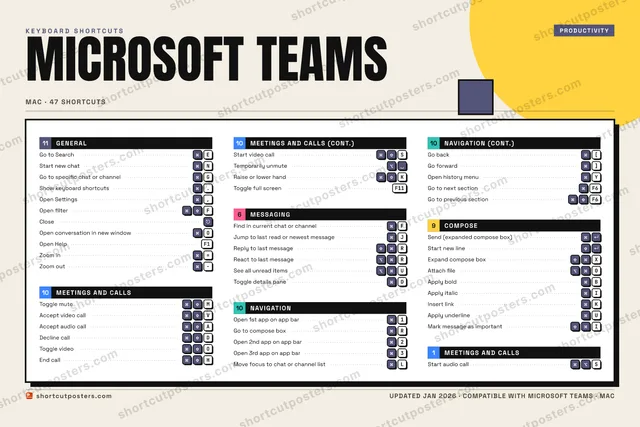
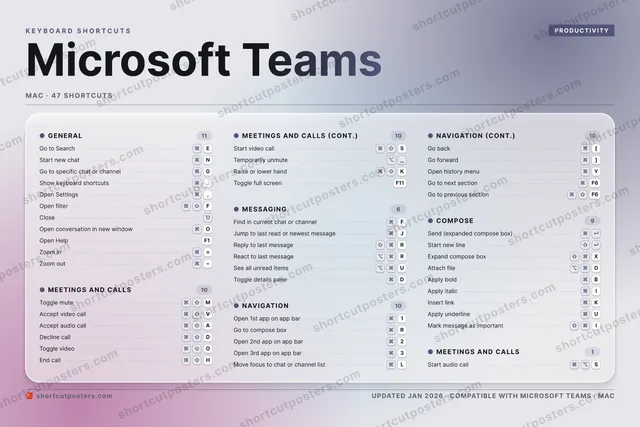
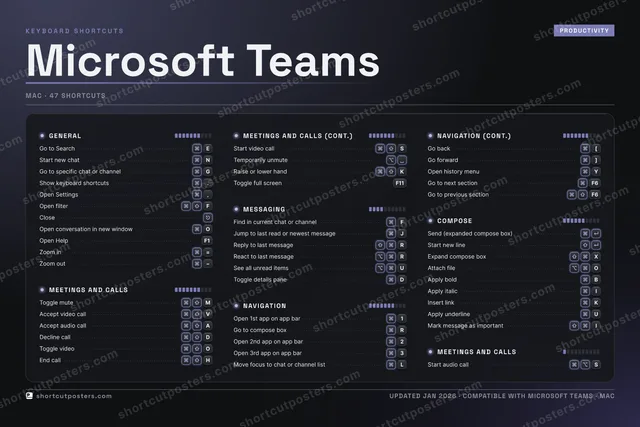
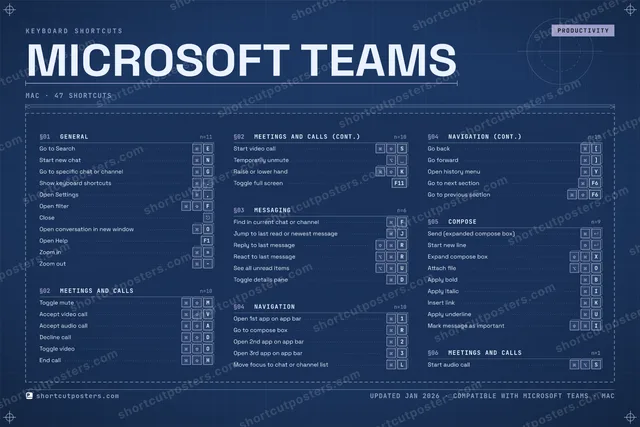
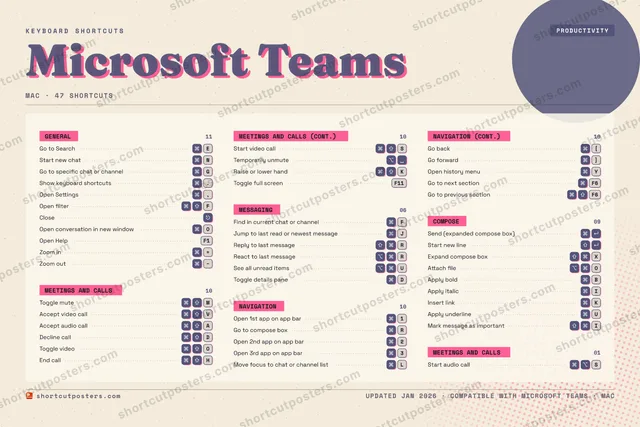
MICROSOFT TEAMSKEYBOARD SHORTCUTS · MAC · 441Open 1st…2Open 2nd…3Open 3rd…4567890QWEGo to Se…RGo to co…TYOpen his…U⌥ ⌘See all …IApply it…O⌘ ⇧Toggle v…PA⌘ ⇧Accept a…S⌘ ⇧Start vi…D⌘ ⇧Decline …FFind in …GGo to sp…H⌘ ⇧End callJJump to …K⌘ ⇧Raise or…LMove foc…ZX⇧ ⌘Expand c…CV⌘ ⇧Accept v…BApply bo…NStart ne…M⌘ ⇧Toggle m…MORE SHORTCUTSShow keyboard….Open Settings,Reply to last…RSend (expande…Start new lineTemporarily u…Open filterFCloseOpen conversa…OReact to last…RAttach fileOInsert linkKToggle full s…F11Open HelpF1Zoom in=Zoom outGo to next se…F6Go to previou…F6Toggle detail…DApply underli…UMark message …Ishortcutposters.comUPDATED JAN 2026 · COMPATIBLE WITH MICROSOFT TEAMS · MAC

Hover to locate · click on the poster to disable · drag to reorder categories & shortcuts · to rename a category

Free PNG $0
  • Web resolution (1600 px)
  • Light watermark
  • Instant download
Made to order
Custom print-ready PDF $2.99
  • 300 DPI, framed-quality — no watermark
  • Every standard print size
  • Built to order from the poster above — checkout link emailed to you

Trouble ordering? Email business@shortcutposters.com.

How it works

  1. 1

    Choose a style

    Pick from four layouts: isometric keys, a typewriter list, a labelled keyboard map, or a bold editorial print.

  2. 2

    Make it yours

    Set the accent colour and palette, rename categories, and reorder anything.

  3. 3

    Pick the shortcuts

    Toggle exactly which shortcuts appear — or add your own custom ones.

  4. 4

    Download or print

    Export a free high-resolution PNG instantly, or order a print-ready PDF.

Four styles to choose from

MICROSOFT TEAMSKEYBOARD SHORTCUTS · MAC · 20 ESSENTIAL1Open 1st…234567890QWEGo to Se…RGo to co…TYUIO⌘ ⇧Toggle v…PA⌘ ⇧Accept a…S⌘ ⇧Start vi…D⌘ ⇧Decline …FFind in …GGo to sp…H⌘ ⇧End callJJump to …KLZXCV⌘ ⇧Accept v…BNStart ne…M⌘ ⇧Toggle m…MORE SHORTCUTSShow keyboard sho….Open Settings,Reply to last mes…RSend (expanded co…Start new lineTemporarily unmuteshortcutposters.comUPDATED JAN 2026 · COMPATIBLE WITH MICROSOFT TEAMS · MAC
Keyboard map Every binding labelled on a realistic QWERTY or AZERTY keyboard.
GENERALGo to SearchEStart new chatNGo to specific chat or channelGShow keyboard shortcuts.Open Settings,MESSAGINGFind in current chat or channelFJump to last read or newest messageJReply to last messageRCOMPOSESend (expanded compose box)Start new lineMEETINGS AND CALLSToggle muteMAccept video callVAccept audio callADecline callDToggle videoOEnd callHStart video callSTemporarily unmuteNAVIGATIONOpen 1st app on app bar1Go to compose boxRMicrosoft TeamsKEYBOARD SHORTCUTS · MAC · 20 ESSENTIALBOTH LAYOUTSQWERTYQWERTYAZERTYAZERTYshortcutposters.comUPDATED JAN 2026 · COMPATIBLE WITH MICROSOFT TEAMS · MAC
Isometric Shortcuts on a 3D isometric keyboard — bold and poster-like.
GENERAL05Go to SearchEStart new chatNGo to specific chat or channelGShow keyboard shortcuts.Open Settings,MESSAGING03Find in current chat or channelFJump to last read or newest messageJReply to last messageRCOMPOSE02Send (expanded compose box)Start new lineMEETINGS AND CALLS08Toggle muteMAccept video callVAccept audio callADecline callDToggle videoOEnd callHStart video callSTemporarily unmuteNAVIGATION02Open 1st app on app bar1Go to compose boxRMicrosoft TeamsKEYBOARD SHORTCUTS · MAC · 20 ESSENTIALBOTH LAYOUTSQWERTYQWERTYAZERTYAZERTYshortcutposters.comUPDATED JAN 2026 · COMPATIBLE WITH MICROSOFT TEAMS · MAC
Typewriter A clean printed list, grouped by category — dense and legible.
MICROSOFT TEAMS · KEYBOARD SHORTCUTSMac · 5 SETS · No.01MICROSOFT TEAMSTOTAL20SHORTCUTSFOR MAC · SHIPPED COMBOSSETSGENERAL05MEETINGS AND 08MESSAGING03NAVIGATION02COMPOSE02REF. EDITION · JAN 2026shortcutposters.comGo to SearchEStart new chatNGo to specific chat or channelGShow keyboard shortcuts.Open Settings,Toggle muteMAccept video callVAccept audio callADecline callDToggle videoOEnd callHStart video callSTemporarily unmuteFind in current chat or channelFJump to last read or newest messageJReply to last messageROpen 1st app on app bar1Go to compose boxRSend (expanded compose box)Start new line
Editorial A bold Swiss-style print: giant wordmark, dense keycap columns, and a totals rail.

Frequently asked questions

Is the Microsoft Teams poster maker free?

Yes — you can design and download a high-resolution PNG of your Microsoft Teams shortcuts poster for free. A print-ready PDF is an optional paid upgrade.

Can I choose which Microsoft Teams shortcuts appear?

Yes. Toggle any shortcut on or off, reorder them, rename categories, and even add your own custom shortcuts.

Can I change the colours and style?

Yes. Pick an accent colour, choose a palette, and switch between the isometric, typewriter, and keyboard-map styles.

Which keyboard layout and operating system are supported?

Choose QWERTY or AZERTY, and switch the edition between the operating systems Microsoft Teams supports (macOS, Windows, Linux).

How do I get a printed poster?

Download the free PNG to print yourself, or order the print-ready, framed-quality PDF directly from the maker.