ShortcutPosters

Poster maker

Make your Microsoft Loop shortcuts poster

Pick the shortcuts that matter, add your own, tune the colours and style — then download a free personalized PNG, or order the print-ready PDF.

Making a poster for:
Style
Accent
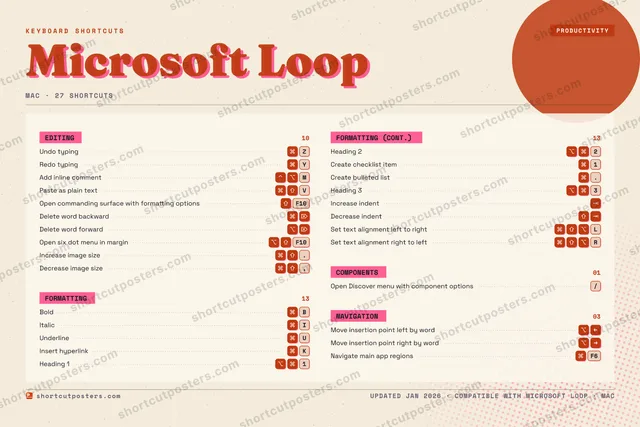
MICROSOFT LOOPKEYBOARD SHORTCUTS · MAC · 271⌥ ⌘Heading 12⌥ ⌘Heading 23⌥ ⌘Heading 34567890QWER⌘ ⇧ ⌥Set text…TYRedo typ…UUnderlineIItalicOPASDFGHJKInsert h…L⌘ ⇧ ⌥Set text…ZUndo typ…XCV⌘ ⇧Paste as…BBoldNM⌃ ⌥Add inli…MORE SHORTCUTSOpen Discover men…/Create checklist …1Create bulleted l….Open commanding s…F10Delete word backw…Delete word forwa…Move insertion po…Move insertion po…Increase indentDecrease indentOpen six dot menu…F10Navigate main app…F6Increase image si….Decrease image si…,shortcutposters.comUPDATED JAN 2026 · COMPATIBLE WITH MICROSOFT LOOP · MAC

Hover to locate · click on the poster to disable · drag to reorder categories & shortcuts · to rename a category

Free PNG $0
  • Web resolution (1600 px)
  • Light watermark
  • Instant download
Made to order
Custom print-ready PDF $2.99
  • 300 DPI, framed-quality — no watermark
  • Every standard print size
  • Built to order from the poster above — checkout link emailed to you

Trouble ordering? Email business@shortcutposters.com.

How it works

  1. 1

    Choose a style

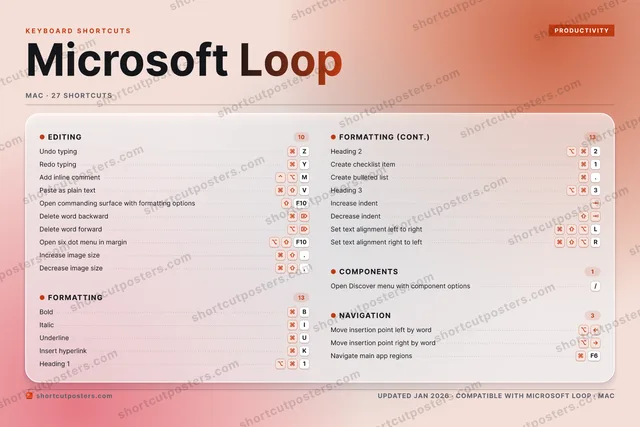
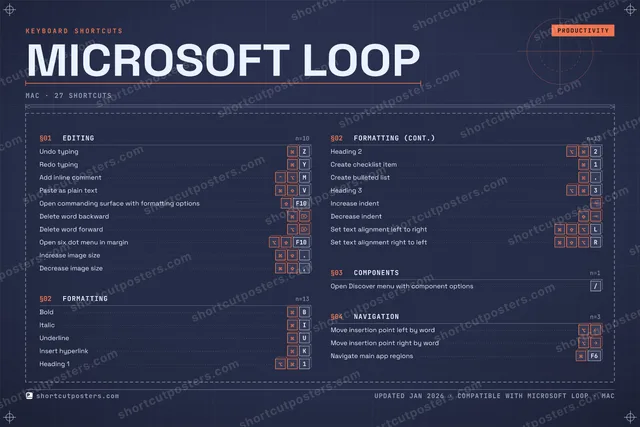
    Pick from four layouts: isometric keys, a typewriter list, a labelled keyboard map, or a bold editorial print.

  2. 2

    Make it yours

    Set the accent colour and palette, rename categories, and reorder anything.

  3. 3

    Pick the shortcuts

    Toggle exactly which shortcuts appear — or add your own custom ones.

  4. 4

    Download or print

    Export a free high-resolution PNG instantly, or order a print-ready PDF.

Four styles to choose from

MICROSOFT LOOPKEYBOARD SHORTCUTS · MAC · 20 ESSENTIAL1⌥ ⌘Heading 12⌥ ⌘Heading 23⌥ ⌘Heading 34567890QWERTYRedo typ…UUnderlineIItalicOPASDFGHJKInsert h…LZUndo typ…XCV⌘ ⇧Paste as…BBoldNM⌃ ⌥Add inli…MORE SHORTCUTSOpen Discover men…/Create checklist …1Create bulleted l….Open commanding s…F10Delete word backw…Delete word forwa…Move insertion po…Move insertion po…Increase indentshortcutposters.comUPDATED JAN 2026 · COMPATIBLE WITH MICROSOFT LOOP · MAC
Keyboard map Every binding labelled on a realistic QWERTY or AZERTY keyboard.
FORMATTINGBoldBItalicIUnderlineUInsert hyperlinkKHeading 11Heading 22Create checklist item1Create bulleted list.Heading 33Increase indentNAVIGATIONMove insertion point left by wordMove insertion point right by wordEDITINGUndo typingZRedo typingYAdd inline commentMPaste as plain textVOpen commanding surface with forma…F10Delete word backwardDelete word forwardCOMPONENTSOpen Discover menu with component …/Microsoft LoopKEYBOARD SHORTCUTS · MAC · 20 ESSENTIALBOTH LAYOUTSQWERTYQWERTYAZERTYAZERTYshortcutposters.comUPDATED JAN 2026 · COMPATIBLE WITH MICROSOFT LOOP · MAC
Isometric Shortcuts on a 3D isometric keyboard — bold and poster-like.
FORMATTING10BoldBItalicIUnderlineUInsert hyperlinkKHeading 11Heading 22Create checklist item1Create bulleted list.Heading 33Increase indentNAVIGATION02Move insertion point left by wordMove insertion point right by wordEDITING07Undo typingZRedo typingYAdd inline commentMPaste as plain textVOpen commanding surface with forma…F10Delete word backwardDelete word forwardCOMPONENTS01Open Discover menu with component …/Microsoft LoopKEYBOARD SHORTCUTS · MAC · 20 ESSENTIALBOTH LAYOUTSQWERTYQWERTYAZERTYAZERTYshortcutposters.comUPDATED JAN 2026 · COMPATIBLE WITH MICROSOFT LOOP · MAC
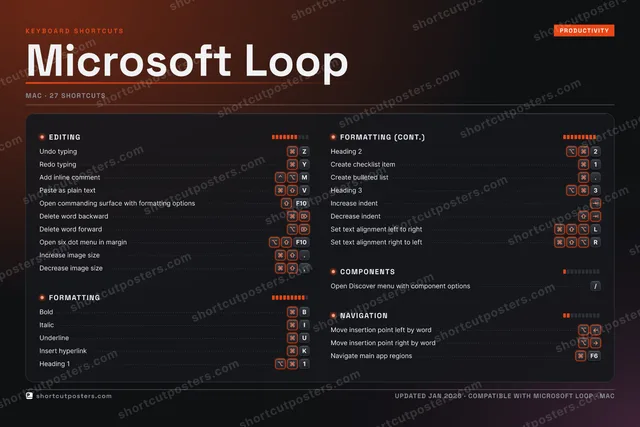
Typewriter A clean printed list, grouped by category — dense and legible.
MICROSOFT LOOP · KEYBOARD SHORTCUTSMac · 4 SETS · No.01MICROSOFT LOOPTOTAL20SHORTCUTSFOR MAC · SHIPPED COMBOSSETSEDITING07FORMATTING10COMPONENTS01NAVIGATION02REF. EDITION · JAN 2026shortcutposters.comUndo typingZRedo typingYAdd inline commentMPaste as plain textVOpen commanding surface with formatting optionsF10Delete word backwardDelete word forwardBoldBItalicIUnderlineUInsert hyperlinkKHeading 11Heading 22Create checklist item1Create bulleted list.Heading 33Increase indentOpen Discover menu with component options/Move insertion point left by wordMove insertion point right by word
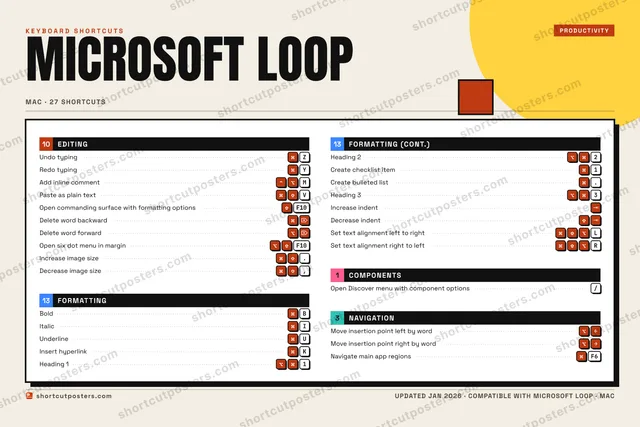
Editorial A bold Swiss-style print: giant wordmark, dense keycap columns, and a totals rail.

Frequently asked questions

Is the Microsoft Loop poster maker free?

Yes — you can design and download a high-resolution PNG of your Microsoft Loop shortcuts poster for free. A print-ready PDF is an optional paid upgrade.

Can I choose which Microsoft Loop shortcuts appear?

Yes. Toggle any shortcut on or off, reorder them, rename categories, and even add your own custom shortcuts.

Can I change the colours and style?

Yes. Pick an accent colour, choose a palette, and switch between the isometric, typewriter, and keyboard-map styles.

Which keyboard layout and operating system are supported?

Choose QWERTY or AZERTY, and switch the edition between the operating systems Microsoft Loop supports (macOS, Windows, Linux).

How do I get a printed poster?

Download the free PNG to print yourself, or order the print-ready, framed-quality PDF directly from the maker.