ShortcutPosters
iPhone appBeta

Make your Meld shortcuts poster

Pick the shortcuts that matter, add your own, tune the colours and style — then download a free personalized PNG, or order the print-ready PDF.

Making a poster for:
Style
Accent
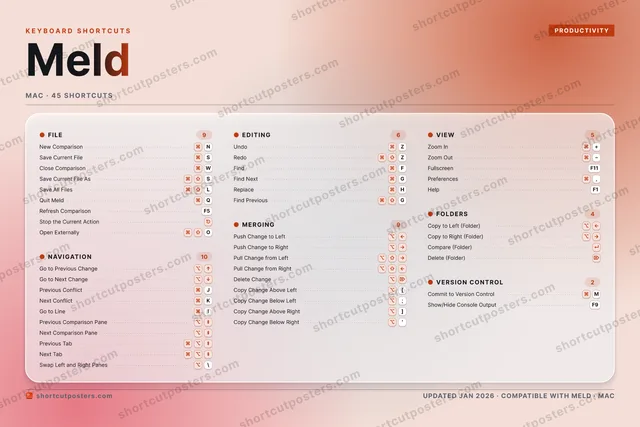
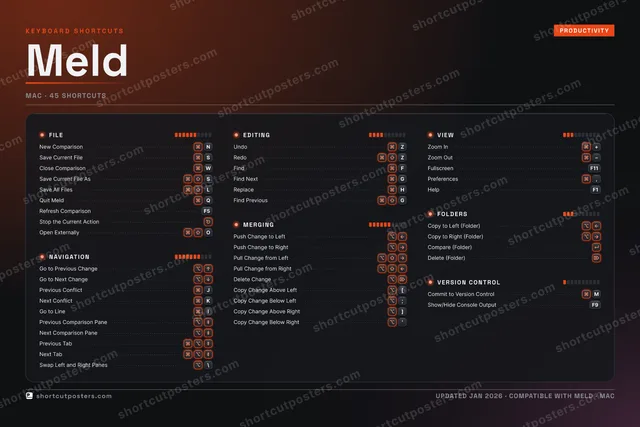
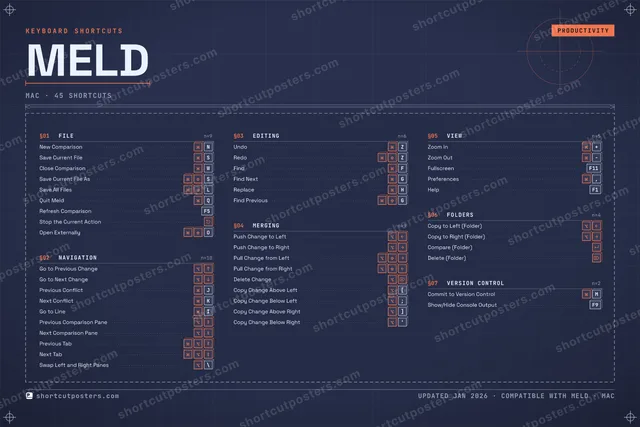
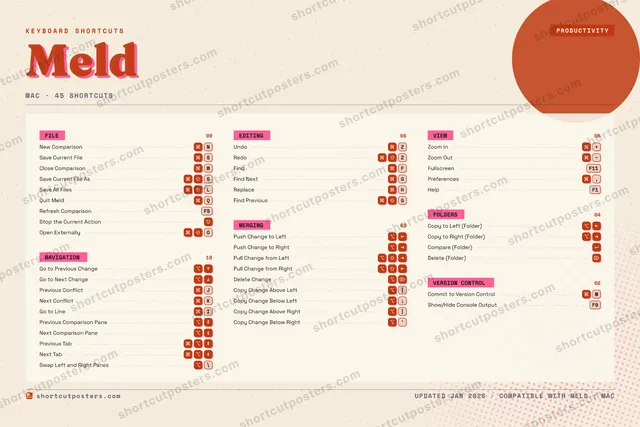
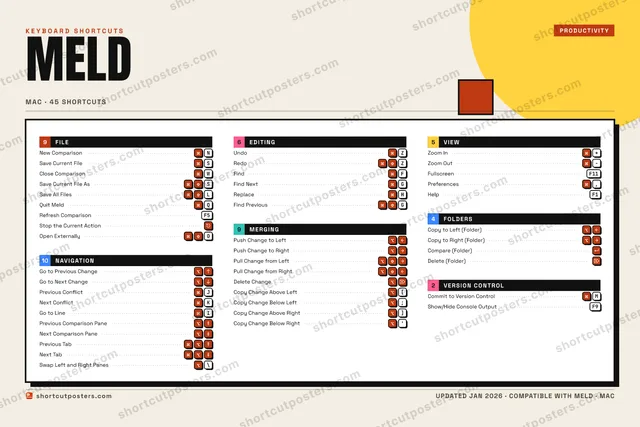
9FILENew Comparison⌘NSave Current File⌘SClose Comparison⌘WSave Current File As⌘⇧SSave All Files⌘⇧LQuit Meld⌘QRefresh ComparisonF5Stop the Current Action⎋Open Externally⌘⇧O10NAVIGATIONGo to Previous Change⌥↑Go to Next Change⌥↓Previous Conflict⌘JNext Conflict⌘KGo to Line⌘IPrevious Comparison Pane⌥⇞Next Comparison Pane⌥⇟Previous Tab⌘⌥⇞Next Tab⌘⌥⇟Swap Left and Right Panes⌥\6EDITINGUndo⌘ZRedo⌘⇧ZFind⌘FFind Next⌘GReplace⌘HFind Previous⌘⇧G9MERGINGPush Change to Left⌥←Push Change to Right⌥→Pull Change from Left⌥⇧→Pull Change from Right⌥⇧←Delete Change⌥⌦Copy Change Above Left⌥[Copy Change Below Left⌥;Copy Change Above Right⌥]Copy Change Below Right⌥'5VIEWZoom In⌘+Zoom Out⌘−FullscreenF11Preferences⌘,HelpF14FOLDERSCopy to Left (Folder)⌥←Copy to Right (Folder)⌥→Compare (Folder)↵Delete (Folder)⌦2VERSION CONTROLCommit to Version Control⌘MShow/Hide Console OutputF9KEYBOARD SHORTCUTSPRODUCTIVITYMELDMAC · 45 SHORTCUTSshortcutposters.comUPDATED JAN 2026 · COMPATIBLE WITH MELD · MACshortcutposters.comshortcutposters.comshortcutposters.comshortcutposters.comshortcutposters.comshortcutposters.comshortcutposters.comshortcutposters.comshortcutposters.comshortcutposters.comshortcutposters.comshortcutposters.comshortcutposters.comshortcutposters.comshortcutposters.comshortcutposters.comshortcutposters.comshortcutposters.comshortcutposters.comshortcutposters.comshortcutposters.comshortcutposters.comshortcutposters.comshortcutposters.comshortcutposters.comshortcutposters.comshortcutposters.comshortcutposters.comshortcutposters.comshortcutposters.comshortcutposters.comshortcutposters.comshortcutposters.comshortcutposters.comshortcutposters.comshortcutposters.comshortcutposters.comshortcutposters.comshortcutposters.comshortcutposters.comshortcutposters.comshortcutposters.comshortcutposters.comshortcutposters.comshortcutposters.comshortcutposters.comshortcutposters.comshortcutposters.comshortcutposters.comshortcutposters.comshortcutposters.comshortcutposters.comshortcutposters.comshortcutposters.comshortcutposters.comshortcutposters.comshortcutposters.comshortcutposters.comshortcutposters.comshortcutposters.comshortcutposters.comshortcutposters.comshortcutposters.comshortcutposters.comshortcutposters.comshortcutposters.comshortcutposters.comshortcutposters.comshortcutposters.comshortcutposters.comshortcutposters.comshortcutposters.comshortcutposters.comshortcutposters.comshortcutposters.comshortcutposters.comshortcutposters.comshortcutposters.comshortcutposters.comshortcutposters.comshortcutposters.comshortcutposters.comshortcutposters.comshortcutposters.comshortcutposters.comshortcutposters.comshortcutposters.comshortcutposters.comshortcutposters.comshortcutposters.comshortcutposters.comshortcutposters.comshortcutposters.comshortcutposters.comshortcutposters.comshortcutposters.comshortcutposters.comshortcutposters.comshortcutposters.comshortcutposters.comshortcutposters.comshortcutposters.comshortcutposters.comshortcutposters.comshortcutposters.comshortcutposters.comshortcutposters.comshortcutposters.comshortcutposters.comshortcutposters.comshortcutposters.com

Hover to locate · click on the poster to disable · drag to reorder categories & shortcuts · ✎ to rename a category

Free PNG $0
  • Web resolution (1600 px)
  • Light watermark
  • Instant download
Made to order
Custom print-ready PDF $2.99
  • 300 DPI, framed-quality — no watermark
  • Every standard print size
  • Built to order from the poster above — checkout link emailed to you

Trouble ordering? Email business@shortcutposters.com.

How it works

  1. 1

    Choose a style

    Pick one of five styles — Studio, Blueprint, Aurora, Block or Riso — each in the app's own colours. Games start from generative Arcade art.

  2. 2

    Make it yours

    Set the accent colour, rename categories, and reorder anything.

  3. 3

    Pick the shortcuts

    Toggle exactly which shortcuts appear — or add your own custom ones.

  4. 4

    Download or print

    Export a free high-resolution PNG instantly, or order a print-ready PDF.

Five styles to choose from
Meld block shortcuts poster preview
Block Neo-brutal Swiss: a giant condensed title, black section bars and hard shadows.
Meld aurora shortcuts poster preview
Aurora Frosted glass on soft halos of the app's colour, white keycaps — light and premium.
Meld studio shortcuts poster preview
Studio A dark console with 3D keys, the modifiers lit and a level meter on each group.
Meld blueprint shortcuts poster preview
Blueprint A technical drawing: grid, dimension lines, numbered sections and wireframe keys.
Meld riso shortcuts poster preview
Riso Two inks, grain and an off-register title, like a risograph print.

Frequently asked questions

Is the Meld poster maker free?

Yes — you can design and download a high-resolution PNG of your Meld shortcuts poster for free. A print-ready PDF is an optional paid upgrade.

Can I choose which Meld shortcuts appear?

Yes. Toggle any shortcut on or off, reorder them, rename categories, and even add your own custom shortcuts.

Can I change the colours and style?

Yes. Pick an accent colour and switch between the Studio, Blueprint, Aurora, Block and Riso styles.

Which operating systems are supported?

Switch the edition between the operating systems Meld supports (macOS, Windows, Linux): every key is shown as it is on that system.

How do I get a printed poster?

Download the free PNG to print yourself, or order the print-ready, framed-quality PDF directly from the maker.