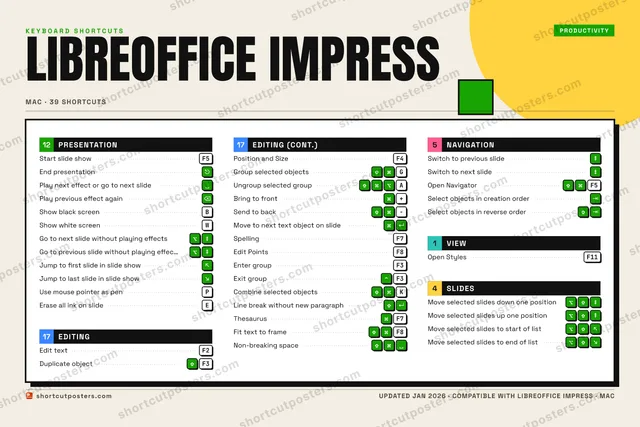
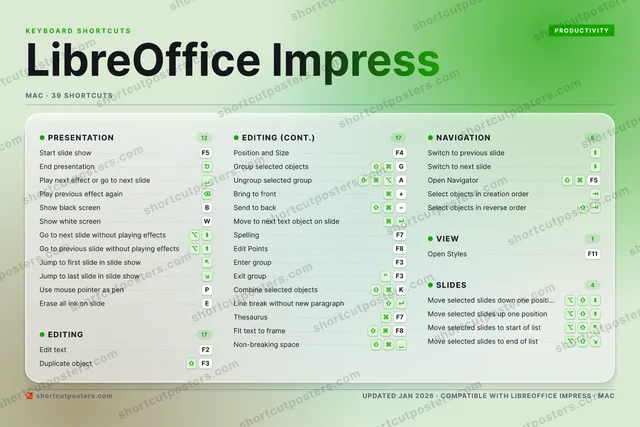
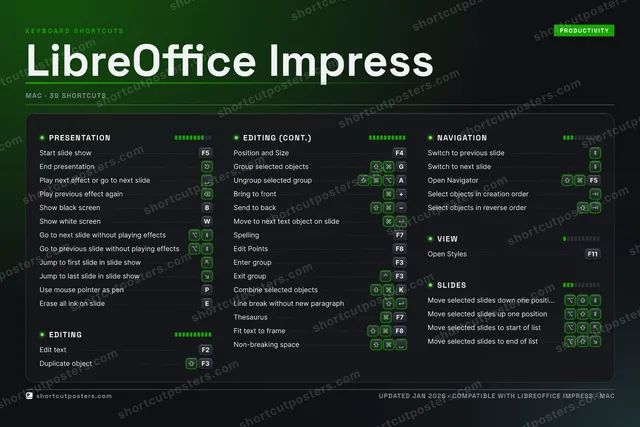
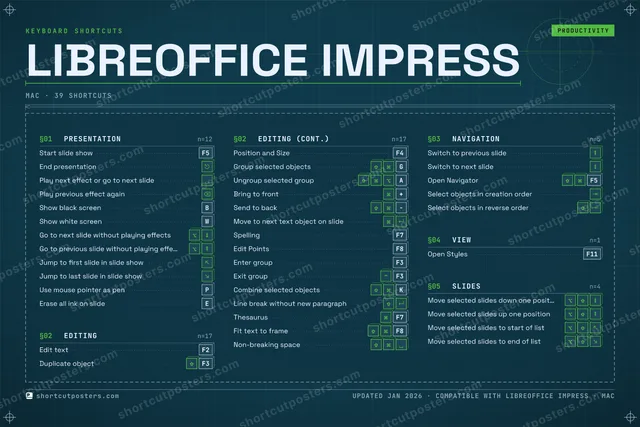
ShortcutPosters

Poster maker

Make your LibreOffice Impress shortcuts poster

Pick the shortcuts that matter, add your own, tune the colours and style — then download a free personalized PNG, or order the print-ready PDF.

Making a poster for:
Style
Accent
LIBREOFFICE IMPRESSKEYBOARD SHORTCUTS · MAC · 32 ESSENTIAL1234567890QWShow whi…EErase al…RTYUIOPUse mous…A⇧ ⌘ ⌥Ungroup …SDFG⇧ ⌘Group se…HJK⇧ ⌘Combine …LZXCVBShow bla…NMMORE SHORTCUTSStart slide s…F5End presentat…Play next eff…Edit textF2Play previous…Duplicate obj…F3Position and …F4Switch to pre…Switch to nex…Go to next sl…Go to previou…Jump to first…Jump to last …Bring to front+Send to backMove to next …Open NavigatorF5SpellingF7Open StylesF11Edit PointsF8Enter groupF3Exit groupF3Line break wi…Select object…Select object…shortcutposters.comUPDATED JAN 2026 · COMPATIBLE WITH LIBREOFFICE IMPRESS · MAC

Hover to locate · click on the poster to disable · drag to reorder categories & shortcuts · to rename a category

Free PNG $0
  • Web resolution (1600 px)
  • Light watermark
  • Instant download
Made to order
Custom print-ready PDF $2.99
  • 300 DPI, framed-quality — no watermark
  • Every standard print size
  • Built to order from the poster above — checkout link emailed to you

Trouble ordering? Email business@shortcutposters.com.

How it works

  1. 1

    Choose a style

    Pick from four layouts: isometric keys, a typewriter list, a labelled keyboard map, or a bold editorial print.

  2. 2

    Make it yours

    Set the accent colour and palette, rename categories, and reorder anything.

  3. 3

    Pick the shortcuts

    Toggle exactly which shortcuts appear — or add your own custom ones.

  4. 4

    Download or print

    Export a free high-resolution PNG instantly, or order a print-ready PDF.

Four styles to choose from

LIBREOFFICE IMPRESSKEYBOARD SHORTCUTS · MAC · 20 ESSENTIAL1234567890QWShow whi…ERTYUIOPUse mous…A⇧ ⌘ ⌥Ungroup …SDFG⇧ ⌘Group se…HJKLZXCVBShow bla…NMMORE SHORTCUTSStart slide showF5End presentationPlay next effect …Edit textF2Play previous eff…Duplicate objectF3Position and SizeF4Switch to previou…Switch to next sl…Go to next slide …Go to previous sl…Jump to first sli…Jump to last slid…Bring to front+Send to backshortcutposters.comUPDATED JAN 2026 · COMPATIBLE WITH LIBREOFFICE IMPRESS · MAC
Keyboard map Every binding labelled on a realistic QWERTY or AZERTY keyboard.
EDITINGEdit textF2Duplicate objectF3Position and SizeF4Group selected objectsGUngroup selected groupABring to front+Send to backNAVIGATIONSwitch to previous slideSwitch to next slidePRESENTATIONStart slide showF5End presentationPlay next effect or go to next sli…Play previous effect againShow black screenBShow white screenWGo to next slide without playing e…Go to previous slide without playi…Jump to first slide in slide showJump to last slide in slide showUse mouse pointer as penPLibreOffice ImpressKEYBOARD SHORTCUTS · MAC · 20 ESSENTIALBOTH LAYOUTSQWERTYQWERTYAZERTYAZERTYshortcutposters.comUPDATED JAN 2026 · COMPATIBLE WITH LIBREOFFICE IMPRESS · MAC
Isometric Shortcuts on a 3D isometric keyboard — bold and poster-like.
EDITING07Edit textF2Duplicate objectF3Position and SizeF4Group selected objectsGUngroup selected groupABring to front+Send to backNAVIGATION02Switch to previous slideSwitch to next slidePRESENTATION11Start slide showF5End presentationPlay next effect or go to next sli…Play previous effect againShow black screenBShow white screenWGo to next slide without playing e…Go to previous slide without playi…Jump to first slide in slide showJump to last slide in slide showUse mouse pointer as penPLibreOffice ImpressKEYBOARD SHORTCUTS · MAC · 20 ESSENTIALBOTH LAYOUTSQWERTYQWERTYAZERTYAZERTYshortcutposters.comUPDATED JAN 2026 · COMPATIBLE WITH LIBREOFFICE IMPRESS · MAC
Typewriter A clean printed list, grouped by category — dense and legible.
LIBREOFFICE IMPRESS · KEYBOARD SHORTCUTSMac · 3 SETS · No.01LIBREOFFICE IMPRESSTOTAL20SHORTCUTSFOR MAC · SHIPPED COMBOSSETSPRESENTATION11EDITING07NAVIGATION02REF. EDITION · JAN 2026shortcutposters.comStart slide showF5End presentationPlay next effect or go to next slidePlay previous effect againShow black screenBShow white screenWGo to next slide without playing effectsGo to previous slide without playing effectsJump to first slide in slide showJump to last slide in slide showUse mouse pointer as penPEdit textF2Duplicate objectF3Position and SizeF4Group selected objectsGUngroup selected groupABring to front+Send to backSwitch to previous slideSwitch to next slide
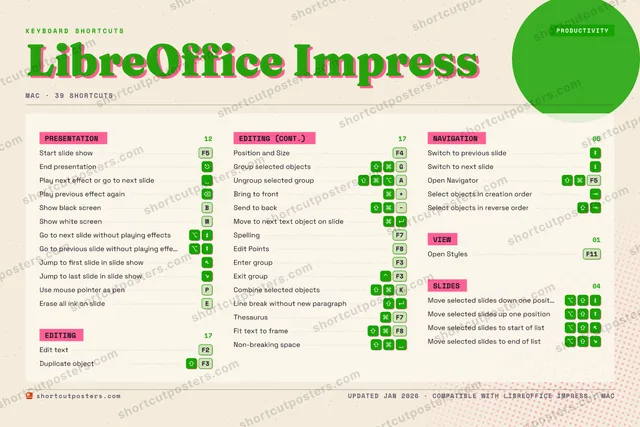
Editorial A bold Swiss-style print: giant wordmark, dense keycap columns, and a totals rail.

Frequently asked questions

Is the LibreOffice Impress poster maker free?

Yes — you can design and download a high-resolution PNG of your LibreOffice Impress shortcuts poster for free. A print-ready PDF is an optional paid upgrade.

Can I choose which LibreOffice Impress shortcuts appear?

Yes. Toggle any shortcut on or off, reorder them, rename categories, and even add your own custom shortcuts.

Can I change the colours and style?

Yes. Pick an accent colour, choose a palette, and switch between the isometric, typewriter, and keyboard-map styles.

Which keyboard layout and operating system are supported?

Choose QWERTY or AZERTY, and switch the edition between the operating systems LibreOffice Impress supports (macOS, Windows, Linux).

How do I get a printed poster?

Download the free PNG to print yourself, or order the print-ready, framed-quality PDF directly from the maker.