ShortcutPosters
iPhone appNew

Make your Gothic 1 controls poster
Pick the keybinds that matter, add your own, tune the colours and style — then download a free personalized PNG.

Making a poster for:
Style
Accent
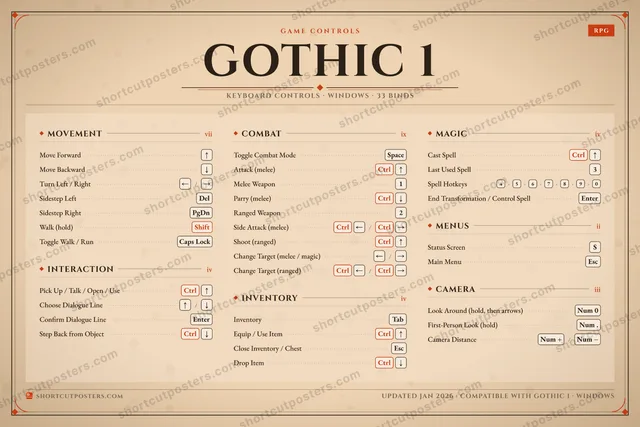
MOVEMENTviiMove Forward↑Move Backward↓Turn Left / Right←/→Sidestep LeftDelSidestep RightPgDnWalk (hold)ShiftToggle Walk / RunCaps LockINTERACTIONivPick Up / Talk / Open / UseCtrl↑Choose Dialogue Line↑/↓Confirm Dialogue LineEnterStep Back from ObjectCtrl↓COMBATixToggle Combat ModeSpaceAttack (melee)Ctrl↑Melee Weapon1Parry (melee)Ctrl↓Ranged Weapon2Side Attack (melee)Ctrl←/Ctrl→Shoot (ranged)Ctrl↑Change Target (melee / magic)←/→Change Target (ranged)Ctrl←/Ctrl→INVENTORYivInventoryTabEquip / Use ItemCtrl↑Close Inventory / ChestEscDrop ItemCtrl↓MAGICivCast SpellCtrl↑Last Used Spell3Spell Hotkeys4›5›6›7›8›9›0End Transformation / Control SpellEnterMENUSiiStatus ScreenSMain MenuEscCAMERAiiiLook Around (hold, then arrows)Num 0First-Person Look (hold)Num .Camera DistanceNum +/Num −GAME CONTROLSRPGGOTHIC 1KEYBOARD CONTROLS · WINDOWS · 33 BINDSshortcutposters.comUPDATED JAN 2026 · COMPATIBLE WITH GOTHIC 1 · WINDOWSshortcutposters.comshortcutposters.comshortcutposters.comshortcutposters.comshortcutposters.comshortcutposters.comshortcutposters.comshortcutposters.comshortcutposters.comshortcutposters.comshortcutposters.comshortcutposters.comshortcutposters.comshortcutposters.comshortcutposters.comshortcutposters.comshortcutposters.comshortcutposters.comshortcutposters.comshortcutposters.comshortcutposters.comshortcutposters.comshortcutposters.comshortcutposters.comshortcutposters.comshortcutposters.comshortcutposters.comshortcutposters.comshortcutposters.comshortcutposters.comshortcutposters.comshortcutposters.comshortcutposters.comshortcutposters.comshortcutposters.comshortcutposters.comshortcutposters.comshortcutposters.comshortcutposters.comshortcutposters.comshortcutposters.comshortcutposters.comshortcutposters.comshortcutposters.comshortcutposters.comshortcutposters.comshortcutposters.comshortcutposters.comshortcutposters.comshortcutposters.comshortcutposters.comshortcutposters.comshortcutposters.comshortcutposters.comshortcutposters.comshortcutposters.comshortcutposters.comshortcutposters.comshortcutposters.comshortcutposters.comshortcutposters.comshortcutposters.comshortcutposters.comshortcutposters.comshortcutposters.comshortcutposters.comshortcutposters.comshortcutposters.comshortcutposters.comshortcutposters.comshortcutposters.comshortcutposters.comshortcutposters.comshortcutposters.comshortcutposters.comshortcutposters.comshortcutposters.comshortcutposters.comshortcutposters.comshortcutposters.comshortcutposters.comshortcutposters.comshortcutposters.comshortcutposters.comshortcutposters.comshortcutposters.comshortcutposters.comshortcutposters.comshortcutposters.comshortcutposters.comshortcutposters.comshortcutposters.comshortcutposters.comshortcutposters.comshortcutposters.comshortcutposters.comshortcutposters.comshortcutposters.comshortcutposters.comshortcutposters.comshortcutposters.comshortcutposters.comshortcutposters.comshortcutposters.comshortcutposters.comshortcutposters.comshortcutposters.comshortcutposters.comshortcutposters.comshortcutposters.comshortcutposters.com

Hover to locate · click on the poster to disable · drag to reorder categories & shortcuts · ✎ to rename a category

Free PNG $0
  • Web resolution (1600 px)
  • Light watermark
  • Instant download
Made to order
Custom print-ready PDF $2.99
  • 300 DPI, framed-quality — no watermark
  • Every standard print size
  • Built to order from the poster above — checkout link emailed to you

Trouble ordering? Email business@shortcutposters.com.

How it works

  1. 1

    Choose a style

    Start from the generative Arcade art, or switch to isometric keys, a typewriter list, a keyboard map, or an editorial print.

  2. 2

    Make it yours

    Set the accent colour, rename categories, and reorder anything.

  3. 3

    Pick the controls

    Toggle exactly which keybinds appear — or add your own custom ones.

  4. 4

    Download or print

    Export a free high-resolution PNG instantly, or order a print-ready PDF.

Five styles to choose from
Gothic 1 controls poster preview
Arcade Generative art drawn from the game's genre and colour — pure geometry, zero spoilers.
GOTHIC 1KEYBOARD SHORTCUTS · WINDOWS · 20 ESSENTIAL1Melee We…2Ranged W…34567890QWERTYUIOPASStatus Scr…DFGHJKLZXCVBNMMORE SHORTCUTSMove Forward↑Pick Up / Talk / Open…Ctrl↑Toggle Combat ModeSpaceAttack (melee)Ctrl↑InventoryTabMove Backward↓Turn Left / Right←/→Parry (melee)Ctrl↓Equip / Use ItemCtrl↑Choose Dialogue Line↑/↓Confirm Dialogue LineEnterSide Attack (melee)Ctrl←/Ctrl→Shoot (ranged)Ctrl↑Cast SpellCtrl↑Main MenuEscSidestep LeftDelSidestep RightPgDnshortcutposters.comUPDATED JAN 2026 · COMPATIBLE WITH GOTHIC 1 · WINDOWS
Keyboard map Every binding labelled on a realistic QWERTY or AZERTY keyboard.
INTERACTIONPick Up / Talk / Open / UseCtrl↑Choose Dialogue Line↑/↓Confirm Dialogue LineEnterCOMBATToggle Combat ModeSpaceAttack (melee)Ctrl↑Melee Weapon1Parry (melee)Ctrl↓Ranged Weapon2Side Attack (melee)Ctrl←/Ctrl→Shoot (ranged)Ctrl↑MENUSStatus ScreenSMain MenuEscMOVEMENTMove Forward↑Move Backward↓Turn Left / Right←/→Sidestep LeftDelSidestep RightPgDnINVENTORYInventoryTabEquip / Use ItemCtrl↑MAGICCast SpellCtrl↑Gothic 1KEYBOARD SHORTCUTS · WINDOWS · 20 ESSENTIALBOTH LAYOUTSQWERTYQWERTYAZERTYAZERTYshortcutposters.comUPDATED JAN 2026 · COMPATIBLE WITH GOTHIC 1 · WINDOWS
Isometric Shortcuts on a 3D isometric keyboard — bold and poster-like.
INTERACTION03Pick Up / Talk / Open / UseCtrl↑Choose Dialogue Line↑/↓Confirm Dialogue LineEnterCOMBAT07Toggle Combat ModeSpaceAttack (melee)Ctrl↑Melee Weapon1Parry (melee)Ctrl↓Ranged Weapon2Side Attack (melee)Ctrl←/Ctrl→Shoot (ranged)Ctrl↑MENUS02Status ScreenSMain MenuEscMOVEMENT05Move Forward↑Move Backward↓Turn Left / Right←/→Sidestep LeftDelSidestep RightPgDnINVENTORY02InventoryTabEquip / Use ItemCtrl↑MAGIC01Cast SpellCtrl↑Gothic 1KEYBOARD SHORTCUTS · WINDOWS · 20 ESSENTIALBOTH LAYOUTSQWERTYQWERTYAZERTYAZERTYshortcutposters.comUPDATED JAN 2026 · COMPATIBLE WITH GOTHIC 1 · WINDOWS
Typewriter A clean printed list, grouped by category — dense and legible.
GOTHIC 1 · KEYBOARD SHORTCUTSWindows · 6 SETS · No.01GOTHIC 1TOTAL20SHORTCUTSFOR WINDOWS · SHIPPED COMBOSSETSMOVEMENT05INTERACTION03COMBAT07INVENTORY02MAGIC01MENUS02REF. EDITION · JAN 2026shortcutposters.comMove Forward↑Move Backward↓Turn Left / Right←›→Sidestep LeftDelSidestep RightPgDnPick Up / Talk / Open / UseCtrl↑Choose Dialogue Line↑›↓Confirm Dialogue LineEnterToggle Combat ModeSpaceAttack (melee)Ctrl↑Melee Weapon1Parry (melee)Ctrl↓Ranged Weapon2Side Attack (melee)Ctrl←›Ctrl→Shoot (ranged)Ctrl↑InventoryTabEquip / Use ItemCtrl↑Cast SpellCtrl↑Status ScreenSMain MenuEsc
Editorial A bold Swiss-style print: giant wordmark, dense keycap columns, and a totals rail.

Frequently asked questions

Is the Gothic 1 controls poster maker free?

Yes — design your Gothic 1 keybinds poster and download it as a free, watermarked PNG. A print-ready PDF (PC / keyboard edition) is an optional paid upgrade.

Can I choose which Gothic 1 controls appear?

Yes. Toggle any keybind on or off, reorder them, rename categories, and add your own custom binds.

Which styles can I use?

Start from the Arcade style — generative art based on the game's genre — or switch to the isometric, typewriter, keyboard-map or editorial layouts, and pick your accent colour.

Does the poster use official Gothic 1 artwork?

No. The poster is built only from the keybinds, text and abstract generated shapes — never logos, covers, screenshots or key art.