ShortcutPosters

Poster maker

Make your Google Drive shortcuts poster
Pick the shortcuts that matter, add your own, tune the colours and style — then download a free personalized PNG, or order the print-ready PDF.

Making a poster for:
Style
Accent
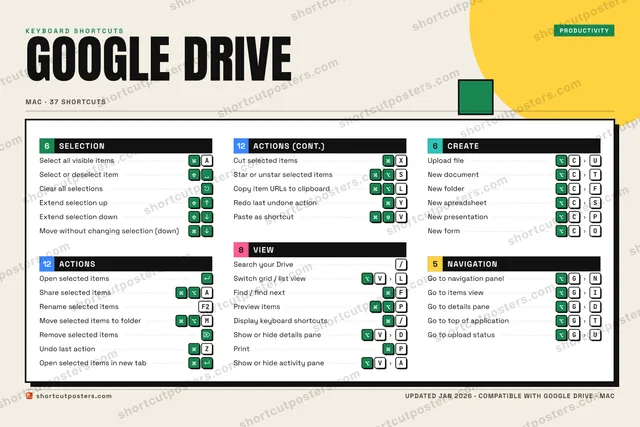
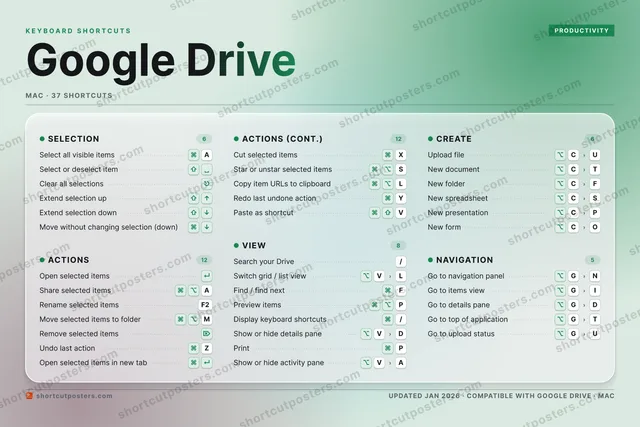
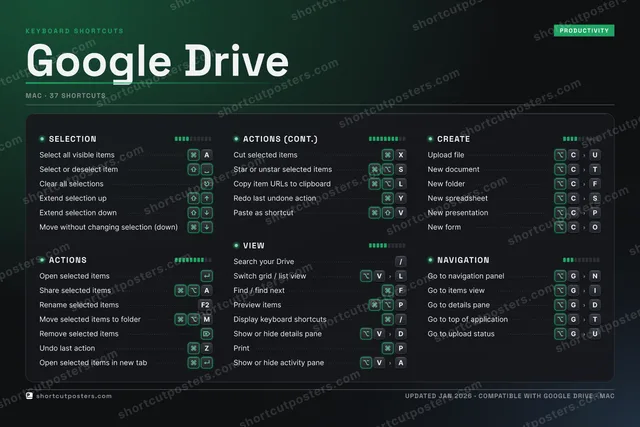
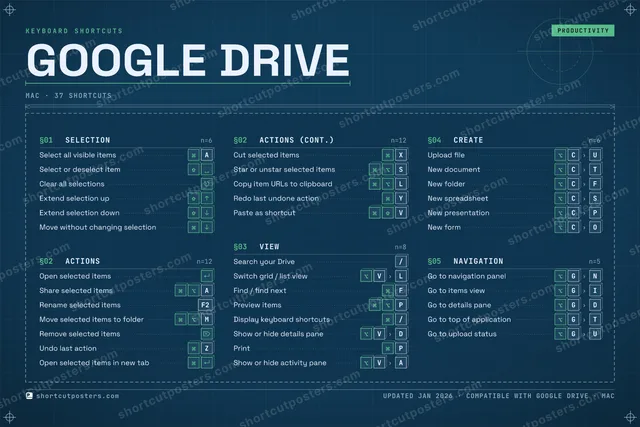
GOOGLE DRIVEKEYBOARD SHORTCUTS · MAC · 371234567890QWERTYRedo las…UIOP⌘ ⌥Preview …ASelect a…S⌘ ⌥Star or …DFFind / f…GGo to na…HJKL⌘ ⌥Copy ite…ZUndo las…XCut sele…CUpload f…VSwitch g…BNM⌘ ⌥Move sel…MORE SHORTCUTSOpen selected…Share selecte…ASearch your D…/Select or des…Rename select…F2Remove select…New documentCTNew folderCFGo to items v…GIClear all sel…Open selected…New spreadshe…CSNew presentat…CPDisplay keybo…/Go to details…GDExtend select…Extend select…Show or hide …VDPrintPGo to top of …GTGo to upload …GUMove without …Paste as shor…VNew formCOShow or hide …VAshortcutposters.comUPDATED JAN 2026 · COMPATIBLE WITH GOOGLE DRIVE · MAC

Hover to locate · click on the poster to disable · drag to reorder categories & shortcuts · to rename a category

Free PNG $0
  • Web resolution (1600 px)
  • Light watermark
  • Instant download
Made to order
Custom print-ready PDF $2.99
  • 300 DPI, framed-quality — no watermark
  • Every standard print size
  • Built to order from the poster above — checkout link emailed to you

Trouble ordering? Email business@shortcutposters.com.

How it works

  1. 1

    Choose a style

    Pick from four layouts: isometric keys, a typewriter list, a labelled keyboard map, or a bold editorial print.

  2. 2

    Make it yours

    Set the accent colour and palette, rename categories, and reorder anything.

  3. 3

    Pick the shortcuts

    Toggle exactly which shortcuts appear — or add your own custom ones.

  4. 4

    Download or print

    Export a free high-resolution PNG instantly, or order a print-ready PDF.

Four styles to choose from

GOOGLE DRIVEKEYBOARD SHORTCUTS · MAC · 20 ESSENTIAL1234567890QWERTYUIOPASelect a…SDFGGo to na…HJKLZUndo las…XCut sele…CUpload f…VSwitch g…BNM⌘ ⌥Move sel…MORE SHORTCUTSOpen selected ite…Share selected it…ASearch your Drive/Select or deselec…Rename selected i…F2Remove selected i…New documentCTNew folderCFGo to items viewGIClear all selecti…Open selected ite…New spreadsheetCSNew presentationCPshortcutposters.comUPDATED JAN 2026 · COMPATIBLE WITH GOOGLE DRIVE · MAC
Keyboard map Every binding labelled on a realistic QWERTY or AZERTY keyboard.
SELECTIONSelect all visible itemsASelect or deselect itemClear all selectionsVIEWSearch your Drive/Switch grid / list viewVLNAVIGATIONGo to navigation panelGNGo to items viewGIACTIONSOpen selected itemsShare selected itemsARename selected itemsF2Move selected items to folderMRemove selected itemsUndo last actionZOpen selected items in new tabCut selected itemsXCREATEUpload fileCUNew documentCTNew folderCFNew spreadsheetCSNew presentationCPGoogle DriveKEYBOARD SHORTCUTS · MAC · 20 ESSENTIALBOTH LAYOUTSQWERTYQWERTYAZERTYAZERTYshortcutposters.comUPDATED JAN 2026 · COMPATIBLE WITH GOOGLE DRIVE · MAC
Isometric Shortcuts on a 3D isometric keyboard — bold and poster-like.
ACTIONS08Open selected itemsShare selected itemsARename selected itemsF2Move selected items to folderMRemove selected itemsUndo last actionZOpen selected items in new tabCut selected itemsXNAVIGATION02Go to navigation panelGNGo to items viewGISELECTION03Select all visible itemsASelect or deselect itemClear all selectionsVIEW02Search your Drive/Switch grid / list viewVLCREATE05Upload fileCUNew documentCTNew folderCFNew spreadsheetCSNew presentationCPGoogle DriveKEYBOARD SHORTCUTS · MAC · 20 ESSENTIALBOTH LAYOUTSQWERTYQWERTYAZERTYAZERTYshortcutposters.comUPDATED JAN 2026 · COMPATIBLE WITH GOOGLE DRIVE · MAC
Typewriter A clean printed list, grouped by category — dense and legible.
GOOGLE DRIVE · KEYBOARD SHORTCUTSMac · 5 SETS · No.01GOOGLE DRIVETOTAL20SHORTCUTSFOR MAC · SHIPPED COMBOSSETSSELECTION03ACTIONS08VIEW02CREATE05NAVIGATION02REF. EDITION · JAN 2026shortcutposters.comSelect all visible itemsASelect or deselect itemClear all selectionsOpen selected itemsShare selected itemsARename selected itemsF2Move selected items to folderMRemove selected itemsUndo last actionZOpen selected items in new tabCut selected itemsXSearch your Drive/Switch grid / list viewVLUpload fileCUNew documentCTNew folderCFNew spreadsheetCSNew presentationCPGo to navigation panelGNGo to items viewGI
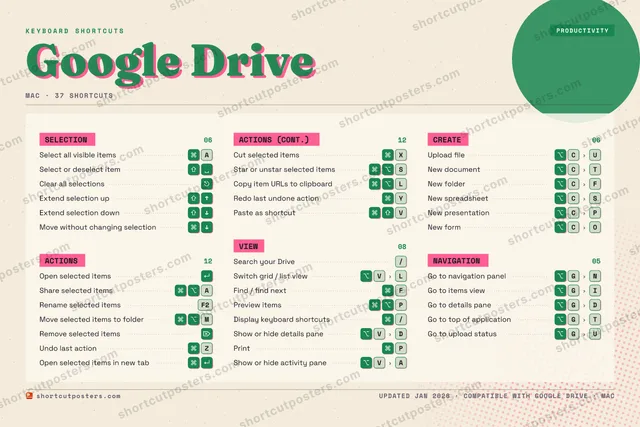
Editorial A bold Swiss-style print: giant wordmark, dense keycap columns, and a totals rail.

Frequently asked questions

Is the Google Drive poster maker free?

Yes — you can design and download a high-resolution PNG of your Google Drive shortcuts poster for free. A print-ready PDF is an optional paid upgrade.

Can I choose which Google Drive shortcuts appear?

Yes. Toggle any shortcut on or off, reorder them, rename categories, and even add your own custom shortcuts.

Can I change the colours and style?

Yes. Pick an accent colour, choose a palette, and switch between the isometric, typewriter, and keyboard-map styles.

Which keyboard layout and operating system are supported?

Choose QWERTY or AZERTY, and switch the edition between the operating systems Google Drive supports (macOS, Windows, Linux).

How do I get a printed poster?

Download the free PNG to print yourself, or order the print-ready, framed-quality PDF directly from the maker.