ShortcutPosters

Poster maker

Make your GitLab shortcuts poster

Pick the shortcuts that matter, add your own, tune the colours and style — then download a free personalized PNG, or order the print-ready PDF.

Making a poster for:
Style
Accent
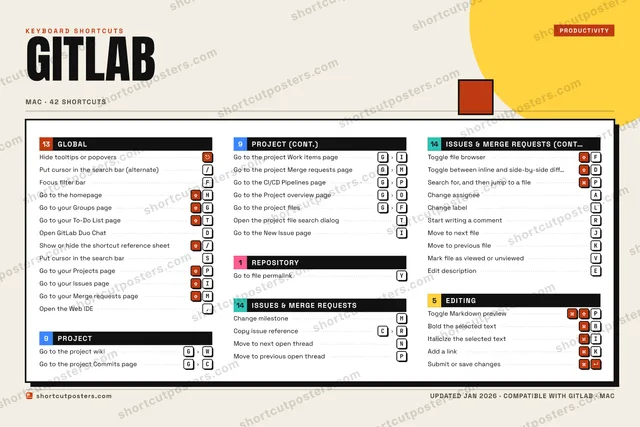
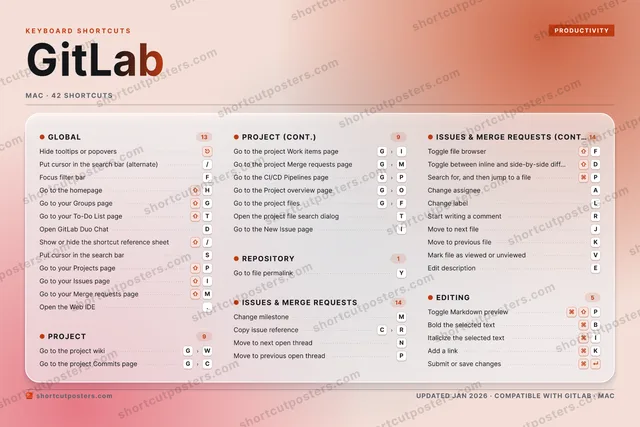
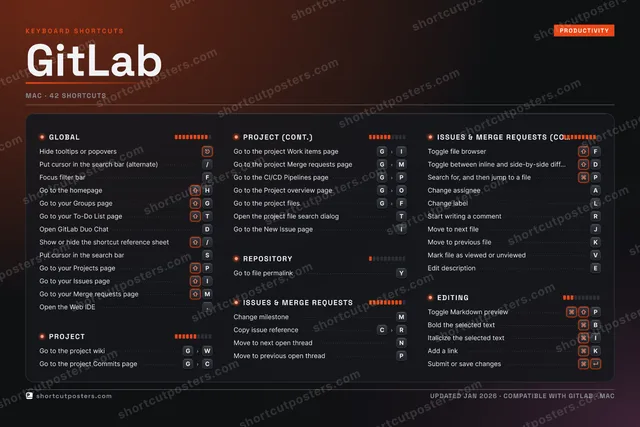
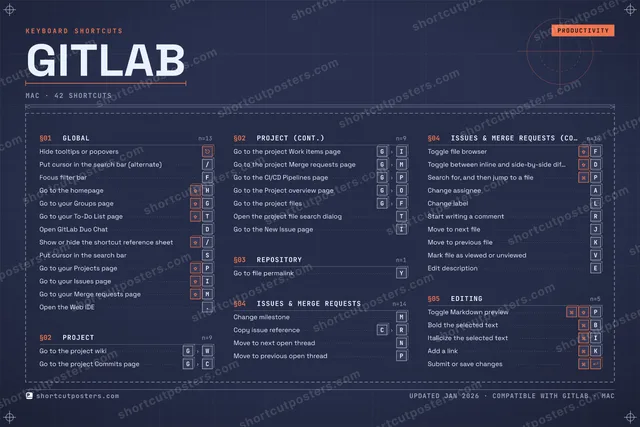
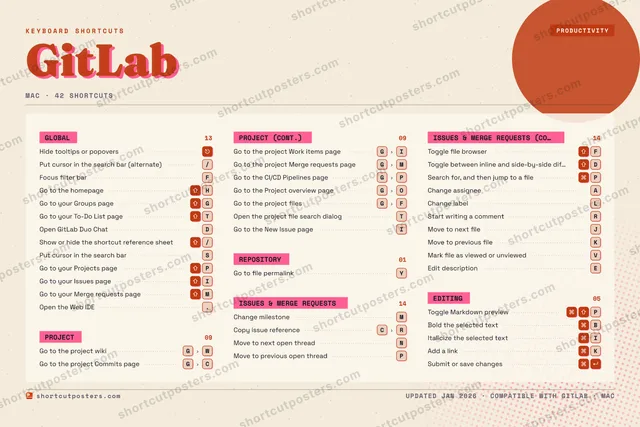
GITLABKEYBOARD SHORTCUTS · MAC · 421234567890QWEEdit des…RStart wr…TGo to yo…YGo to fi…UIItaliciz…OPMove to …AChange a…SPut curs…DToggle b…FToggle f…GGo to th…HGo to th…JMove to …KMove to …LChange l…ZXCCopy iss…VMark fil…BBold the…NMove to …MChange m…MORE SHORTCUTSHide tooltips…Search for, a…PToggle Markdo…PPut cursor in…/Focus filter …FGo to your Gr…GOpen GitLab D…DGo to the pro…GCGo to the pro…GIGo to the pro…GMGo to the CI/…GPAdd a linkKSubmit or sav…Show or hide …/Go to your Pr…PGo to your Is…IGo to your Me…MOpen the Web ….Go to the Pro…GOGo to the pro…GFOpen the proj…TGo to the New…Ishortcutposters.comUPDATED JAN 2026 · COMPATIBLE WITH GITLAB · MAC

Hover to locate · click on the poster to disable · drag to reorder categories & shortcuts · to rename a category

Free PNG $0
  • Web resolution (1600 px)
  • Light watermark
  • Instant download
Made to order
Custom print-ready PDF $2.99
  • 300 DPI, framed-quality — no watermark
  • Every standard print size
  • Built to order from the poster above — checkout link emailed to you

Trouble ordering? Email business@shortcutposters.com.

How it works

  1. 1

    Choose a style

    Pick from four layouts: isometric keys, a typewriter list, a labelled keyboard map, or a bold editorial print.

  2. 2

    Make it yours

    Set the accent colour and palette, rename categories, and reorder anything.

  3. 3

    Pick the shortcuts

    Toggle exactly which shortcuts appear — or add your own custom ones.

  4. 4

    Download or print

    Export a free high-resolution PNG instantly, or order a print-ready PDF.

Four styles to choose from

GITLABKEYBOARD SHORTCUTS · MAC · 20 ESSENTIAL1234567890QWERTGo to yo…YGo to fi…UIOPMove to …ASDToggle b…FToggle f…GGo to th…HGo to th…JKLZXCCopy iss…VBNMove to …MChange m…MORE SHORTCUTSHide tooltips or …Search for, and t…PToggle Markdown p…PPut cursor in the…/Focus filter barFGo to your Groups…GOpen GitLab Duo C…DGo to the project…GCGo to the project…GIGo to the project…GMshortcutposters.comUPDATED JAN 2026 · COMPATIBLE WITH GITLAB · MAC
Keyboard map Every binding labelled on a realistic QWERTY or AZERTY keyboard.
PROJECTGo to the project wikiGWGo to the project Commits pageGCGo to the project Work items pageGIGo to the project Merge requests pa…GMREPOSITORYGo to file permalinkYEDITINGToggle Markdown previewPGLOBALHide tooltips or popoversPut cursor in the search bar (alter…/Focus filter barFGo to the homepageHGo to your Groups pageGGo to your To-Do List pageTOpen GitLab Duo ChatDISSUES & MERGE REQUESTSChange milestoneMCopy issue referenceCRMove to next open threadNMove to previous open threadPToggle file browserFToggle between inline and side-by-s…DSearch for, and then jump to a filePGitLabKEYBOARD SHORTCUTS · MAC · 20 ESSENTIALBOTH LAYOUTSQWERTYQWERTYAZERTYAZERTYshortcutposters.comUPDATED JAN 2026 · COMPATIBLE WITH GITLAB · MAC
Isometric Shortcuts on a 3D isometric keyboard — bold and poster-like.
PROJECT04Go to the project wikiGWGo to the project Commits pageGCGo to the project Work items pageGIGo to the project Merge requests p…GMREPOSITORY01Go to file permalinkYEDITING01Toggle Markdown previewPGLOBAL07Hide tooltips or popoversPut cursor in the search bar (alte…/Focus filter barFGo to the homepageHGo to your Groups pageGGo to your To-Do List pageTOpen GitLab Duo ChatDISSUES & MERGE REQUESTS07Change milestoneMCopy issue referenceCRMove to next open threadNMove to previous open threadPToggle file browserFToggle between inline and side-by-…DSearch for, and then jump to a filePGitLabKEYBOARD SHORTCUTS · MAC · 20 ESSENTIALBOTH LAYOUTSQWERTYQWERTYAZERTYAZERTYshortcutposters.comUPDATED JAN 2026 · COMPATIBLE WITH GITLAB · MAC
Typewriter A clean printed list, grouped by category — dense and legible.
GITLAB · KEYBOARD SHORTCUTSMac · 5 SETS · No.01GITLABTOTAL20SHORTCUTSFOR MAC · SHIPPED COMBOSSETSGLOBAL07PROJECT04REPOSITORY01ISSUES & MERG07EDITING01REF. EDITION · JAN 2026shortcutposters.comHide tooltips or popoversPut cursor in the search bar (alternate)/Focus filter barFGo to the homepageHGo to your Groups pageGGo to your To-Do List pageTOpen GitLab Duo ChatDGo to the project wikiGWGo to the project Commits pageGCGo to the project Work items pageGIGo to the project Merge requests pageGMGo to file permalinkYChange milestoneMCopy issue referenceCRMove to next open threadNMove to previous open threadPToggle file browserFToggle between inline and side-by-side diff viewDSearch for, and then jump to a filePToggle Markdown previewP
Editorial A bold Swiss-style print: giant wordmark, dense keycap columns, and a totals rail.

Frequently asked questions

Is the GitLab poster maker free?

Yes — you can design and download a high-resolution PNG of your GitLab shortcuts poster for free. A print-ready PDF is an optional paid upgrade.

Can I choose which GitLab shortcuts appear?

Yes. Toggle any shortcut on or off, reorder them, rename categories, and even add your own custom shortcuts.

Can I change the colours and style?

Yes. Pick an accent colour, choose a palette, and switch between the isometric, typewriter, and keyboard-map styles.

Which keyboard layout and operating system are supported?

Choose QWERTY or AZERTY, and switch the edition between the operating systems GitLab supports (macOS, Windows, Linux).

How do I get a printed poster?

Download the free PNG to print yourself, or order the print-ready, framed-quality PDF directly from the maker.