ShortcutPosters

Poster maker

Make your Element shortcuts poster

Pick the shortcuts that matter, add your own, tune the colours and style — then download a free personalized PNG, or order the print-ready PDF.

Making a poster for:
Style
Accent
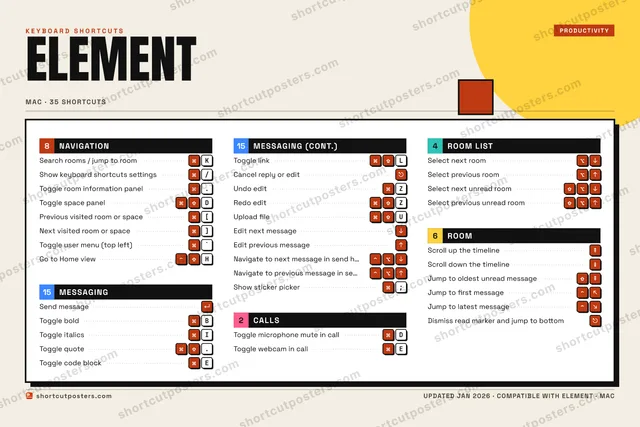
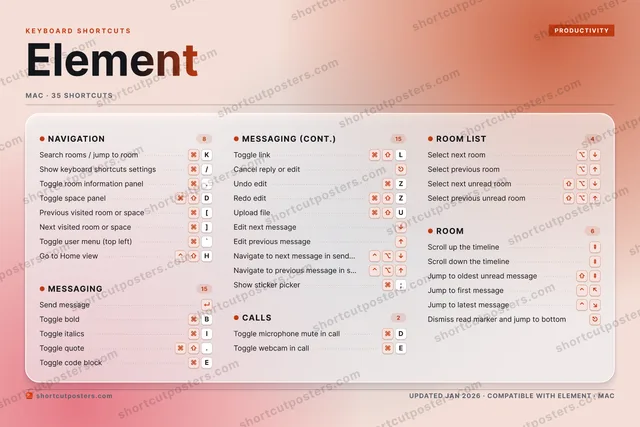
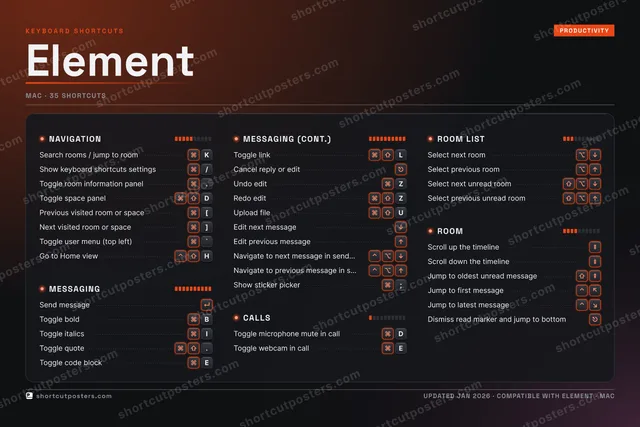
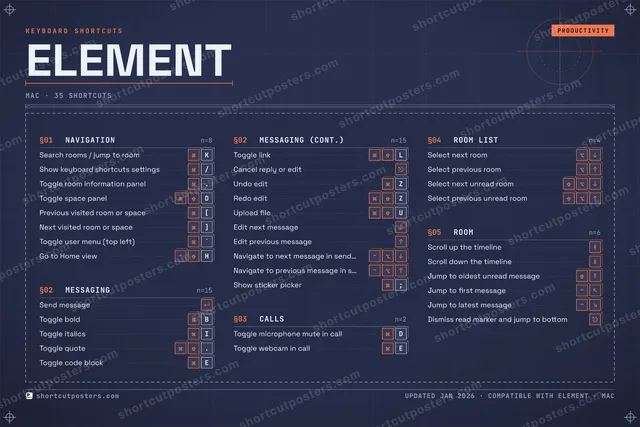
ELEMENTKEYBOARD SHORTCUTS · MAC · 34 ESSENTIAL1234567890QWEToggle w…RTYU⌘ ⇧Upload f…IToggle i…OPASDToggle m…FGH⌃ ⇧Go to Ho…JKSearch r…L⌘ ⇧Toggle l…ZUndo editXCVBToggle b…NMMORE SHORTCUTSSend messageSelect next r…Select previo…Select next u…Select previo…Show keyboard…/Toggle room i….Toggle space …DPrevious visi…[Next visited …]Toggle quote.Toggle code b…ECancel reply …Redo editZScroll up the…Scroll down t…Jump to oldes…Toggle user m…`Edit next mes…Edit previous…Jump to first…Jump to lates…Dismiss read …Navigate to n…Navigate to p…shortcutposters.comUPDATED JAN 2026 · COMPATIBLE WITH ELEMENT · MAC

Hover to locate · click on the poster to disable · drag to reorder categories & shortcuts · to rename a category

Free PNG $0
  • Web resolution (1600 px)
  • Light watermark
  • Instant download
Made to order
Custom print-ready PDF $2.99
  • 300 DPI, framed-quality — no watermark
  • Every standard print size
  • Built to order from the poster above — checkout link emailed to you

Trouble ordering? Email business@shortcutposters.com.

How it works

  1. 1

    Choose a style

    Pick from four layouts: isometric keys, a typewriter list, a labelled keyboard map, or a bold editorial print.

  2. 2

    Make it yours

    Set the accent colour and palette, rename categories, and reorder anything.

  3. 3

    Pick the shortcuts

    Toggle exactly which shortcuts appear — or add your own custom ones.

  4. 4

    Download or print

    Export a free high-resolution PNG instantly, or order a print-ready PDF.

Four styles to choose from

ELEMENTKEYBOARD SHORTCUTS · MAC · 20 ESSENTIAL1234567890QWEToggle w…RTYUIToggle i…OPASDToggle m…FGHJKSearch r…L⌘ ⇧Toggle l…ZUndo editXCVBToggle b…NMMORE SHORTCUTSSend messageSelect next roomSelect previous r…Select next unrea…Select previous u…Show keyboard sho…/Toggle room infor….Toggle space panelDPrevious visited …[Next visited room…]Toggle quote.Toggle code blockECancel reply or e…shortcutposters.comUPDATED JAN 2026 · COMPATIBLE WITH ELEMENT · MAC
Keyboard map Every binding labelled on a realistic QWERTY or AZERTY keyboard.
MESSAGINGSend messageToggle boldBToggle italicsIToggle quote.Toggle code blockEToggle linkLCancel reply or editUndo editZROOM LISTSelect next roomSelect previous roomSelect next unread roomSelect previous unread roomNAVIGATIONSearch rooms / jump to roomKShow keyboard shortcuts settings/Toggle room information panel.Toggle space panelDPrevious visited room or space[Next visited room or space]CALLSToggle microphone mute in callDToggle webcam in callEElementKEYBOARD SHORTCUTS · MAC · 20 ESSENTIALBOTH LAYOUTSQWERTYQWERTYAZERTYAZERTYshortcutposters.comUPDATED JAN 2026 · COMPATIBLE WITH ELEMENT · MAC
Isometric Shortcuts on a 3D isometric keyboard — bold and poster-like.
MESSAGING08Send messageToggle boldBToggle italicsIToggle quote.Toggle code blockEToggle linkLCancel reply or editUndo editZROOM LIST04Select next roomSelect previous roomSelect next unread roomSelect previous unread roomNAVIGATION06Search rooms / jump to roomKShow keyboard shortcuts settings/Toggle room information panel.Toggle space panelDPrevious visited room or space[Next visited room or space]CALLS02Toggle microphone mute in callDToggle webcam in callEElementKEYBOARD SHORTCUTS · MAC · 20 ESSENTIALBOTH LAYOUTSQWERTYQWERTYAZERTYAZERTYshortcutposters.comUPDATED JAN 2026 · COMPATIBLE WITH ELEMENT · MAC
Typewriter A clean printed list, grouped by category — dense and legible.
ELEMENT · KEYBOARD SHORTCUTSMac · 4 SETS · No.01ELEMENTTOTAL20SHORTCUTSFOR MAC · SHIPPED COMBOSSETSNAVIGATION06MESSAGING08CALLS02ROOM LIST04REF. EDITION · JAN 2026shortcutposters.comSearch rooms / jump to roomKShow keyboard shortcuts settings/Toggle room information panel.Toggle space panelDPrevious visited room or space[Next visited room or space]Send messageToggle boldBToggle italicsIToggle quote.Toggle code blockEToggle linkLCancel reply or editUndo editZToggle microphone mute in callDToggle webcam in callESelect next roomSelect previous roomSelect next unread roomSelect previous unread room
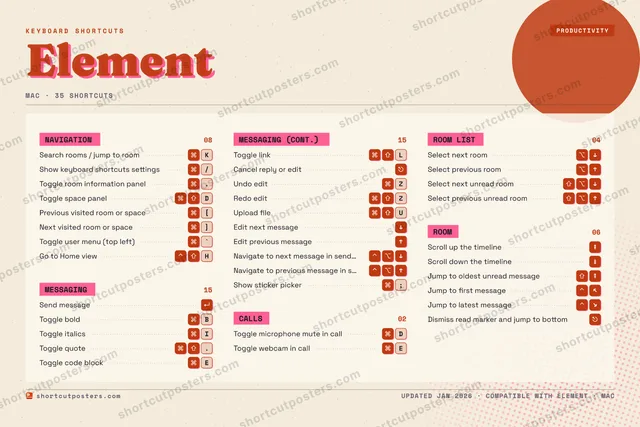
Editorial A bold Swiss-style print: giant wordmark, dense keycap columns, and a totals rail.

Frequently asked questions

Is the Element poster maker free?

Yes — you can design and download a high-resolution PNG of your Element shortcuts poster for free. A print-ready PDF is an optional paid upgrade.

Can I choose which Element shortcuts appear?

Yes. Toggle any shortcut on or off, reorder them, rename categories, and even add your own custom shortcuts.

Can I change the colours and style?

Yes. Pick an accent colour, choose a palette, and switch between the isometric, typewriter, and keyboard-map styles.

Which keyboard layout and operating system are supported?

Choose QWERTY or AZERTY, and switch the edition between the operating systems Element supports (macOS, Windows, Linux).

How do I get a printed poster?

Download the free PNG to print yourself, or order the print-ready, framed-quality PDF directly from the maker.