ShortcutPosters

Poster maker

Make your ClickUp shortcuts poster

Pick the shortcuts that matter, add your own, tune the colours and style — then download a free personalized PNG, or order the print-ready PDF.

Making a poster for:
Style
Accent
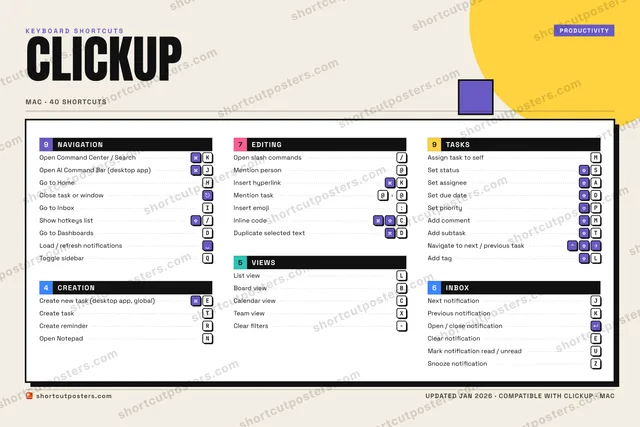
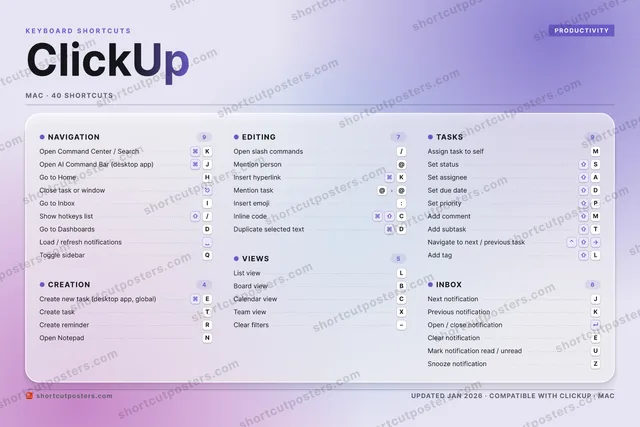
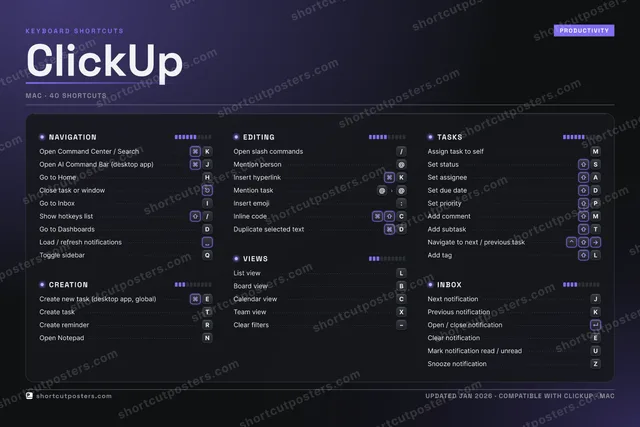
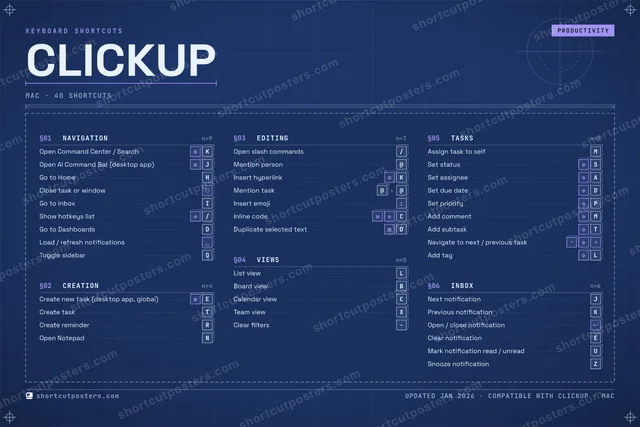
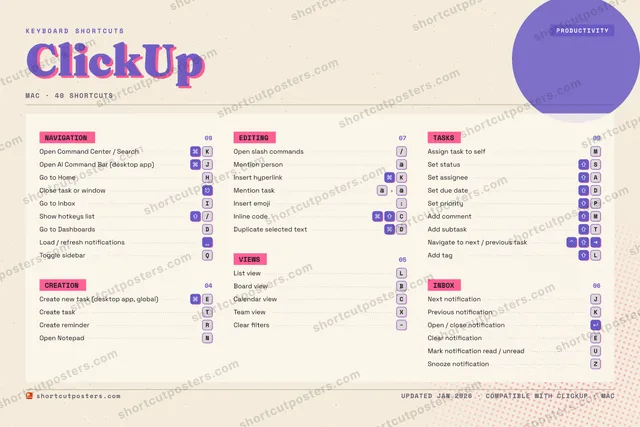
CLICKUPKEYBOARD SHORTCUTS · MAC · 401234567890QToggle s…WECreate n…RCreate r…TCreate t…YUMark not…IGo to In…OPSet prio…ASet assi…SSet stat…DSet due …FGHGo to Ho…JOpen AI …KOpen Com…LList viewZSnooze n…XTeam viewCCalendar…VBBoard vi…NOpen Not…MAssign t…MORE SHORTCUTSClose task or win…Open slash comman…/Mention person@Insert hyperlinkKShow hotkeys list/Go to DashboardsDLoad / refresh no…Add commentMAdd subtaskTNavigate to next …Next notificationJPrevious notifica…KOpen / close noti…Clear notificationEMention task@@Clear filtersAdd tagLInsert emoji:Inline codeCDuplicate selecte…Dshortcutposters.comUPDATED JAN 2026 · COMPATIBLE WITH CLICKUP · MAC

Hover to locate · click on the poster to disable · drag to reorder categories & shortcuts · to rename a category

Free PNG $0
  • Web resolution (1600 px)
  • Light watermark
  • Instant download
Made to order
Custom print-ready PDF $2.99
  • 300 DPI, framed-quality — no watermark
  • Every standard print size
  • Built to order from the poster above — checkout link emailed to you

Trouble ordering? Email business@shortcutposters.com.

How it works

  1. 1

    Choose a style

    Pick from four layouts: isometric keys, a typewriter list, a labelled keyboard map, or a bold editorial print.

  2. 2

    Make it yours

    Set the accent colour and palette, rename categories, and reorder anything.

  3. 3

    Pick the shortcuts

    Toggle exactly which shortcuts appear — or add your own custom ones.

  4. 4

    Download or print

    Export a free high-resolution PNG instantly, or order a print-ready PDF.

Four styles to choose from

CLICKUPKEYBOARD SHORTCUTS · MAC · 20 ESSENTIAL1234567890QWECreate n…RCreate r…TCreate t…YUIGo to In…OPASet assi…SSet stat…DSet due …FGHGo to Ho…JOpen AI …KOpen Com…LList viewZXCVBBoard vi…NMAssign t…MORE SHORTCUTSClose task or win…Open slash comman…/Mention person@Insert hyperlinkKShow hotkeys list/Go to DashboardsDLoad / refresh no…shortcutposters.comUPDATED JAN 2026 · COMPATIBLE WITH CLICKUP · MAC
Keyboard map Every binding labelled on a realistic QWERTY or AZERTY keyboard.
CREATIONCreate new task (desktop app, glob…ECreate taskTCreate reminderREDITINGOpen slash commands/Mention person@Insert hyperlinkKTASKSAssign task to selfMSet statusSSet assigneeASet due dateDNAVIGATIONOpen Command Center / SearchKOpen AI Command Bar (desktop app)JGo to HomeHClose task or windowGo to InboxIShow hotkeys list/Go to DashboardsDLoad / refresh notificationsVIEWSList viewLBoard viewBClickUpKEYBOARD SHORTCUTS · MAC · 20 ESSENTIALBOTH LAYOUTSQWERTYQWERTYAZERTYAZERTYshortcutposters.comUPDATED JAN 2026 · COMPATIBLE WITH CLICKUP · MAC
Isometric Shortcuts on a 3D isometric keyboard — bold and poster-like.
CREATION03Create new task (desktop app, glob…ECreate taskTCreate reminderREDITING03Open slash commands/Mention person@Insert hyperlinkKTASKS04Assign task to selfMSet statusSSet assigneeASet due dateDNAVIGATION08Open Command Center / SearchKOpen AI Command Bar (desktop app)JGo to HomeHClose task or windowGo to InboxIShow hotkeys list/Go to DashboardsDLoad / refresh notificationsVIEWS02List viewLBoard viewBClickUpKEYBOARD SHORTCUTS · MAC · 20 ESSENTIALBOTH LAYOUTSQWERTYQWERTYAZERTYAZERTYshortcutposters.comUPDATED JAN 2026 · COMPATIBLE WITH CLICKUP · MAC
Typewriter A clean printed list, grouped by category — dense and legible.
CLICKUP · KEYBOARD SHORTCUTSMac · 5 SETS · No.01CLICKUPTOTAL20SHORTCUTSFOR MAC · SHIPPED COMBOSSETSNAVIGATION08CREATION03EDITING03VIEWS02TASKS04REF. EDITION · JAN 2026shortcutposters.comOpen Command Center / SearchKOpen AI Command Bar (desktop app)JGo to HomeHClose task or windowGo to InboxIShow hotkeys list/Go to DashboardsDLoad / refresh notificationsCreate new task (desktop app, global)ECreate taskTCreate reminderROpen slash commands/Mention person@Insert hyperlinkKList viewLBoard viewBAssign task to selfMSet statusSSet assigneeASet due dateD
Editorial A bold Swiss-style print: giant wordmark, dense keycap columns, and a totals rail.

Frequently asked questions

Is the ClickUp poster maker free?

Yes — you can design and download a high-resolution PNG of your ClickUp shortcuts poster for free. A print-ready PDF is an optional paid upgrade.

Can I choose which ClickUp shortcuts appear?

Yes. Toggle any shortcut on or off, reorder them, rename categories, and even add your own custom shortcuts.

Can I change the colours and style?

Yes. Pick an accent colour, choose a palette, and switch between the isometric, typewriter, and keyboard-map styles.

Which keyboard layout and operating system are supported?

Choose QWERTY or AZERTY, and switch the edition between the operating systems ClickUp supports (macOS, Windows, Linux).

How do I get a printed poster?

Download the free PNG to print yourself, or order the print-ready, framed-quality PDF directly from the maker.