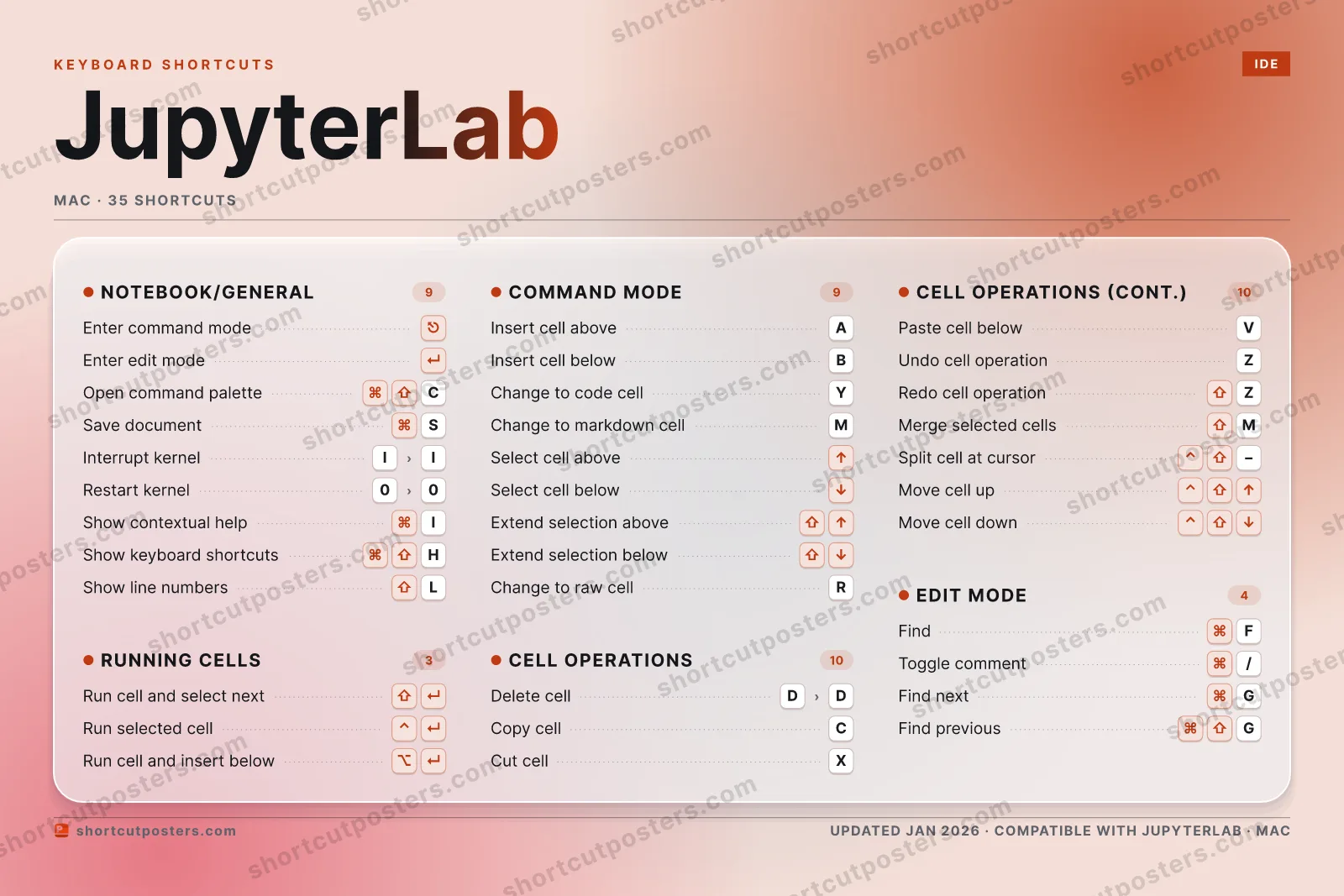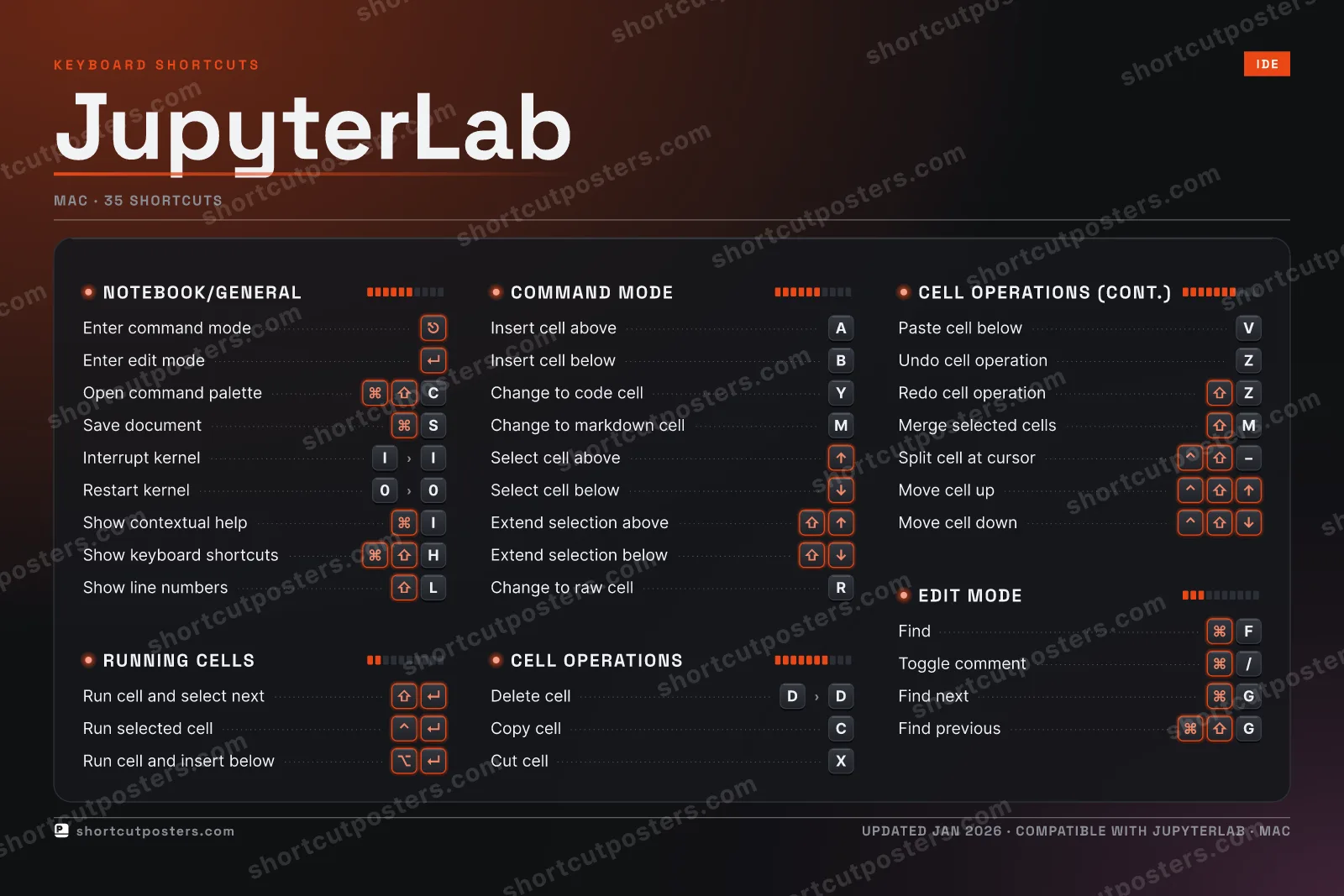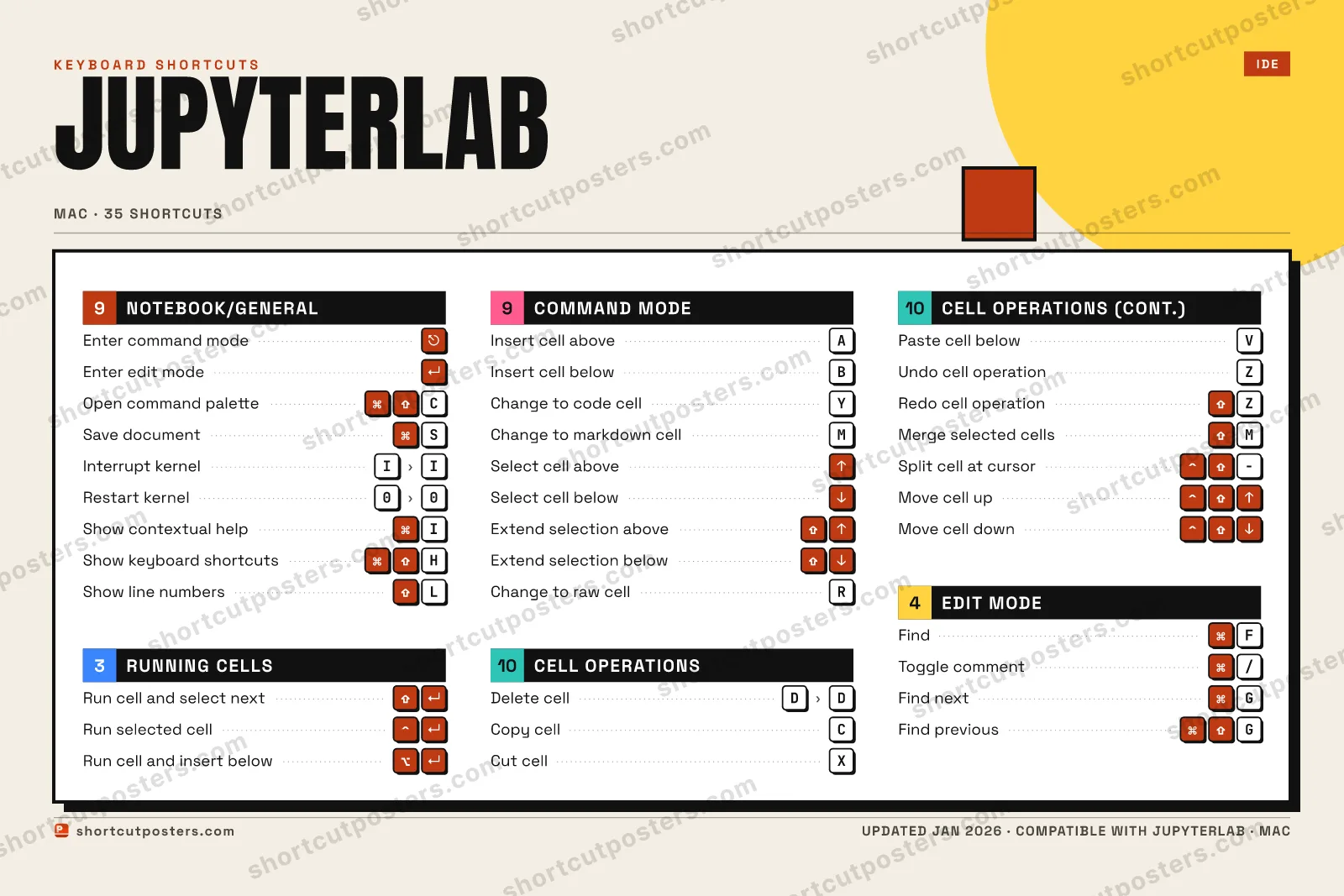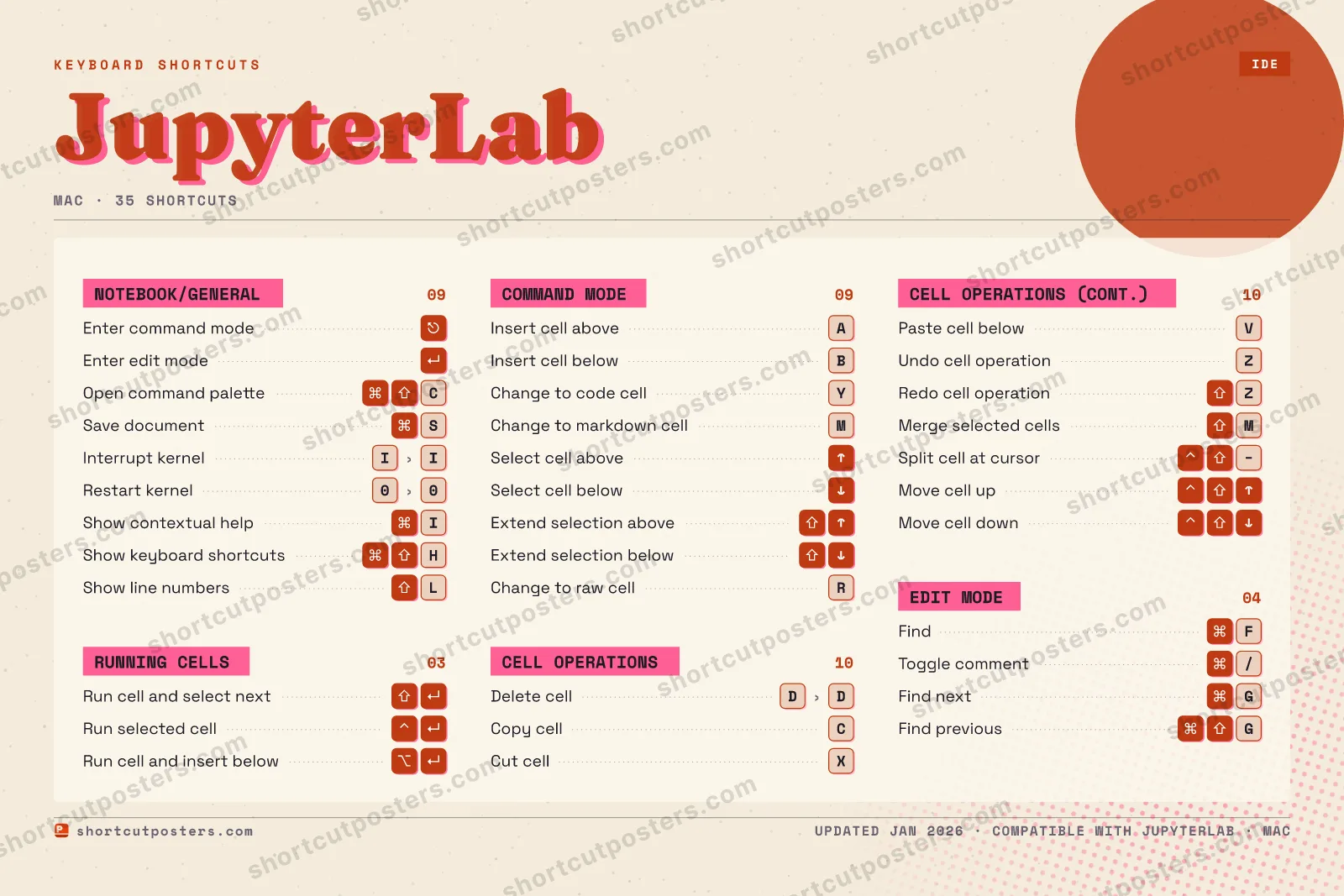

4 art directions — pick one below, click to zoom & compare.
⤢ JUPYTERLAB KEYBOARD SHORTCUTS · MAC · 35 1 2 3 4 5 6 7 8 9 0 Restart … Q W E R Change t… T Y Change t… U I Interrup… O P A Insert c… S ⌘ Save doc… D Delete c… F ⌘ Find G ⌘ Find next H ⌘ ⇧ Show key… J K L ⇧ Show lin… Z Undo cel… X Cut cell C ⌘ ⇧ Open com… V Paste ce… B Insert c… N M Change t… MORE SHORTCUTS Enter command mode ⎋ Enter edit mode ↵ Run cell and sele… ⇧ ↵ Run selected cell ⌃ ↵ Run cell and inse… ⌥ ↵ Copy cell C Select cell above ↑ Select cell below ↓ Redo cell operati… ⇧ Z Extend selection … ⇧ ↑ Extend selection … ⇧ ↓ Merge selected ce… ⇧ M Split cell at cur… ⌃ ⇧ − Move cell up ⌃ ⇧ ↑ Move cell down ⌃ ⇧ ↓ Toggle comment ⌘ / Find previous ⌘ ⇧ G Show contextual h… ⌘ I shortcutposters.com UPDATED JAN 2026 · COMPATIBLE WITH JUPYTERLAB · MAC
JUPYTERLAB KEYBOARD SHORTCUTS · MAC · 35 1 2 3 4 5 6 7 8 9 0 Restart … A Insert c… Z Undo cel… E R Change t… T Y Change t… U I Interrup… O P Q S ⌘ Save doc… D Delete c… F ⌘ Find G ⌘ Find next H ⌘ ⇧ Show key… J K L ⇧ Show lin… M Change t… W X Cut cell C ⌘ ⇧ Open com… V Paste ce… B Insert c… N MORE SHORTCUTS Enter command mode ⎋ Enter edit mode ↵ Run cell and sele… ⇧ ↵ Run selected cell ⌃ ↵ Run cell and inse… ⌥ ↵ Copy cell C Select cell above ↑ Select cell below ↓ Redo cell operati… ⇧ Z Extend selection … ⇧ ↑ Extend selection … ⇧ ↓ Merge selected ce… ⇧ M Split cell at cur… ⌃ ⇧ − Move cell up ⌃ ⇧ ↑ Move cell down ⌃ ⇧ ↓ Toggle comment ⌘ / Find previous ⌘ ⇧ G Show contextual h… ⌘ I shortcutposters.com UPDATED JAN 2026 · COMPATIBLE WITH JUPYTERLAB · MAC
⤢ COMMAND MODE Insert cell above A Insert cell below B Change to code cell Y Change to markdown c… M Select cell above ↑ Select cell below ↓ Extend selection abo… ⇧ ↑ Extend selection bel… ⇧ ↓ Change to raw cell R EDIT MODE Find ⌘ F Toggle comment ⌘ / Find next ⌘ G Find previous ⌘ ⇧ G NOTEBOOK/GENERAL Enter command mode ⎋ Enter edit mode ↵ Open command palette ⌘ ⇧ C Save document ⌘ S Interrupt kernel I › I Restart kernel 0 › 0 Show contextual help ⌘ I Show keyboard shortc… ⌘ ⇧ H Show line numbers ⇧ L RUNNING CELLS Run cell and select … ⇧ ↵ Run selected cell ⌃ ↵ Run cell and insert … ⌥ ↵ CELL OPERATIONS Delete cell D › D Copy cell C Cut cell X Paste cell below V Undo cell operation Z Redo cell operation ⇧ Z Merge selected cells ⇧ M Split cell at cursor ⌃ ⇧ − Move cell up ⌃ ⇧ ↑ Move cell down ⌃ ⇧ ↓ JupyterLab KEYBOARD SHORTCUTS · MAC · 35 BOTH LAYOUTS QWERTY Q W E R T Y AZERTY A Z E R T Y shortcutposters.com UPDATED JAN 2026 · COMPATIBLE WITH JUPYTERLAB · MAC ⤢ RUNNING CELLS 03 Run cell and select next ⇧ ↵ Run selected cell ⌃ ↵ Run cell and insert below ⌥ ↵ COMMAND MODE 09 Insert cell above A Insert cell below B Change to code cell Y Change to markdown cell M Select cell above ↑ Select cell below ↓ Extend selection above ⇧ ↑ Extend selection below ⇧ ↓ Change to raw cell R EDIT MODE 04 Find ⌘ F Toggle comment ⌘ / Find next ⌘ G Find previous ⌘ ⇧ G NOTEBOOK/GENERAL 09 Enter command mode ⎋ Enter edit mode ↵ Open command palette ⌘ ⇧ C Save document ⌘ S Interrupt kernel I › I Restart kernel 0 › 0 Show contextual help ⌘ I Show keyboard shortcuts ⌘ ⇧ H Show line numbers ⇧ L CELL OPERATIONS 10 Delete cell D › D Copy cell C Cut cell X Paste cell below V Undo cell operation Z Redo cell operation ⇧ Z Merge selected cells ⇧ M Split cell at cursor ⌃ ⇧ − Move cell up ⌃ ⇧ ↑ Move cell down ⌃ ⇧ ↓ JupyterLab KEYBOARD SHORTCUTS · MAC · 35 BOTH LAYOUTS QWERTY Q W E R T Y AZERTY A Z E R T Y shortcutposters.com UPDATED JAN 2026 · COMPATIBLE WITH JUPYTERLAB · MAC
⤢ JUPYTERLAB · KEYBOARD SHORTCUTS Mac · 5 SETS · No.01 JUPYTERLAB TOTAL 35 SHORTCUTS FOR MAC · SHIPPED COMBOS SETS NOTEBOOK/GENE 09 RUNNING CELLS 03 COMMAND MODE 09 CELL OPERATIO 10 EDIT MODE 04 REF. EDITION · JAN 2026 shortcutposters.com Enter command mode ⎋ Enter edit mode ↵ Open command palette ⌘ ⇧ C Save document ⌘ S Interrupt kernel I › I Restart kernel 0 › 0 Show contextual help ⌘ I Show keyboard shortcuts ⌘ ⇧ H Show line numbers ⇧ L Run cell and select next ⇧ ↵ Run selected cell ⌃ ↵ Run cell and insert below ⌥ ↵ Insert cell above A Insert cell below B Change to code cell Y Change to markdown cell M Select cell above ↑ Select cell below ↓ Extend selection above ⇧ ↑ Extend selection below ⇧ ↓ Change to raw cell R Delete cell D › D Copy cell C Cut cell X Paste cell below V Undo cell operation Z Redo cell operation ⇧ Z Merge selected cells ⇧ M Split cell at cursor ⌃ ⇧ − Move cell up ⌃ ⇧ ↑ Move cell down ⌃ ⇧ ↓ Find ⌘ F Toggle comment ⌘ / Find next ⌘ G Find previous ⌘ ⇧ G
JUPYTERLAB KEYBOARD SHORTCUTS · MAC · 14 ESSENTIAL 1 2 3 4 5 6 7 8 9 0 Q W E R T Y Change t… U I O P A Insert c… S ⌘ Save doc… D Delete c… F G H J K L Z X Cut cell C ⌘ ⇧ Open com… V Paste ce… B Insert c… N M MORE SHORTCUTS Enter command mode ⎋ Enter edit mode ↵ Run cell and sele… ⇧ ↵ Run selected cell ⌃ ↵ Run cell and inse… ⌥ ↵ Copy cell C shortcutposters.com UPDATED JAN 2026 · COMPATIBLE WITH JUPYTERLAB · MAC Keyboard map NOTEBOOK/GENERAL Enter command mode ⎋ Enter edit mode ↵ Open command palette ⌘ ⇧ C Save document ⌘ S CELL OPERATIONS Delete cell D › D Copy cell C Cut cell X Paste cell below V RUNNING CELLS Run cell and select next ⇧ ↵ Run selected cell ⌃ ↵ Run cell and insert below ⌥ ↵ COMMAND MODE Insert cell above A Insert cell below B Change to code cell Y JupyterLab KEYBOARD SHORTCUTS · MAC · 14 ESSENTIAL BOTH LAYOUTS QWERTY Q W E R T Y AZERTY A Z E R T Y shortcutposters.com UPDATED JAN 2026 · COMPATIBLE WITH JUPYTERLAB · MAC Isometric NOTEBOOK/GENERAL 04 Enter command mode ⎋ Enter edit mode ↵ Open command palette ⌘ ⇧ C Save document ⌘ S CELL OPERATIONS 04 Delete cell D › D Copy cell C Cut cell X Paste cell below V RUNNING CELLS 03 Run cell and select next ⇧ ↵ Run selected cell ⌃ ↵ Run cell and insert below ⌥ ↵ COMMAND MODE 03 Insert cell above A Insert cell below B Change to code cell Y JupyterLab KEYBOARD SHORTCUTS · MAC · 14 ESSENTIAL BOTH LAYOUTS QWERTY Q W E R T Y AZERTY A Z E R T Y shortcutposters.com UPDATED JAN 2026 · COMPATIBLE WITH JUPYTERLAB · MAC Typewriter JUPYTERLAB · KEYBOARD SHORTCUTS Mac · 4 SETS · No.01 JUPYTERLAB TOTAL 14 SHORTCUTS FOR MAC · SHIPPED COMBOS SETS NOTEBOOK/GENE 04 RUNNING CELLS 03 COMMAND MODE 03 CELL OPERATIO 04 REF. EDITION · JAN 2026 shortcutposters.com Enter command mode ⎋ Enter edit mode ↵ Open command palette ⌘ ⇧ C Save document ⌘ S Run cell and select next ⇧ ↵ Run selected cell ⌃ ↵ Run cell and insert below ⌥ ↵ Insert cell above A Insert cell below B Change to code cell Y Delete cell D › D Copy cell C Cut cell X Paste cell below V Editorial JupyterLab is the web-based interactive development environment for Jupyter notebooks, code, and data. Its modal notebook editing splits keyboard control into command mode for cell-level actions and edit mode for typing, so mastering the shortcuts makes running, building, and rearranging cells fast without reaching for the mouse.
Official: Official site
All JupyterLab keyboard shortcuts (Mac)
Cell Operations Notebook/General Command Mode Edit Mode
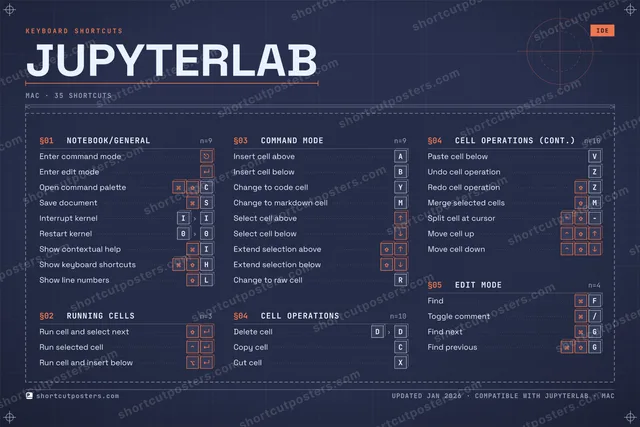
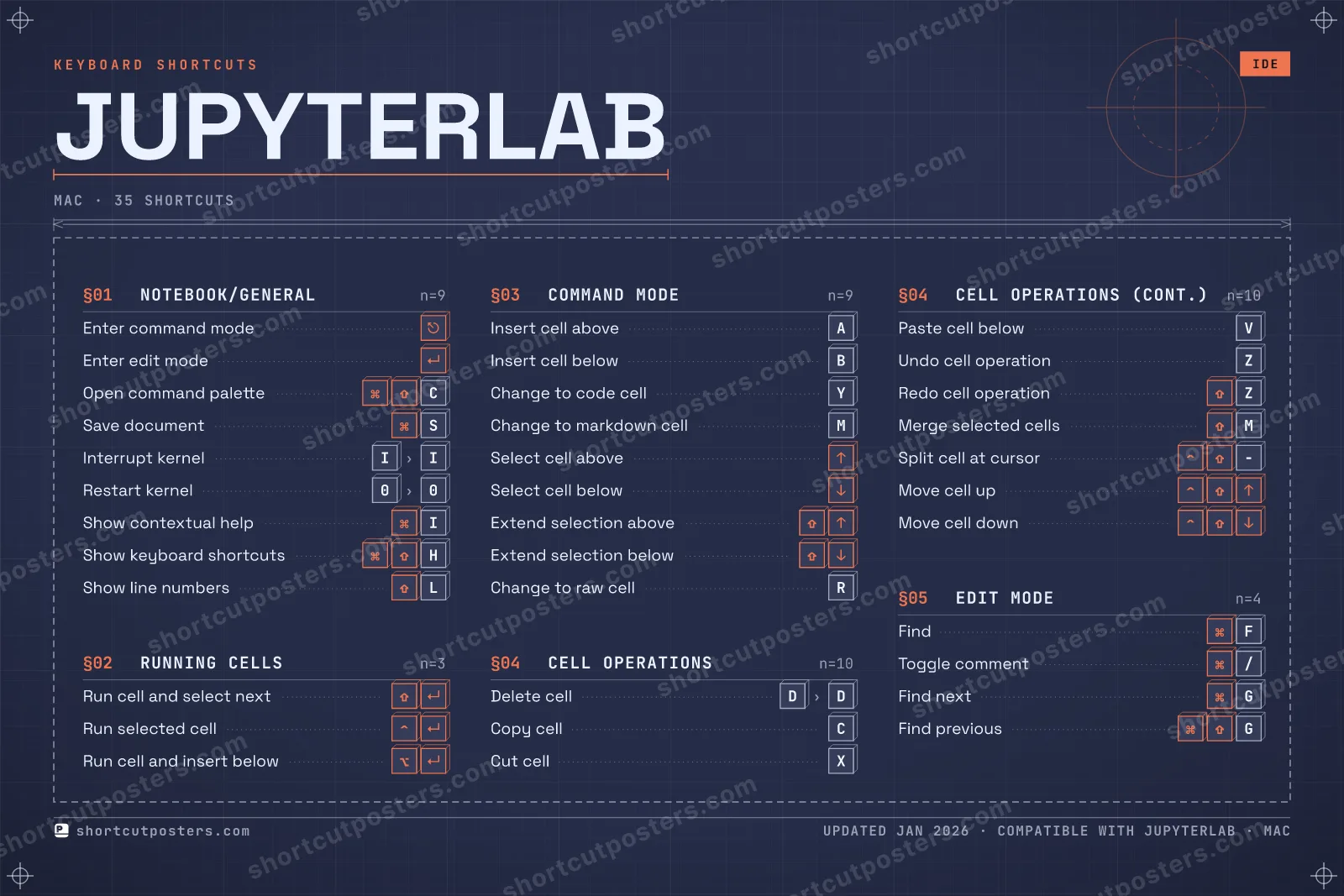
Cell Operations 10 Action Shortcut Delete cell D then D Copy cell C Cut cell X Paste cell below V Undo cell operation Z Redo cell operation ⇧ Z Merge selected cells ⇧ M Split cell at cursor ⌃ ⇧ − Move cell up ⌃ ⇧ ↑ Move cell down ⌃ ⇧ ↓
Notebook/General 9 Action Shortcut Enter command mode ⎋ Enter edit mode ↵ Open command palette ⌘ ⇧ C Save document ⌘ S Interrupt kernel I then I Restart kernel 0 then 0 Show contextual help ⌘ I Show keyboard shortcuts ⌘ ⇧ H Show line numbers ⇧ L
Command Mode 9 Action Shortcut Insert cell above A Insert cell below B Change to code cell Y Change to markdown cell M Select cell above ↑ Select cell below ↓ Extend selection above ⇧ ↑ Extend selection below ⇧ ↓ Change to raw cell R
Edit Mode 4 Action Shortcut Find ⌘ F Toggle comment ⌘ / Find next ⌘ G Find previous ⌘ ⇧ G
Running Cells 3 Action Shortcut Run cell and select next ⇧ ↵ Run selected cell ⌃ ↵ Run cell and insert below ⌥ ↵
Sourced from jupyterlab.readthedocs.io , jupyter-notebook.readthedocs.io
·
Last verified June 18, 2026
Unofficial reference. ShortcutPosters is not affiliated with, endorsed by, or
sponsored by JupyterLab. All product names, logos, and trademarks are property of
their respective owners. See our licensing & trademark
notice .
Frequently asked questions
Does the poster include every JupyterLab shortcut? JupyterLab has 35 keyboard shortcuts in total — the complete list is free to read on this page. The poster features the most essential ones, curated to stay readable on a wall.
Can I print it at home? Yes. The digital download is a high-resolution 300 DPI file you can print at home or at any print shop, in standard frame sizes.
Does it cover both Mac and Windows? We sell separate Mac and Windows editions so every key matches your keyboard exactly. This page is the macOS edition.
Is this an official JupyterLab product? No. This is an unofficial reference poster and is not affiliated with or endorsed by JupyterLab. All trademarks belong to their respective owners. Was this reference helpful? Thanks — your feedback helps us improve.
▲ Yes
▼ No