ShortcutPosters
Cover art © its publisher — for identification only. Details

Windows · 36 default keybinds

✓ Steam Deck ready

Star Wars Zero Company Keyboard & Controller Controls

Strategy games →

Star Wars Zero Company is a turn-based tactics game from Bit Reactor set during the Clone Wars, built around squad positioning, cover, and ability-driven combat. Its default scheme splits keyboard input between an overhead tactical camera and an over-the-shoulder targeting view, with the same keys often doing double duty depending on context.

Star Wars Zero Company official site ↗
Put it on your wall

Star Wars Zero Company controls poster

A generative poster unique to Star Wars Zero Company — styled by its genre and signature colour. Pure design, zero spoilers. Free to download for your battlestation.

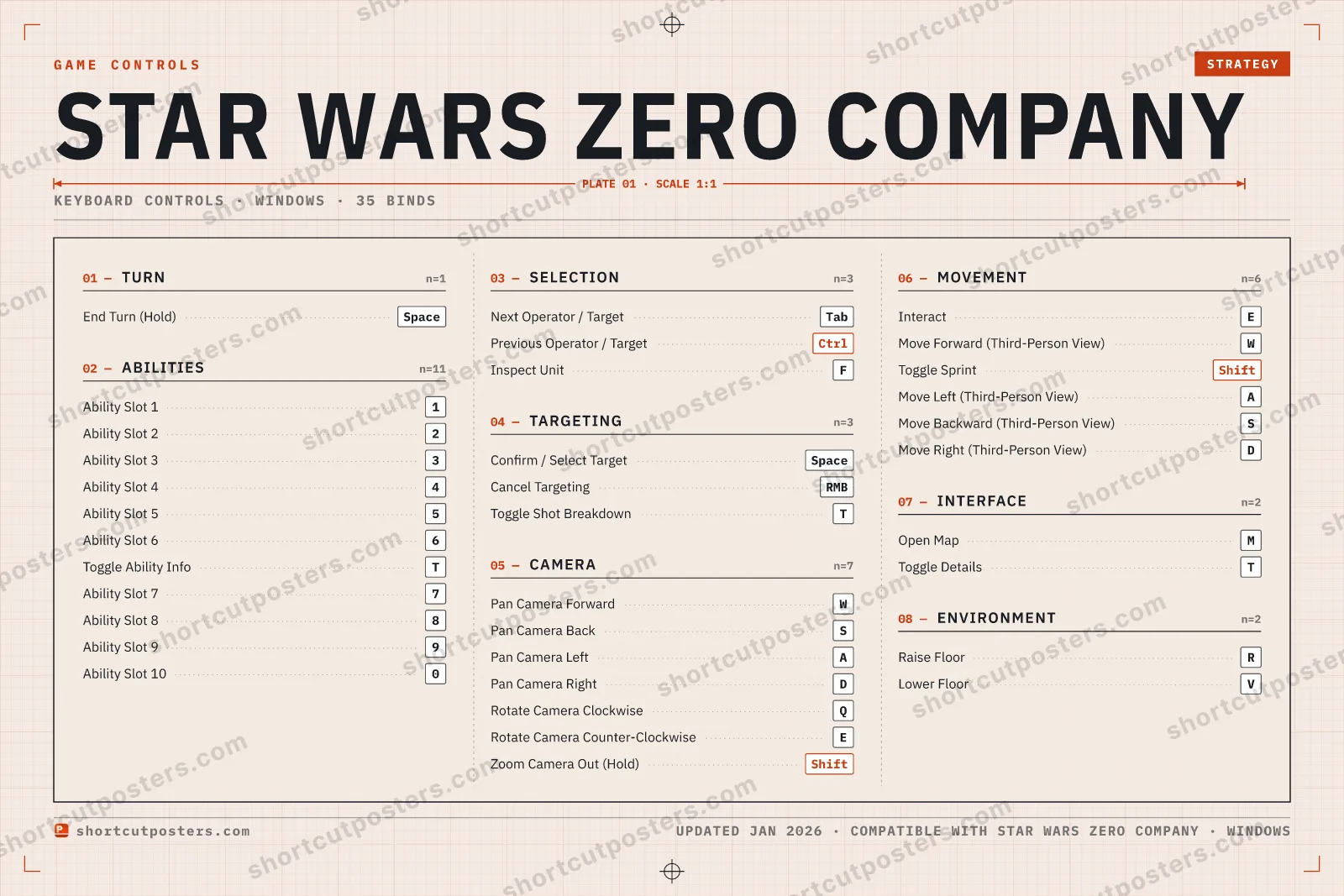
TURN01End Turn (Hold)SpaceSELECTION03Next Operator / TargetTabPrevious Operator / TargetCtrlInspect UnitFTARGETING03Confirm / Select TargetSpaceCancel TargetingRMBToggle Shot BreakdownTMOVEMENT06InteractEMove Forward (Third-Person View)WToggle SprintShiftMove Left (Third-Person View)AMove Backward (Third-Person View)SMove Right (Third-Person View)DINTERFACE02Open MapMToggle DetailsTABILITIES11Ability Slot 11Ability Slot 22Ability Slot 33Ability Slot 44Ability Slot 55Ability Slot 66Toggle Ability InfoTAbility Slot 77Ability Slot 88Ability Slot 99Ability Slot 100CAMERA07Pan Camera ForwardWPan Camera BackSPan Camera LeftAPan Camera RightDRotate Camera ClockwiseQRotate Camera Counter-ClockwiseEZoom Camera Out (Hold)ShiftENVIRONMENT02Raise FloorRLower FloorVGAME CONTROLSSTRATEGYSTAR WARS ZERO COMPANYKEYBOARD CONTROLS · WINDOWS · 35 BINDSshortcutposters.comUPDATED JAN 2026 · COMPATIBLE WITH STAR WARS ZERO COMPANY · WINDOWS

Free PNG is web-resolution & lightly watermarked.

Want it print-ready?

Framed-quality 300 DPI, no watermark — $2.99 (PC / keyboard edition). Drop your email and we'll send the checkout link.

Prefer email? Write to business@shortcutposters.com.

🎮 Controller / gamepad poster — coming soon.

All Star Wars Zero Company controls

Layout

36 default keybinds across 8 categories. Most can be reassigned in Star Wars Zero Company's control settings. Switch to Gamepad to see Xbox and PlayStation buttons side by side.

`
1
2
3
4
5
6
7
8
9
0
-
=
⌫ Back
Tab
Q
W
E
R
T
Y
U
I
O
P
[
]
\
Caps
A
S
D
F
G
H
J
K
L
;
'
Enter ⏎
Shift
Z
X
C
V
B
N
M
,
.
/
Shift
Ctrl
Win
Alt
Space
Alt
Win
Menu
Ctrl

Abilities 11

Action Shortcut
Ability Slot 1 1
Ability Slot 2 2
Ability Slot 3 3
Ability Slot 4 4
Ability Slot 5 5
Ability Slot 6 6
Toggle Ability Info T
Ability Slot 7 7
Ability Slot 8 8
Ability Slot 9 9
Ability Slot 10 0

Camera 7

Action Shortcut
Pan Camera Forward W
Pan Camera Back S
Pan Camera Left A
Pan Camera Right D
Rotate Camera Clockwise Q
Rotate Camera Counter-Clockwise E
Zoom Camera Out (Hold) Shift

Movement 6

Action Shortcut
Interact E
Move Forward (Third-Person View) W
Toggle Sprint Shift
Move Left (Third-Person View) A
Move Backward (Third-Person View) S
Move Right (Third-Person View) D

Selection 4

Action Shortcut
Next Operator / Target Tab
Previous Operator / Target Ctrl
Inspect Unit F
Abandon Selected Units

Targeting 3

Action Shortcut
Confirm / Select Target Space
Cancel Targeting RMB
Toggle Shot Breakdown T

Interface 2

Action Shortcut
Open Map M
Toggle Details T

Environment 2

Action Shortcut
Raise Floor R
Lower Floor V

Turn 1

Action Shortcut
End Turn (Hold) Space

Sourced from ea.com , ea.com , vulkk.com Last verified

Unofficial reference. ShortcutPosters is not affiliated with, endorsed by, or sponsored by Star Wars Zero Company. All product names, logos, and trademarks are property of their respective owners. See our licensing & trademark notice.

Star Wars Zero Company controls — FAQ

What are the default controls for Star Wars Zero Company?
Star Wars Zero Company, a strategy game, uses 36 default keybinds across 8 categories — on keyboard and controller. The complete, up-to-date list is free to read on this page.
Can you remap Star Wars Zero Company controls?
Yes. These are the game's default bindings — nearly all of them can be reassigned from Star Wars Zero Company's in-game control or key-binding settings.
Does Star Wars Zero Company support a controller?
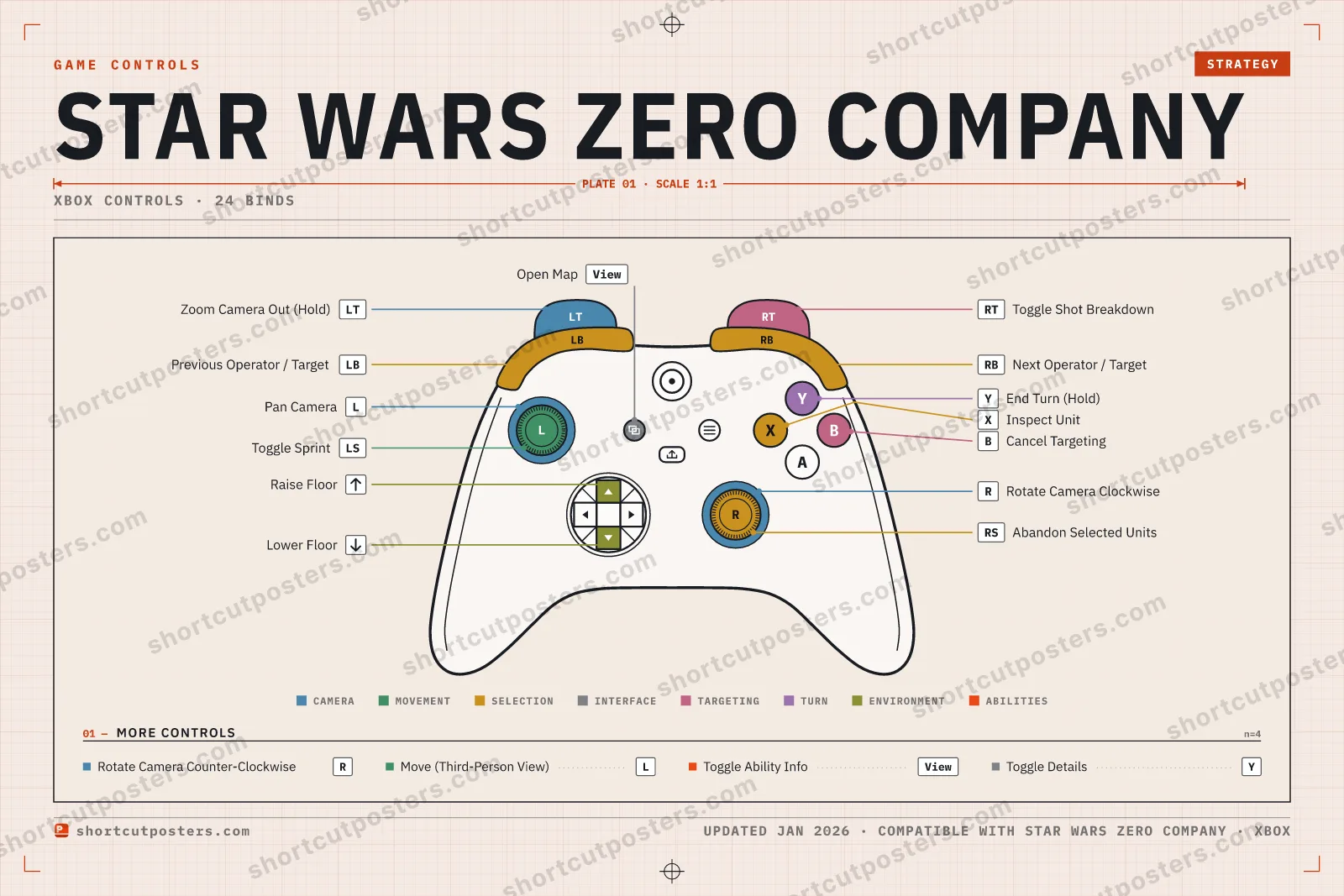
Yes — Star Wars Zero Company has full gamepad support. The Xbox, PlayStation and Steam Deck button maps are shown on this page alongside the keyboard controls.
Which platforms do these Star Wars Zero Company controls cover?
These keyboard controls apply on Windows. Most bindings are identical across platforms unless noted.
Is this an official Star Wars Zero Company resource?
No. This is an unofficial reference and is not affiliated with or endorsed by Star Wars Zero Company or its publisher. All trademarks belong to their respective owners.
Round 1🔥0⚡0Rookie

Press the key for the action shown.