SimCity Keyboard controls
- Windows · Mac
- 40 default keybinds
- Simulation →
SimCity (2013) is Maxis's online city-building simulation for PC and Mac, sold through EA/Origin rather than Steam. Its keyboard shortcuts drive the camera, the Turtle/Llama/Cheetah time controls, the zoning and road tools, and the data maps you lean on to keep a dense city running. The bindings below are the defaults printed in EA's own SimCity game manual; on Mac the manual's Ctrl combos map to Command and Alt maps to Option.
All SimCity keyboard controls
+ 3 more controls in the table below
+ 3 more controls in the table below
+ 3 more controls in the table below
+ 3 more controls in the table below
Tip Hover or tap a key to see what it does. Most of these 40 keybinds can be reassigned in SimCity's control settings.
40 shortcuts
Camera 10
| Action | Shortcut |
|---|---|
| Pan camera up | W |
| Pan camera down | S |
| Pan camera left | A |
| Pan camera right | D |
| Rotate camera left | Q |
| Rotate camera right | E |
| Zoom in | + |
| Zoom out | − |
| Tilt camera up | End |
| Tilt camera down | Home |
Road Tools 7
| Action | Shortcut |
|---|---|
| Straight road tool | I |
| Curvy road tool | U |
| Arc road tool | J |
| Circle road tool | O |
| Rectangle road tool | H |
| Constrain road type | Shift |
| Toggle road grid on/off | Alt |
Tools 6
| Action | Shortcut |
|---|---|
| Residential zoning tool | CtrlR |
| Commercial zoning tool | CtrlC |
| Industrial zoning tool | CtrlI |
| Bulldoze tool | B |
| Unzoning tool | CtrlU |
| Upgrade road tool | R |
Menus 6
| Action | Shortcut |
|---|---|
| Roads menu | ShiftR |
| Power menu | ShiftP |
| Water menu | ShiftW |
| Mass Transit menu | ShiftT |
| Disasters menu | ShiftX |
| Next menu or submenu | Tab |
Time 4
| Action | Shortcut |
|---|---|
| Pause simulation | ` |
| Turtle (slowest speed) | 1 |
| Llama (normal speed) | 2 |
| Cheetah (fastest speed) | 3 |
Data & Info 4
| Action | Shortcut |
|---|---|
| Budget information | F3 |
| Population information | F2 |
| Land Value data map | F7 |
| Cycle through data maps | / |
General 3
| Action | Shortcut |
|---|---|
| Options menu / back out | Esc |
| Screen capture | C |
| Enter / exit region view | Bksp |
Sourced from eaassets-a.akamaihd.net Last verified
40 shortcuts
Camera 10
| Action | Shortcut |
|---|---|
| Pan camera up | W |
| Pan camera down | S |
| Pan camera left | A |
| Pan camera right | D |
| Rotate camera left | Q |
| Rotate camera right | E |
| Zoom in | + |
| Zoom out | − |
| Tilt camera up | ↘ |
| Tilt camera down | ↖ |
Road Tools 7
| Action | Shortcut |
|---|---|
| Straight road tool | I |
| Curvy road tool | U |
| Arc road tool | J |
| Circle road tool | O |
| Rectangle road tool | H |
| Constrain road type | ⇧ |
| Toggle road grid on/off | ⌥ |
Tools 6
| Action | Shortcut |
|---|---|
| Residential zoning tool | ⌘R |
| Commercial zoning tool | ⌘C |
| Industrial zoning tool | ⌘I |
| Bulldoze tool | B |
| Unzoning tool | ⌘U |
| Upgrade road tool | R |
Menus 6
| Action | Shortcut |
|---|---|
| Roads menu | ⇧R |
| Power menu | ⇧P |
| Water menu | ⇧W |
| Mass Transit menu | ⇧T |
| Disasters menu | ⇧X |
| Next menu or submenu | ⇥ |
Time 4
| Action | Shortcut |
|---|---|
| Pause simulation | ` |
| Turtle (slowest speed) | 1 |
| Llama (normal speed) | 2 |
| Cheetah (fastest speed) | 3 |
Data & Info 4
| Action | Shortcut |
|---|---|
| Budget information | F3 |
| Population information | F2 |
| Land Value data map | F7 |
| Cycle through data maps | / |
General 3
| Action | Shortcut |
|---|---|
| Options menu / back out | ⎋ |
| Screen capture | C |
| Enter / exit region view | ⌫ |
Sourced from eaassets-a.akamaihd.net Last verified
Unofficial reference. ShortcutPosters is not affiliated with, endorsed by, or sponsored by SimCity. All product names, logos, and trademarks are property of their respective owners. See our licensing & trademark notice.
Shown at scaleNo watermark on your file
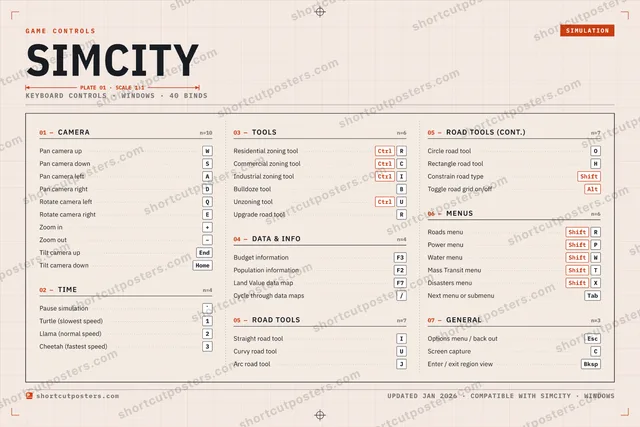
SimCity, on your wall.
Print-ready 36×24″ at 300 DPI, for your printer or any print shop.Free preview: 1600 px, watermarked.
No watermark on what you buy. It only protects this preview.
- The keyboard poster
- 10 800 px at 300 DPI, up to 91×61 cm
- PNG + print-ready PDF, instant download
SimCity controls poster
SimCity controls — FAQ
- What are the default controls for SimCity?
- SimCity, a simulation game, uses 40 default keybinds across 7 categories. The complete, up-to-date list is free to read on this page.
- Can you remap SimCity controls?
- Yes. These are the game's default bindings — nearly all of them can be reassigned from SimCity's in-game control or key-binding settings.
- Which platforms do these SimCity controls cover?
- These keyboard controls apply on Windows and Mac. Most bindings are identical across platforms unless noted.
- Is this an official SimCity resource?
- No. This is an unofficial reference and is not affiliated with or endorsed by SimCity or its publisher. All trademarks belong to their respective owners.
Thanks — your feedback helps us improve.