Rising Storm 2: Vietnam Keyboard controls
- Windows
- 63 default keybinds
- Shooter →
- Red Orchestra collection →
Cover art © its publisher — for identification only. Cover © its publisher. Details
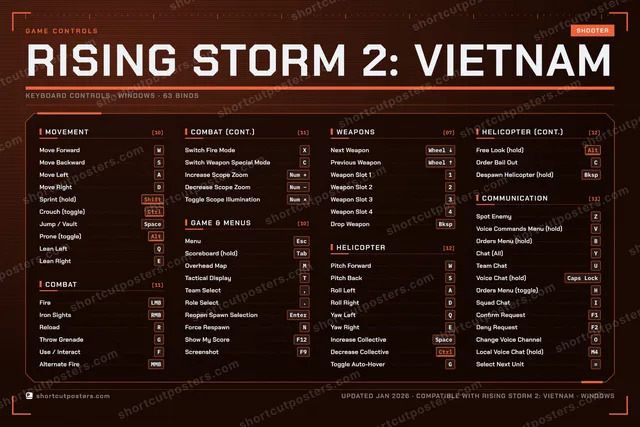
Rising Storm 2: Vietnam is the Antimatter Games and Tripwire Interactive follow-up to Red Orchestra 2, a large-scale Unreal Engine 3 shooter that moves the series to Vietnam and adds flyable helicopters. The keys below are the game's own default scheme from its shipped input config, which changed several Red Orchestra 2 habits: crouch moved to Ctrl, interact to F, and fire mode to X, while W, A, S, D, Q, E, Space and Ctrl double as the helicopter pitch, roll, yaw and collective controls.
All Rising Storm 2: Vietnam keyboard controls
+ 4 more controls in the table below
+ 4 more controls in the table below
Tip Hover or tap a key to see what it does. Most of these 63 keybinds can be reassigned in Rising Storm 2: Vietnam's control settings.
63 shortcuts
Communication 13
| Action | Shortcut |
|---|---|
| Spot Enemy | Z |
| Voice Commands Menu (hold) | V |
| Orders Menu (hold) | B |
| Chat (All) | Y |
| Team Chat | U |
| Voice Chat (hold) | Caps Lock |
| Orders Menu (toggle) | H |
| Squad Chat | I |
| Confirm Request | F1 |
| Deny Request | F2 |
| Change Voice Channel | O |
| Local Voice Chat (hold) | M4 |
| Select Next Unit | = |
Helicopter 12
| Action | Shortcut |
|---|---|
| Pitch Forward | W |
| Pitch Back | S |
| Roll Left | A |
| Roll Right | D |
| Yaw Left | Q |
| Yaw Right | E |
| Increase Collective | Space |
| Decrease Collective | Ctrl |
| Toggle Auto-Hover | G |
| Free Look (hold) | Alt |
| Order Bail Out | C |
| Despawn Helicopter (hold) | Bksp |
Combat 11
| Action | Shortcut |
|---|---|
| Fire | LMB |
| Iron Sights | RMB |
| Reload | R |
| Throw Grenade | G |
| Use / Interact | F |
| Alternate Fire | MMB |
| Switch Fire Mode | X |
| Switch Weapon Special Mode | C |
| Increase Scope Zoom | Num + |
| Decrease Scope Zoom | Num − |
| Toggle Scope Illumination | Num × |
Movement 10
| Action | Shortcut |
|---|---|
| Move Forward | W |
| Move Backward | S |
| Move Left | A |
| Move Right | D |
| Sprint (hold) | Shift |
| Crouch (toggle) | Ctrl |
| Jump / Vault | Space |
| Prone (toggle) | Alt |
| Lean Left | Q |
| Lean Right | E |
Game & Menus 10
| Action | Shortcut |
|---|---|
| Menu | Esc |
| Scoreboard (hold) | Tab |
| Overhead Map | M |
| Tactical Display | T |
| Team Select | , |
| Role Select | . |
| Reopen Spawn Selection | Enter |
| Force Respawn | N |
| Show My Score | F12 |
| Screenshot | F9 |
Weapons 7
| Action | Shortcut |
|---|---|
| Next Weapon | Wheel ↓ |
| Previous Weapon | Wheel ↑ |
| Weapon Slot 1 | 1 |
| Weapon Slot 2 | 2 |
| Weapon Slot 3 | 3 |
| Weapon Slot 4 | 4 |
| Drop Weapon | Bksp |
Sourced from steamdb.info, store.steampowered.com Last verified
Unofficial reference. ShortcutPosters is not affiliated with, endorsed by, or sponsored by Rising Storm 2: Vietnam. All product names, logos, and trademarks are property of their respective owners. See our licensing & trademark notice.
Shown at scaleNo watermark on your file
Rising Storm 2: Vietnam, on your wall.
Print-ready 36×24″ at 300 DPI, for your printer or any print shop.Free preview: 1600 px, watermarked.
No watermark on what you buy. It only protects this preview.
- The keyboard poster
- 10 800 px at 300 DPI, up to 91×61 cm
- PNG + print-ready PDF, instant download
Rising Storm 2: Vietnam controls poster
Rising Storm 2: Vietnam controls — FAQ
- What are the default controls for Rising Storm 2: Vietnam?
- Rising Storm 2: Vietnam, a shooter game, uses 63 default keybinds across 6 categories. The complete, up-to-date list is free to read on this page.
- Can you remap Rising Storm 2: Vietnam controls?
- Yes. These are the game's default bindings — nearly all of them can be reassigned from Rising Storm 2: Vietnam's in-game control or key-binding settings.
- Which platforms do these Rising Storm 2: Vietnam controls cover?
- These keyboard controls apply on Windows. Most bindings are identical across platforms unless noted.
- Is this an official Rising Storm 2: Vietnam resource?
- No. This is an unofficial reference and is not affiliated with or endorsed by Rising Storm 2: Vietnam or its publisher. All trademarks belong to their respective owners.
Thanks — your feedback helps us improve.
Red Orchestra collection
2 Red Orchestra games in the catalogue, every control scheme free to read.
See all 2 Red Orchestra games →