Pokémon UNITE is a 5-on-5 team MOBA set on Aeos Island, where you level up a Pokémon, battle for Aeos Energy, and race to score goals before the clock runs out. On Nintendo Switch every action is a gamepad input: the left stick moves, the right stick aims, and the face buttons and triggers fire your attacks, moves, and Unite Move.
All Pokémon UNITE controls
Combat 5
| Action | Switch |
|---|---|
| Basic Attack | A |
| Special Move 1 | R |
| Special Move 2 | ZR |
| Unite Move | ZL |
| Cancel Move | B |
Objectives 3
| Action | Switch |
|---|---|
| Score Goal | X |
| Use Battle Item | Y |
| Warp to Start / Recall | D-Pad ↓ |
Interface 3
| Action | Switch |
|---|---|
| View Arena / Pan Camera | L |
| Quick Chat | D-Pad ↑ |
| Toggle Minimap | − |
Movement 2
| Action | Switch |
|---|---|
| Move | L-Stick |
| Aim Move / Target | R-Stick |
Progression 2
| Action | Switch |
|---|---|
| Select Move (left option) | D-Pad ← |
| Select Move (right option) | D-Pad → |
System 1
| Action | Switch |
|---|---|
| Open Menu | + |
Sourced from game8.co Last verified
Unofficial reference. ShortcutPosters is not affiliated with, endorsed by, or sponsored by Pokémon UNITE. All product names, logos, and trademarks are property of their respective owners. See our licensing & trademark notice.
Shown at scaleNo watermark on your file
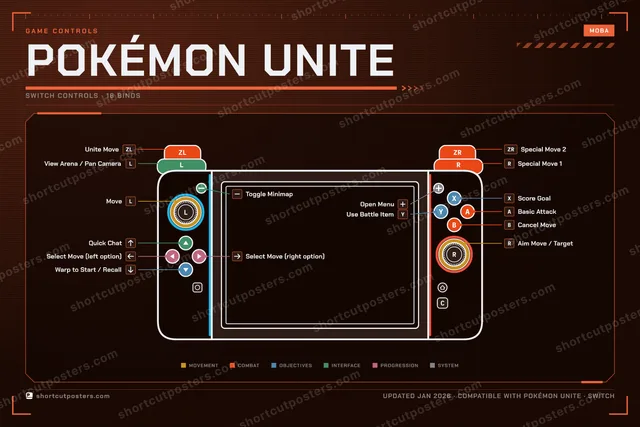
Pokémon UNITE, on your wall.
Print-ready 36×24″ at 300 DPI, for your printer or any print shop.Free preview: 1600 px, watermarked.
No watermark on what you buy. It only protects this preview.
- The Switch controller poster
- 10 800 px at 300 DPI, up to 91×61 cm
- PNG + print-ready PDF, instant download
Pokémon UNITE controls poster
Pokémon UNITE controls — FAQ
- What are the default controls for Pokémon UNITE?
- Pokémon UNITE, a moba game, maps 16 actions to the Nintendo Switch controller. The complete button layout is shown on this page, free to read.
- What buttons do you use in Pokémon UNITE?
- Every Pokémon UNITE action is mapped to its Nintendo Switch button on this page — face buttons, triggers, sticks and the d-pad — so you can see the whole control scheme at a glance.
- Can you remap Pokémon UNITE controls?
- These are the game's default bindings. Remapping depends on the title and the Nintendo Switch's system button-mapping options.
- Is this an official Pokémon UNITE resource?
- No. This is an unofficial reference and is not affiliated with or endorsed by Pokémon UNITE or its publisher. All trademarks belong to their respective owners.
Thanks — your feedback helps us improve.