NBA 2K27 Keyboard & controller controls
- Windows
- 38 default keybinds
- ✓ Steam Deck ready
- Sports →
Cover art © its publisher — for identification only. Cover © its publisher. Details
NBA 2K27 is Visual Concepts' annual NBA sim, built around ProPLAY-driven Pro Stick shooting, dribbling, and reworked physical defense. It's designed first for a dual-analog gamepad, and 2K's own manual maps that Xbox controller layout onto a numpad-based PC keyboard scheme button-for-button.
All NBA 2K27 controls
+ 5 more controls in the table below
+ 5 more controls in the table below
Tip Hover or tap a key to see what it does. Most of these 38 keybinds can be reassigned in NBA 2K27's control settings.
28 shortcuts
Defense 8
| Action | Shortcut |
|---|---|
| Steal (press) / Intentional Foul (hold) | Num 5 |
| Block / Rebound | Num 3 |
| Intense Defense / Ball Denial | Shift |
| Defensive Adjustments / Double Team | Tab |
| Player Swap (closest to ball) | Space |
| Take Charge (hold) | Num 1 |
| Icon Swap | Num + |
| Fast Shuffle | ShiftNum Enter |
Offense - Scoring 3
| Action | Shortcut |
|---|---|
| Shoot (press) / Pump Fake (tap) / Spin Gather (double tap) | Num 5 |
| Post-Up | Shift |
| Putback Dunk / Layup (hold) | Num 5 |
Offense - Passing 7
| Action | Shortcut |
|---|---|
| Pass / Skip Pass (hold) | Space |
| Bounce Pass (tap) / Handoff Pass (hold) | Num 1 |
| Lob Pass (tap) / Alley-Oop (double tap) | Num 3 |
| Icon Pass | Num + |
| Pick Control (Roll vs. Fade) | Tab |
| Fake Pass | Num 3Num 1 |
| Jump Pass | SpaceNum 5 |
Menus & HUD 6
| Action | Shortcut |
|---|---|
| Gameplay HUD | ↑ |
| Offensive Game Plan | → |
| Defensive Game Plan | → |
| OTFC Offense Strategy | ← |
| OTFC Defensive Sets | ← |
| OTFC Substitutions | ↓ |
Core Controls 4
| Action | Shortcut |
|---|---|
| Move Player | WthenAthenSthenD |
| Sprint | Num Enter |
| Pause Menu | Esc |
| Call Timeout | PgUp |
Sourced from assets.2k.com, 2k.com, nba.2k.com, store.steampowered.com Last verified Shortcuts last changed
Tip Hover or tap a button to see what it does; the switch above changes the controller.
38 shortcuts
Defense 11
| Action | XboxPlayStationSwitchSteam Deck |
|---|---|
| Hands Up (On-Ball Defense) | R-Stick |
| Steal (press) / Intentional Foul (hold) | X■XY |
| Block / Rebound | Y▲YX |
| Intense Defense / Ball Denial | LTL2L2ZL |
| Defensive Adjustments / Double Team | LBL1L1L |
| Player Swap (closest to ball) | A✕AB |
| Take Charge (hold) | B●BA |
| Icon Swap | RBR1R1R |
| Cutoff Move | LTL2L2ZLR-Stick |
| Fast Shuffle | LTL2L2ZLRTR2R2ZR |
| Deny Ball (Off-Ball Defense) | R-Stick |
Offense - Scoring 9
| Action | XboxPlayStationSwitchSteam Deck |
|---|---|
| Shoot (press) / Pump Fake (tap) / Spin Gather (double tap) | X■XY |
| Jump Shot (Pro Stick) | R-Stick |
| Rhythm Shooting | R-Stick |
| Post-Up | LTL2L2ZL |
| Go-To Shot | R-Stick |
| Putback Dunk / Layup (hold) | X■XY |
| 2-Hand Dunk (driving) | RTR2R2ZRR-Stick |
| Euro Step Layup | R-Stick |
| Step-Through Up-and-Under | R-Stick |
Offense - Passing 7
| Action | XboxPlayStationSwitchSteam Deck |
|---|---|
| Pass / Skip Pass (hold) | A✕AB |
| Bounce Pass (tap) / Handoff Pass (hold) | B●BA |
| Lob Pass (tap) / Alley-Oop (double tap) | Y▲YX |
| Icon Pass | RBR1R1R |
| Pick Control (Roll vs. Fade) | LBL1L1L |
| Fake Pass | Y▲YXB●BA |
| Jump Pass | A✕ABX■XY |
Menus & HUD 6
| Action | XboxPlayStationSwitchSteam Deck |
|---|---|
| Gameplay HUD | D-Pad ↑ |
| Offensive Game Plan | D-Pad → |
| Defensive Game Plan | D-Pad → |
| OTFC Offense Strategy | D-Pad ← |
| OTFC Defensive Sets | D-Pad ← |
| OTFC Substitutions | D-Pad ↓ |
Core Controls 5
| Action | XboxPlayStationSwitchSteam Deck |
|---|---|
| Move Player | L-Stick |
| Sprint | RTR2R2ZR |
| Pro Stick (Shoot / Dribble / Pass) | R-Stick |
| Pause Menu | MenuOptionsMenu+ |
| Call Timeout | ViewShareView− |
Sourced from assets.2k.com, 2k.com, nba.2k.com, store.steampowered.com Last verified Shortcuts last changed
Unofficial reference. ShortcutPosters is not affiliated with, endorsed by, or sponsored by NBA 2K27. All product names, logos, and trademarks are property of their respective owners. See our licensing & trademark notice.
Shown at scaleNo watermark on your file
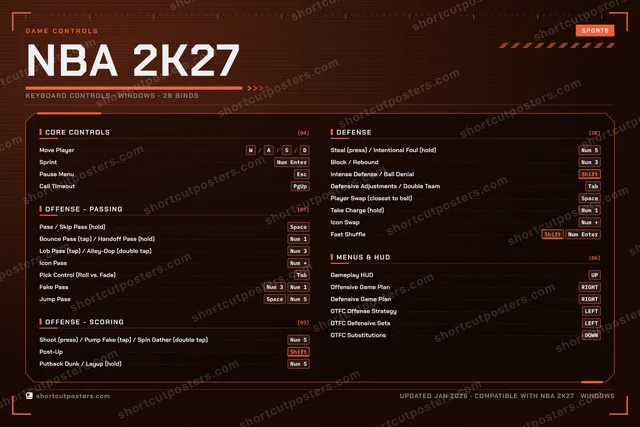
NBA 2K27, on your wall.
A file to print yourself, or printed and shipped to your door.Printed and shipped to your door.
No watermark on what you buy. It only protects this preview.
- The keyboard poster and the Xbox, PlayStation, Switch and Steam Deck controller posters
- 10 800 px at 300 DPI, up to 91×61 cm
- PNG + print-ready PDF, instant download
NBA 2K27 · Print-ready file
instant download
Get the fileNBA 2K27 controls poster
NBA 2K27 controls — FAQ
- What are the default controls for NBA 2K27?
- NBA 2K27, a sports game, uses 38 default keybinds across 5 categories — on keyboard and controller. The complete, up-to-date list is free to read on this page.
- Can you remap NBA 2K27 controls?
- Yes. These are the game's default bindings — nearly all of them can be reassigned from NBA 2K27's in-game control or key-binding settings.
- Does NBA 2K27 support a controller?
- Yes — NBA 2K27 has full gamepad support. The Xbox, PlayStation, Switch and Steam Deck button maps are shown on this page alongside the keyboard controls.
- Which platforms do these NBA 2K27 controls cover?
- These keyboard controls apply on Windows. NBA 2K27 also released on Xbox, PlayStation and Switch, and this page carries those controller bindings too. Most bindings are identical across platforms unless noted.
- Is this an official NBA 2K27 resource?
- No. This is an unofficial reference and is not affiliated with or endorsed by NBA 2K27 or its publisher. All trademarks belong to their respective owners.
Thanks — your feedback helps us improve.