
METAL GEAR SOLID: Peace Walker - Master Collection Version Keyboard & controller controls
- Windows
- 23 default keybinds
- ✓ Steam Deck ready
- Action →
- Metal Gear collection →
Cover art © its publisher — for identification only. Cover © its publisher. Details
Konami's Master Collection release of Peace Walker, the 1974-set chapter in which Big Boss builds Militaires Sans Frontières into a private army and runs missions solo or in four-player CO-OPS. On keyboard and mouse it plays as an over-the-shoulder shooter: WASD to run with Left Shift to walk, right click to raise a weapon and left click to fire or use CQC, Space to change stance, E for context actions, and 1 and 2 for the equipment and weapon windows. Gamepad bindings follow the manual's default Shooter Type layout.
All METAL GEAR SOLID: Peace Walker - Master Collection Version controls
+ 1 more control in the table below
+ 1 more control in the table below
Tip Hover or tap a key to see what it does. Most of these 23 keybinds can be reassigned in METAL GEAR SOLID: Peace Walker - Master Collection Version's control settings.
Movement 7
| Action | Shortcut |
|---|---|
| Move Forward (run) | W |
| Move Backward (run) | S |
| Move Left (run) | A |
| Move Right (run) | D |
| Change Stance (hold to lie down) | Space |
| Walk (hold with WASD; tilt the stick slightly on a pad) | Shift |
| Roll Forward (while running) | Space |
Combat 5
| Action | Shortcut |
|---|---|
| Aim Weapon (hold) | RMB |
| Use Weapon / CQC when unarmed | LMB |
| Reload | R |
| Grab and Choke (hold near an enemy without moving) | LMB |
| Auto Aim Switch | Esc |
Camera 3
| Action | Shortcut |
|---|---|
| Control Camera / Aim | Mouse |
| Reset Camera | MMB |
| Change Scope Zoom (while scoped; D-pad left/right on a pad) | Wheel |
Actions 3
| Action | Shortcut |
|---|---|
| Action (context: climb, hang, body search, interrogate) | E |
| Press Against Wall (hold near a wall) | E |
| Knock on Wall (while pressed against it) | LMB |
Inventory 2
| Action | Shortcut |
|---|---|
| Show Equipment Window (hold) / Quick-Change Equipment (tap) | 1 |
| Show Weapon Window (hold) / Quick-Change Weapon (tap) | 2 |
System 2
| Action | Shortcut |
|---|---|
| Display Menu Window | Tab |
| Codec Call | Q |
Co-op 1
| Action | Shortcut |
|---|---|
| CO-OPS Communications | Z |
Sourced from metalgear.konami.net Last verified
Tip Hover or tap a button to see what it does; the switch above changes the controller.
Movement 7
| Action | XboxPlayStationSwitchSteam Deck |
|---|---|
| Move Forward (run) | L-Stick |
| Move Backward (run) | L-Stick |
| Move Left (run) | L-Stick |
| Move Right (run) | L-Stick |
| Change Stance (hold to lie down) | A✕AB |
| Walk (hold with WASD; tilt the stick slightly on a pad) | L-Stick |
| Roll Forward (while running) | A✕AB |
Combat 5
| Action | XboxPlayStationSwitchSteam Deck |
|---|---|
| Aim Weapon (hold) | LTL2L2ZL |
| Use Weapon / CQC when unarmed | RTR2R2ZR |
| Reload | B●BA |
| Grab and Choke (hold near an enemy without moving) | RTR2R2ZR |
| Auto Aim Switch | X■XY |
Camera 2
| Action | XboxPlayStationSwitchSteam Deck |
|---|---|
| Control Camera / Aim | R-Stick |
| Reset Camera | RSR3R3RS |
Actions 3
| Action | XboxPlayStationSwitchSteam Deck |
|---|---|
| Action (context: climb, hang, body search, interrogate) | Y▲YX |
| Press Against Wall (hold near a wall) | Y▲YX |
| Knock on Wall (while pressed against it) | RTR2R2ZR |
Inventory 2
| Action | XboxPlayStationSwitchSteam Deck |
|---|---|
| Show Equipment Window (hold) / Quick-Change Equipment (tap) | LBL1L1L |
| Show Weapon Window (hold) / Quick-Change Weapon (tap) | RBR1R1R |
System 2
| Action | XboxPlayStationSwitchSteam Deck |
|---|---|
| Display Menu Window | MenuOptionsMenu+ |
| Codec Call | ViewShareView− |
Sourced from metalgear.konami.net Last verified
Unofficial reference. ShortcutPosters is not affiliated with, endorsed by, or sponsored by METAL GEAR SOLID: Peace Walker - Master Collection Version. All product names, logos, and trademarks are property of their respective owners. See our licensing & trademark notice.
Shown at scaleNo watermark on your file
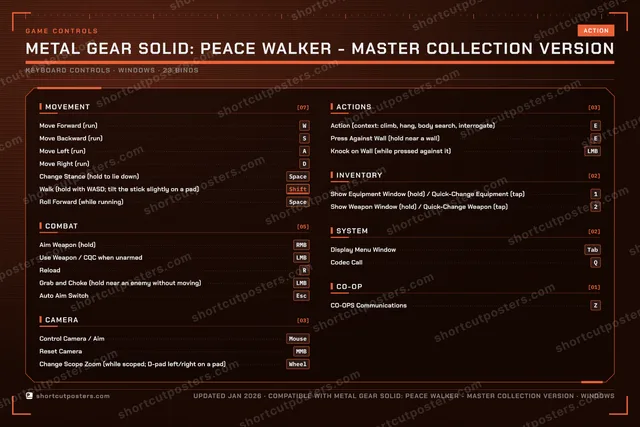
METAL GEAR SOLID: Peace Walker - Master Collection Version, on your wall.
Print-ready 36×24″ at 300 DPI, for your printer or any print shop.Free preview: 1600 px, watermarked.
No watermark on what you buy. It only protects this preview.
- The keyboard poster and the Xbox, PlayStation, Switch and Steam Deck controller posters
- 10 800 px at 300 DPI, up to 91×61 cm
- PNG + print-ready PDF, instant download
METAL GEAR SOLID: Peace Walker - Master Collection Version controls poster
METAL GEAR SOLID: Peace Walker - Master Collection Version controls — FAQ
- What are the default controls for METAL GEAR SOLID: Peace Walker - Master Collection Version?
- METAL GEAR SOLID: Peace Walker - Master Collection Version, a action game, uses 23 default keybinds across 7 categories — on keyboard and controller. The complete, up-to-date list is free to read on this page.
- Can you remap METAL GEAR SOLID: Peace Walker - Master Collection Version controls?
- Yes. These are the game's default bindings — nearly all of them can be reassigned from METAL GEAR SOLID: Peace Walker - Master Collection Version's in-game control or key-binding settings.
- Does METAL GEAR SOLID: Peace Walker - Master Collection Version support a controller?
- Yes — METAL GEAR SOLID: Peace Walker - Master Collection Version has full gamepad support. The Xbox, PlayStation, Switch and Steam Deck button maps are shown on this page alongside the keyboard controls.
- Which platforms do these METAL GEAR SOLID: Peace Walker - Master Collection Version controls cover?
- These keyboard controls apply on Windows. METAL GEAR SOLID: Peace Walker - Master Collection Version also released on Xbox, PlayStation and Switch, and this page carries those controller bindings too. Most bindings are identical across platforms unless noted.
- Is this an official METAL GEAR SOLID: Peace Walker - Master Collection Version resource?
- No. This is an unofficial reference and is not affiliated with or endorsed by METAL GEAR SOLID: Peace Walker - Master Collection Version or its publisher. All trademarks belong to their respective owners.
Thanks — your feedback helps us improve.
Metal Gear collection
8 Metal Gear games in the catalogue, every control scheme free to read.
-

 METAL GEAR SOLID V: The Phantom Pain Keyboard + Gamepad
-

 Metal Gear Solid Delta: Snake Eater Keyboard + Gamepad
-
 Metal Gear Rising: Revengeance Keyboard
-
 METAL GEAR SOLID 4: Guns of the Patriots - Master Collection Version Keyboard + Gamepad
-

 Metal Gear Solid (Master Collection Version) Keyboard + Gamepad
-
 METAL GEAR SURVIVE Keyboard + Gamepad