Lightyear Frontier Keyboard & controller controls
- Windows
- 15 unconfirmed controls
- ✓ Steam Deck ready
- Simulation →
Cover art © its publisher — for identification only. Cover © its publisher. Details
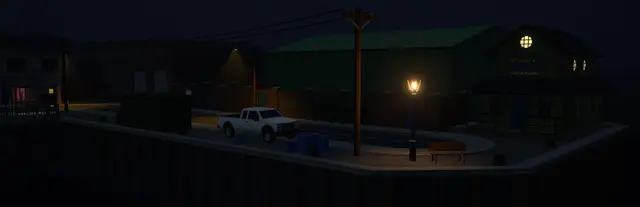
Lightyear Frontier is an open-world mech farming adventure from FRAME BREAK, where you grow crops and explore an alien planet from the cockpit of a customizable mech. These default keyboard, mouse, and Xbox controller bindings cover movement, piloting the mech, tool actions, and building.
All Lightyear Frontier controls
+ 1 more control in the table below
+ 1 more control in the table below
Tip Hover or tap a key to see what it does. Most of these 15 keybinds can be reassigned in Lightyear Frontier's control settings.
Movement 6
| Action | Shortcut |
|---|---|
| Move Forward | W |
| Move Back | S |
| Move Left | A |
| Move Right | D |
| Sprint | Shift |
| Jump | Space |
Mech & Tools 6
| Action | Shortcut |
|---|---|
| Tool Action (Primary) | LMB |
| Tool Action (Secondary) | RMB |
| Tool Wheel | Q |
| Mech Modes | Ctrl |
| Build Mode | B |
| Flashlight | F |
Camera & View 2
| Action | Shortcut |
|---|---|
| Look Around | Mouse |
| Change Camera | Wheel |
Interaction 1
| Action | Shortcut |
|---|---|
| Interact | E |
Sourced from magicgameworld.com, store.steampowered.com Last verified
Tip Hover or tap a button to see what it does; the switch above changes the controller.
Movement 6
| Action | XboxSteam Deck |
|---|---|
| Move Forward | L-Stick |
| Move Back | L-Stick |
| Move Left | L-Stick |
| Move Right | L-Stick |
| Sprint | LSL3 |
| Jump | AA |
Mech & Tools 6
| Action | XboxSteam Deck |
|---|---|
| Tool Action (Primary) | RTR2 |
| Tool Action (Secondary) | LTL2 |
| Tool Wheel | LBL1 |
| Mech Modes | RBR1 |
| Build Mode | BB |
| Flashlight | RSR3 |
Camera & View 2
| Action | XboxSteam Deck |
|---|---|
| Look Around | R-Stick |
| Change Camera | D-Pad ↑ |
Interaction 1
| Action | XboxSteam Deck |
|---|---|
| Interact | XX |
Sourced from magicgameworld.com, store.steampowered.com Last verified
Unofficial reference. ShortcutPosters is not affiliated with, endorsed by, or sponsored by Lightyear Frontier. All product names, logos, and trademarks are property of their respective owners. See our licensing & trademark notice.
Shown at scaleNo watermark on your file
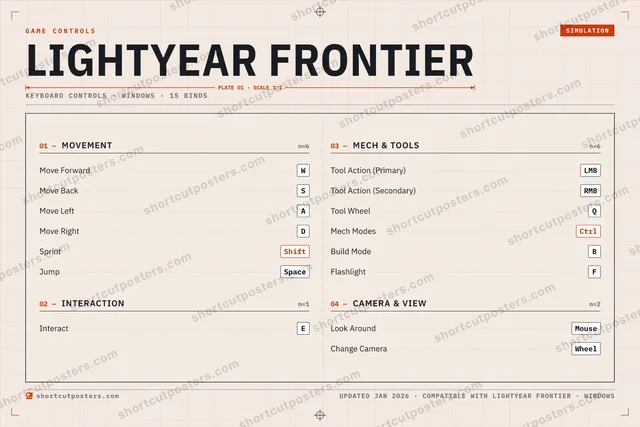
Lightyear Frontier, on your wall.
Print-ready 36×24″ at 300 DPI, for your printer or any print shop.Free preview: 1600 px, watermarked.
No watermark on what you buy. It only protects this preview.
- The keyboard poster and the Xbox and Steam Deck controller posters
- 10 800 px at 300 DPI, up to 91×61 cm
- PNG + print-ready PDF, instant download
Lightyear Frontier controls poster
Lightyear Frontier controls — FAQ
- What are the default controls for Lightyear Frontier?
- Lightyear Frontier, a simulation game, uses 15 default keybinds across 4 categories — on keyboard and controller. The complete, up-to-date list is free to read on this page.
- Can you remap Lightyear Frontier controls?
- Yes. These are the game's default bindings — nearly all of them can be reassigned from Lightyear Frontier's in-game control or key-binding settings.
- Does Lightyear Frontier support a controller?
- Yes — Lightyear Frontier has full gamepad support. The Xbox and Steam Deck button maps are shown on this page alongside the keyboard controls.
- Which platforms do these Lightyear Frontier controls cover?
- These keyboard controls apply on Windows. Lightyear Frontier also released on Xbox, and this page carries those controller bindings too. Most bindings are identical across platforms unless noted.
- Is this an official Lightyear Frontier resource?
- No. This is an unofficial reference and is not affiliated with or endorsed by Lightyear Frontier or its publisher. All trademarks belong to their respective owners.
Thanks — your feedback helps us improve.