LEGO Batman: Legacy of the Dark Knight Xbox controls
- Xbox · PlayStation · Nintendo Switch 2
- 28 unconfirmed controls
- Action →
Cover art © its publisher — for identification only. Cover © its publisher. Details
LEGO Batman: Legacy of the Dark Knight is TT Games' open-world LEGO take on Bruce Wayne's career in Gotham City, with Arkham-style counter combat, gadgets and a garage of Batmobiles. This page covers the default controller layout on foot and behind the wheel: jumping and gliding, attacks, counters and takedowns, the gadget and partner swaps on the D-pad, and the vehicle controls. On PlayStation the map opens from the touchpad. Keyboard bindings are not covered yet.
All LEGO Batman: Legacy of the Dark Knight controls
Tip Hover or tap a button to see what it does; the switch above changes the controller.
28 shortcuts
Vehicles 10
| Action | XboxPlayStationSwitchSteam Deck |
|---|---|
| Steer Vehicle | L-Stick |
| Accelerate (Hold) | RTR2R2ZR |
| Brake (Hold) | LTL2L2ZL |
| Boost | X■XY |
| Exit Vehicle | B●BA |
| Rockets | Y▲YX |
| Accelerate, Alternate (Hold) | A✕AB |
| Vehicle Camera View | D-Pad ← |
| Power Winch (Once Unlocked) | LBL1L1L |
| Horn / Siren | LSL3L3LS |
Movement 6
| Action | XboxPlayStationSwitchSteam Deck |
|---|---|
| Move Character | L-Stick |
| Jump / Glide (in air) | A✕AB |
| Move Camera | R-Stick |
| Dodge / Drop from Ledge | B●BA |
| Sprint | LSL3L3LS |
| Grapple | LBL1L1L |
Gadgets 5
| Action | XboxPlayStationSwitchSteam Deck |
|---|---|
| Throw / Use Gadget | RTR2R2ZR |
| Aim Gadget | LTL2L2ZL |
| Select Primary Gadget | D-Pad ← |
| Select Secondary Gadget | D-Pad → |
| Detect | RSR3R3RS |
Combat 3
| Action | XboxPlayStationSwitchSteam Deck |
|---|---|
| Basic Attack | X■XY |
| Counterattack / Interact | Y▲YX |
| Takedown | RBR1R1R |
Characters 2
| Action | XboxPlayStationSwitchSteam Deck |
|---|---|
| Switch to Partner (Hold: Character Menu) | D-Pad ↓ |
| Spawn Vehicle (Hold: Choose Vehicle) | D-Pad ↑ |
Menus 2
| Action | XboxPlayStationSwitchSteam Deck |
|---|---|
| Map / Status Screen | ViewShareView− |
| Pause Menu | MenuOptionsMenu+ |
Sourced from gamefaqs.gamespot.com Last verified
Unofficial reference. ShortcutPosters is not affiliated with, endorsed by, or sponsored by LEGO Batman: Legacy of the Dark Knight. All product names, logos, and trademarks are property of their respective owners. See our licensing & trademark notice.
Shown at scaleNo watermark on your file
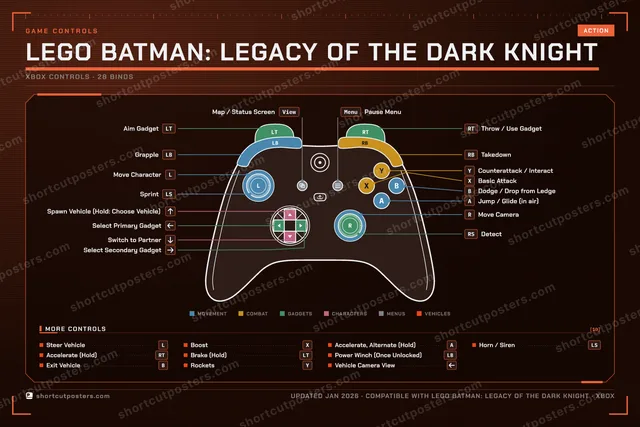
LEGO Batman: Legacy of the Dark Knight, on your wall.
Print-ready 36×24″ at 300 DPI, for your printer or any print shop.Free preview: 1600 px, watermarked.
No watermark on what you buy. It only protects this preview.
- The Xbox, PlayStation, Switch and Steam Deck controller posters
- 10 800 px at 300 DPI, up to 91×61 cm
- PNG + print-ready PDF, instant download
LEGO Batman: Legacy of the Dark Knight controls poster
LEGO Batman: Legacy of the Dark Knight controls — FAQ
- What are the default controls for LEGO Batman: Legacy of the Dark Knight?
- LEGO Batman: Legacy of the Dark Knight, a action game, maps 28 actions to the Xbox controller. The complete button layout is shown on this page, free to read.
- What buttons do you use in LEGO Batman: Legacy of the Dark Knight?
- Every LEGO Batman: Legacy of the Dark Knight action is mapped to its Xbox button on this page — face buttons, triggers, sticks and the d-pad — so you can see the whole control scheme at a glance.
- Can you remap LEGO Batman: Legacy of the Dark Knight controls?
- These are the game's default bindings. Remapping depends on the title and the Xbox's system button-mapping options.
- Is this an official LEGO Batman: Legacy of the Dark Knight resource?
- No. This is an unofficial reference and is not affiliated with or endorsed by LEGO Batman: Legacy of the Dark Knight or its publisher. All trademarks belong to their respective owners.
Thanks — your feedback helps us improve.