Deus Ex: Invisible War Keyboard controls
- Windows
- 43 default keybinds
- Action →
- Deus Ex collection →
Cover art © its publisher — for identification only. Cover © its publisher. Details
Deus Ex: Invisible War is Ion Storm's 2003 sequel to the original Deus Ex, set twenty years later and built around universal ammo, six biomod slots and a toolbelt. These are the default PC bindings from Eidos's own manual, which puts biomods on F1-F6, toolbelt items on 1-6 and every interaction on the right mouse button, plus the quicksave keys PCGamingWiki records.
All Deus Ex: Invisible War keyboard controls
+ 1 more control in the table below
+ 1 more control in the table below
Tip Hover or tap a key to see what it does. Most of these 43 keybinds can be reassigned in Deus Ex: Invisible War's control settings.
43 shortcuts
Interface 11
| Action | Shortcut |
|---|---|
| Inventory Screen | V |
| Quick Save | F10 |
| Quick Load | F12 |
| Biomod Screen | B |
| Datavault (goals, notes, images) | N |
| Return to Main Menu | Esc |
| Open Mod Installation (biomod screen or weapon selected) | Tab |
| Biomod HUD Display | Num 3 |
| Toolbelt HUD Display | Num 1 |
| HUD Selection Up | Num 5 |
| HUD Selection Down | Num 2 |
Movement 9
| Action | Shortcut |
|---|---|
| Move Forward | W |
| Jump | Space |
| Strafe Left | A |
| Look / Aim | Mouse |
| Crouch / Stand Toggle | C |
| Move Back (arrow keys) | ↓ |
| Strafe Right (arrow keys) | → |
| Walk / Run Toggle | Shift |
| Mantle (hold) | Space |
Biomods 6
| Action | Shortcut |
|---|---|
| Toggle Biomod Slot 1 | F1 |
| Toggle Biomod Slot 2 | F2 |
| Toggle Biomod Slot 3 | F3 |
| Toggle Biomod Slot 4 | F4 |
| Toggle Biomod Slot 5 | F5 |
| Toggle Biomod Slot 6 | F6 |
Toolbelt 6
| Action | Shortcut |
|---|---|
| Equip Toolbelt Slot 1 | 1 |
| Equip Toolbelt Slot 2 | 2 |
| Equip Toolbelt Slot 3 | 3 |
| Equip Toolbelt Slot 4 | 4 |
| Equip Toolbelt Slot 5 | 5 |
| Equip Toolbelt Slot 6 | 6 |
Menus 6
| Action | Shortcut |
|---|---|
| Accept / Select | Enter |
| Drop Selected Inventory Item | Tab |
| Conversation: Skip Line | Enter |
| Delete Selected Save Game | Tab |
| Datavault: Cycle Goals / Notes / Images | ←then→ |
| Conversation: Skip Paragraph | Space |
Combat 3
| Action | Shortcut |
|---|---|
| Attack Targeted Enemy or Object | LMB |
| Alt-Fire Attack | F |
| Throw In-Hand Item | LMB |
Interaction 2
| Action | Shortcut |
|---|---|
| Interact (talk, use, pick up) | RMB |
| Drop In-Hand Item | RMB |
Sourced from store.steampowered.com, shared.fastly.steamstatic.com, pcgamingwiki.com Last verified Shortcuts last changed
Unofficial reference. ShortcutPosters is not affiliated with, endorsed by, or sponsored by Deus Ex: Invisible War. All product names, logos, and trademarks are property of their respective owners. See our licensing & trademark notice.
Shown at scaleNo watermark on your file
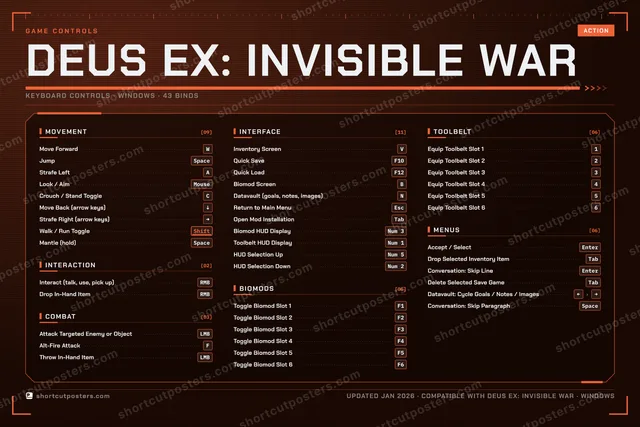
Deus Ex: Invisible War, on your wall.
Print-ready 36×24″ at 300 DPI, for your printer or any print shop.Free preview: 1600 px, watermarked.
No watermark on what you buy. It only protects this preview.
- The keyboard poster
- 10 800 px at 300 DPI, up to 91×61 cm
- PNG + print-ready PDF, instant download
Deus Ex: Invisible War controls poster
Deus Ex: Invisible War controls — FAQ
- What are the default controls for Deus Ex: Invisible War?
- Deus Ex: Invisible War, a action game, uses 43 default keybinds across 7 categories. The complete, up-to-date list is free to read on this page.
- Can you remap Deus Ex: Invisible War controls?
- Yes. These are the game's default bindings — nearly all of them can be reassigned from Deus Ex: Invisible War's in-game control or key-binding settings.
- Which platforms do these Deus Ex: Invisible War controls cover?
- These keyboard controls apply on Windows. Most bindings are identical across platforms unless noted.
- Is this an official Deus Ex: Invisible War resource?
- No. This is an unofficial reference and is not affiliated with or endorsed by Deus Ex: Invisible War or its publisher. All trademarks belong to their respective owners.
Thanks — your feedback helps us improve.
Deus Ex collection
4 Deus Ex games in the catalogue, every control scheme free to read.
See all 4 Deus Ex games →