ShortcutPosters
iPhone appNew

DayZ Keyboard & controller controls

Get the poster

Cover art © its publisher — for identification only. Cover © its publisher. Details

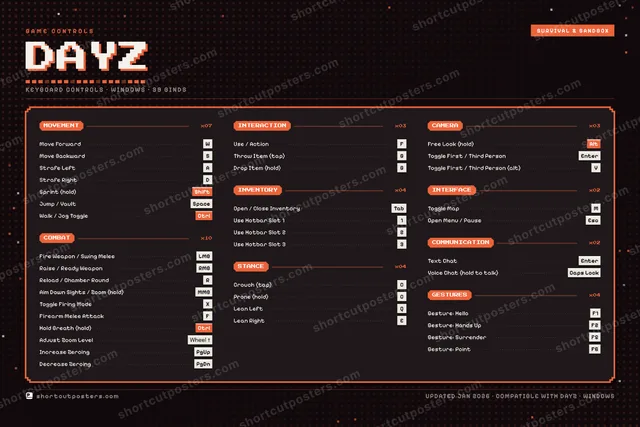
A complete reference to the default keyboard and mouse controls for DayZ on PC. Learn the default keybindings for movement, stances, combat, weapons, inventory, interaction, and communication so you can survive Chernarus from your very first spawn.

DayZ official site ↗ View on Steam ↗

All DayZ controls

Layout
Esc
F1
F2
F3
F4
F5
F6
F7
F8
F9
F10
F11
F12
`
1
2
3
4
5
6
7
8
9
0
-
=
⌫ Back
Tab
Q
W
E
R
T
Y
U
I
O
P
[
]
\
Caps
A
S
D
F
G
H
J
K
L
;
'
Enter ⏎
Shift
Z
X
C
V
B
N
M
,
.
/
Shift
Ctrl
Win
Alt
Space
Alt
Win
Menu
Ctrl
MMB · Aim Down Sights / Zoom (hold)
↑
←
↓
→

+ 2 more controls in the table below

Tip Hover or tap a key to see what it does. Most of these 39 keybinds can be reassigned in DayZ's control settings.

39 shortcuts

Combat 10

Action Shortcut
Fire Weapon / Swing Melee LMB
Raise / Ready Weapon RMB
Reload / Chamber Round R
Aim Down Sights / Zoom (hold) MMB
Toggle Firing Mode X
Firearm Melee Attack F
Hold Breath (hold) Ctrl
Adjust Zoom Level Wheel ↑
Increase Zeroing PgUp
Decrease Zeroing PgDn

Movement 7

Action Shortcut
Move Forward W
Move Backward S
Strafe Left A
Strafe Right D
Sprint (hold) Shift
Jump / Vault Space
Walk / Jog Toggle Ctrl

Stance 4

Action Shortcut
Crouch (tap) C
Prone (hold) C
Lean Left Q
Lean Right E

Inventory 4

Action Shortcut
Open / Close Inventory Tab
Use Hotbar Slot 1 1
Use Hotbar Slot 2 2
Use Hotbar Slot 3 3

Gestures 4

Action Shortcut
Gesture: Hello F1
Gesture: Hands Up F2
Gesture: Surrender F5
Gesture: Point F6

Interaction 3

Action Shortcut
Use / Action F
Throw Item (tap) G
Drop Item (hold) G

Camera 3

Action Shortcut
Free Look (hold) Alt
Toggle First / Third Person Enter
Toggle First / Third Person (alt) V

Interface 2

Action Shortcut
Toggle Map M
Open Menu / Pause Esc

Communication 2

Action Shortcut
Text Chat Enter
Voice Chat (hold to talk) Caps Lock

Sourced from dayz.fandom.com, bisecthosting.com, shacknews.com, kosgames.com, holy.gg Last verified

Unofficial reference. ShortcutPosters is not affiliated with, endorsed by, or sponsored by DayZ. All product names, logos, and trademarks are property of their respective owners. See our licensing & trademark notice.
Shown at scaleNo watermark on your file

The poster

DayZ, on your wall.

A file to print yourself, or printed and shipped to your door.Printed and shipped to your door.

No watermark on what you buy. It only protects this preview.

Format
  • The keyboard poster and the Xbox, PlayStation, Switch and Steam Deck controller posters
  • 10 800 px at 300 DPI, up to 91×61 cm
  • PNG + print-ready PDF, instant download

DayZ controls poster

DayZ controls — FAQ

What are the default controls for DayZ?
DayZ, a survival & sandbox game, uses 39 default keybinds across 9 categories — on keyboard and controller. The complete, up-to-date list is free to read on this page.
Can you remap DayZ controls?
Yes. These are the game's default bindings — nearly all of them can be reassigned from DayZ's in-game control or key-binding settings.
Does DayZ support a controller?
Yes — DayZ has full gamepad support. The Xbox, PlayStation, Switch and Steam Deck button maps are shown on this page alongside the keyboard controls.
Which platforms do these DayZ controls cover?
These keyboard controls apply on Windows. DayZ also released on Xbox, PlayStation and Switch, and this page carries those controller bindings too. Most bindings are identical across platforms unless noted.
Is this an official DayZ resource?
No. This is an unofficial reference and is not affiliated with or endorsed by DayZ or its publisher. All trademarks belong to their respective owners.