Sid Meier's Civilization III Complete Keyboard controls
- Windows
- 61 default keybinds
- Strategy →
- Civilization collection →
Cover art © its publisher — for identification only. Cover © its publisher. Details
Sid Meier's Civilization III is Firaxis' 2001 turn-based strategy game, sold on Steam as the Complete edition with the Play the World and Conquests expansions. It introduced culture-driven borders, strategic resources and leader-built armies, and almost every unit order and advisor screen has a one-key hotkey. The rows below come from the keyboard-shortcut appendix of the Complete edition manual that 2K serves from Steam: numeric-keypad movement, unit and worker orders, the F1–F11 advisor screens and the game menu keys.
All Sid Meier's Civilization III Complete keyboard controls
+ 6 more controls in the table below
+ 6 more controls in the table below
Tip Hover or tap a key to see what it does. Most of these 61 keybinds can be reassigned in Sid Meier's Civilization III Complete's control settings.
61 shortcuts
Unit Orders 12
| Action | Shortcut |
|---|---|
| Go To | G |
| Fortify / Garrison | F |
| Hold (Skip Turn) | Space |
| Wait | Wthen/thenTab |
| Sentry | Y |
| Explore | E |
| Bombard | B |
| Pillage | ShiftP |
| Load / Unload | L |
| Upgrade | U |
| Upgrade All | ShiftU |
| Disband | D |
Advisors & Screens 11
| Action | Shortcut |
|---|---|
| Domestic Advisor | F1 |
| Science Advisor | F6 |
| Trade Advisor | F2 |
| Military Advisor | F3 |
| Foreign Advisor | F4 |
| Cultural Advisor | F5 |
| Wonders of the World | F7 |
| Histograph / Score | F8 |
| Demographics | F11 |
| Palace | F9 |
| Spaceship | F10 |
Worker & Settler Orders 10
| Action | Shortcut |
|---|---|
| Build City / Join City | B |
| Build Road | R |
| Irrigate | I |
| Build Mine | M |
| Automate Worker | A |
| Build Railroad | ShiftR |
| Clean Up Pollution | ShiftC |
| Plant Forest | N |
| Build Fortress | CtrlF |
| Build Road To | CtrlR |
Unit Movement 8
| Action | Shortcut |
|---|---|
| Move North | ↑then/thenNum 8 |
| Move South | ↓then/thenNum 2 |
| Move East | →then/thenNum 6 |
| Move West | ←then/thenNum 4 |
| Move Northeast | PgUpthen/thenNum 9 |
| Move Northwest | Homethen/thenNum 7 |
| Move Southeast | PgDnthen/thenNum 3 |
| Move Southwest | Endthen/thenNum 1 |
Map & Navigation 8
| Action | Shortcut |
|---|---|
| Center on Active Unit | C |
| Next Unit | ] |
| Next City | . |
| Zoom In / Out | Z |
| Center on Capital | H |
| Previous Unit | [ |
| Previous City | , |
| Toggle Map Grid | CtrlG |
Game 6
| Action | Shortcut |
|---|---|
| Save Game | CtrlS |
| Load Game | CtrlL |
| Quit | Esc |
| Preferences | CtrlP |
| New Game | CtrlShiftQ |
| Resign and Quit | CtrlQ |
Turns & Government 4
| Action | Shortcut |
|---|---|
| End Turn Immediately | ShiftEnter |
| Contact Rival Leaders | ShiftD |
| Change Government (Revolution) | ShiftG |
| Civilopedia | CtrlC |
City Screen 2
| Action | Shortcut |
|---|---|
| Hurry Production (Rush Job) | H |
| Contact City Governors | G |
Sourced from store.steampowered.com, shared.fastly.steamstatic.com Last verified
Unofficial reference. ShortcutPosters is not affiliated with, endorsed by, or sponsored by Sid Meier's Civilization III Complete. All product names, logos, and trademarks are property of their respective owners. See our licensing & trademark notice.
Shown at scaleNo watermark on your file
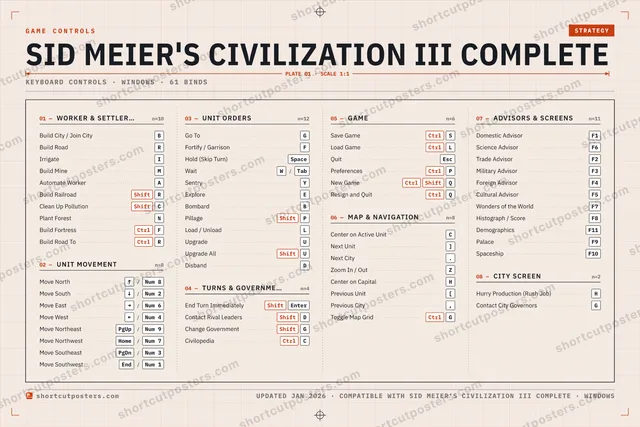
Sid Meier's Civilization III Complete, on your wall.
Print-ready 36×24″ at 300 DPI, for your printer or any print shop.Free preview: 1600 px, watermarked.
No watermark on what you buy. It only protects this preview.
- The keyboard poster
- 10 800 px at 300 DPI, up to 91×61 cm
- PNG + print-ready PDF, instant download
Sid Meier's Civilization III Complete controls poster
Sid Meier's Civilization III Complete controls — FAQ
- What are the default controls for Sid Meier's Civilization III Complete?
- Sid Meier's Civilization III Complete, a strategy game, uses 61 default keybinds across 8 categories. The complete, up-to-date list is free to read on this page.
- Can you remap Sid Meier's Civilization III Complete controls?
- Yes. These are the game's default bindings — nearly all of them can be reassigned from Sid Meier's Civilization III Complete's in-game control or key-binding settings.
- Which platforms do these Sid Meier's Civilization III Complete controls cover?
- These keyboard controls apply on Windows. Most bindings are identical across platforms unless noted.
- Is this an official Sid Meier's Civilization III Complete resource?
- No. This is an unofficial reference and is not affiliated with or endorsed by Sid Meier's Civilization III Complete or its publisher. All trademarks belong to their respective owners.
Thanks — your feedback helps us improve.
Civilization collection
6 Civilization games in the catalogue, every control scheme free to read.
See all 6 Civilization games →