0 A.D. Keyboard controls
- Windows · Mac · Linux
- 43 default keybinds
- Strategy →
Cover art © its publisher — for identification only. Cover © its publisher. Details
0 A.D. (Empires Ascendant) is a free, open-source historical real-time strategy game by Wildfire Games. Its default hotkeys cover camera control, idle-unit selection, control groups, and battlefield commands so you can micro your economy and armies without hunting through menus. Bindings are position-based, so they are identical on Windows, macOS, and Linux.
All 0 A.D. keyboard controls
+ 4 more controls in the table below
+ 4 more controls in the table below
Tip Hover or tap a key to see what it does. Most of these 43 keybinds can be reassigned in 0 A.D.'s control settings.
43 shortcuts
Commands 11
| Action | Shortcut |
|---|---|
| Attack-Move (hold + right-click) | Ctrl |
| Stop | H |
| Queue Order (hold) | Shift |
| Back to Work | Y |
| Unload Garrison | U |
| Guard / Escort | G |
| Patrol | P |
| Delete Unit or Building | Del |
| Repair | J |
| Rotate Building Clockwise | ] |
| Flare / Ping | K |
Camera 10
| Action | Shortcut |
|---|---|
| Pan Camera | Arrows |
| Rotate Camera Clockwise | Q |
| Rotate Camera Counter-clockwise | E |
| Reset Camera | R |
| Follow Selected Unit | F |
| Zoom In | + |
| Zoom Out | − |
| Jump to Saved Camera View | F5 |
| Focus on Last Attack | Space |
| Save Camera View | CtrlF5 |
General 9
| Action | Shortcut |
|---|---|
| Cancel / Deselect | Esc |
| Chat | Enter |
| Pause Game | ShiftSpace |
| Quick Save | ShiftF5 |
| Team Chat | T |
| Quick Load | ShiftF8 |
| Toggle Fullscreen | AltEnter |
| Summary Screen | CtrlTab |
| Structure Tree | AltShiftT |
Selection 7
| Action | Shortcut |
|---|---|
| Select Idle Worker | . |
| Add to Selection (hold) | Shift |
| Select Idle Warrior | / |
| Select Idle Unit | \ |
| Remove from Selection (hold) | Ctrl |
| Select Military Only (hold) | Alt |
| Select Idle Builder | ; |
Control Groups 3
| Action | Shortcut |
|---|---|
| Create Control Group | Ctrl1 |
| Select Control Group | 1 |
| Add to Control Group | Shift1 |
Interface 3
| Action | Shortcut |
|---|---|
| Show Health Bars (hold) | Tab |
| Toggle GUI | AltG |
| Diplomacy Screen | CtrlH |
Sourced from svn.wildfiregames.com, trac.wildfiregames.com Last verified
Unofficial reference. ShortcutPosters is not affiliated with, endorsed by, or sponsored by 0 A.D.. All product names, logos, and trademarks are property of their respective owners. See our licensing & trademark notice.
Shown at scaleNo watermark on your file
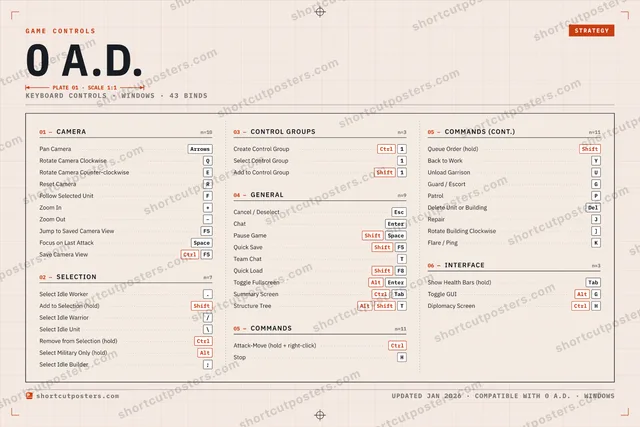
0 A.D., on your wall.
Print-ready 36×24″ at 300 DPI, for your printer or any print shop.Free preview: 1600 px, watermarked.
No watermark on what you buy. It only protects this preview.
- The keyboard poster
- 10 800 px at 300 DPI, up to 91×61 cm
- PNG + print-ready PDF, instant download
0 A.D. controls poster
0 A.D. controls — FAQ
- What are the default controls for 0 A.D.?
- 0 A.D., a strategy game, uses 43 default keybinds across 6 categories. The complete, up-to-date list is free to read on this page.
- Can you remap 0 A.D. controls?
- Yes. These are the game's default bindings — nearly all of them can be reassigned from 0 A.D.'s in-game control or key-binding settings.
- Which platforms do these 0 A.D. controls cover?
- These keyboard controls apply on Windows and Mac and Linux. Most bindings are identical across platforms unless noted.
- Is this an official 0 A.D. resource?
- No. This is an unofficial reference and is not affiliated with or endorsed by 0 A.D. or its publisher. All trademarks belong to their respective owners.
Thanks — your feedback helps us improve.