ShortcutPosters

Make your Total War: Warhammer II controls poster
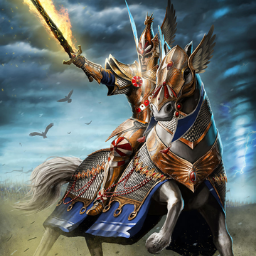
Pick the keybinds that matter, add your own, tune the colours and style — then download a free personalized PNG.

Making a poster for:
Style
Accent
01 —CAMERAn=16Pan CameraW/A/S/DRotate Camera Left / RightQ›EZoom CameraWheelStep Forward FastNum 8Accelerate CameraPgUpDecelerate CameraPgDnDefault Camera RotationEndIncrease Camera RotationShiftPgUpDecrease Camera RotationShiftPgDnCinematic ModeInsCinematic CameraDelPan Camera Faster (hold)ShiftPitch Camera Up / DownV›CPan Camera Up / DownX›ZFree Rotate Camera (hold)MMBIntelligent ZoomN02 —UNIT ORDERSn=19Move / AttackRMBPan to UnitEndPan to GeneralHomeBattle Increase RankCtrlUPBattle Increase FileCtrlDOWN02 —UNIT ORDERS (CONT.)n=19Battle Step ForwardUPBattle Step BackwardsDOWNBattle Rotate LeftCtrlLEFTBattle Rotate RightCtrlRIGHTStrafe Unit LeftLEFTStrafe Unit RightRIGHTShow Radial MenuSpaceToggle Melee ModeFMove in Formation (drag)AltLMBHalt Selected UnitsBkspToggle Unit Speed (Walk / Run)RAdd Waypoint (hold)ShiftRMBShow Unit Destinations (hold)SpaceAbout FaceJ03 —BATTLE SELECTIONn=13Select UnitLMBSelect Entire ArmyCtrlACreate / Select Unit Group 10Ctrl0Drag SelectLMBAdd Unit to SelectionCtrlLMBCreate Control GroupCtrl1Select Control Group103 —BATTLE SELECTION (CO…n=13Select All Melee InfantryCtrlISelect All Missile UnitsCtrlMSelect All CavalryCtrlCSelect All ArtilleryCtrlBDeselect AllEnterSelect Next / Previous Unit.›,04 —CAMPAIGNn=17End TurnEnterView / Overview1Show Garrison2Show Building Browser3Recruit Lord4Recruit Agents / Units5Show Objectives6Open Diplomacy7Show Technologies8Rites9Toggle Move SpeedRAuto-Merge UnitsCtrlMGo to CapitalHomeDisband Current SelectionCtrlPStrategic Map ToggleTab04 —CAMPAIGN (CONT.)n=17Quick SaveCtrlSQuick LoadCtrlL05 —BATTLE SPEEDn=2Pause / Unpause BattlePCycle Battle SpeedT06 —UIn=8Open MenuEscVoice ChatCtrlQStandard PingF5Chat Panel OnYToggle Unit Cards VisibilityIToggle Sound EffectsAltXToggle MusicAltMToggle UI VisibilityK07 —FORMATIONSn=2Group UnitsGLock / Unlock Group FormationCtrlGGAME CONTROLSSTRATEGYTOTAL WAR: WARHAMMER IIPLATE 01 · SCALE 1:1KEYBOARD CONTROLS · WINDOWS · 77 BINDSshortcutposters.comUPDATED JAN 2026 · COMPATIBLE WITH TOTAL WAR: WARHAMMER II · WINDOWSshortcutposters.comshortcutposters.comshortcutposters.comshortcutposters.comshortcutposters.comshortcutposters.comshortcutposters.comshortcutposters.comshortcutposters.comshortcutposters.comshortcutposters.comshortcutposters.comshortcutposters.comshortcutposters.comshortcutposters.comshortcutposters.comshortcutposters.comshortcutposters.comshortcutposters.comshortcutposters.comshortcutposters.comshortcutposters.comshortcutposters.comshortcutposters.comshortcutposters.comshortcutposters.comshortcutposters.comshortcutposters.comshortcutposters.comshortcutposters.comshortcutposters.comshortcutposters.comshortcutposters.comshortcutposters.comshortcutposters.comshortcutposters.comshortcutposters.comshortcutposters.comshortcutposters.comshortcutposters.comshortcutposters.comshortcutposters.comshortcutposters.comshortcutposters.comshortcutposters.comshortcutposters.comshortcutposters.comshortcutposters.comshortcutposters.comshortcutposters.comshortcutposters.comshortcutposters.comshortcutposters.comshortcutposters.comshortcutposters.comshortcutposters.comshortcutposters.comshortcutposters.comshortcutposters.comshortcutposters.comshortcutposters.comshortcutposters.comshortcutposters.comshortcutposters.comshortcutposters.comshortcutposters.comshortcutposters.comshortcutposters.comshortcutposters.comshortcutposters.comshortcutposters.comshortcutposters.comshortcutposters.comshortcutposters.comshortcutposters.comshortcutposters.comshortcutposters.comshortcutposters.comshortcutposters.comshortcutposters.comshortcutposters.comshortcutposters.comshortcutposters.comshortcutposters.comshortcutposters.comshortcutposters.comshortcutposters.comshortcutposters.comshortcutposters.comshortcutposters.comshortcutposters.comshortcutposters.comshortcutposters.comshortcutposters.comshortcutposters.comshortcutposters.comshortcutposters.comshortcutposters.comshortcutposters.comshortcutposters.comshortcutposters.comshortcutposters.comshortcutposters.comshortcutposters.comshortcutposters.comshortcutposters.comshortcutposters.comshortcutposters.comshortcutposters.comshortcutposters.comshortcutposters.com

Hover to locate · click on the poster to disable · drag to reorder categories & shortcuts · ✎ to rename a category

Free PNG $0
  • Web resolution (1600 px)
  • Light watermark
  • Instant download
Made to order
Custom print-ready PDF $2.99
  • 300 DPI, framed-quality — no watermark
  • Every standard print size
  • Built to order from the poster above — checkout link emailed to you

Trouble ordering? Email business@shortcutposters.com.

How it works

  1. 1

    Choose a style

    Start from the generative Arcade art, or switch to isometric keys, a typewriter list, a keyboard map, or an editorial print.

  2. 2

    Make it yours

    Set the accent colour and palette, rename categories, and reorder anything.

  3. 3

    Pick the controls

    Toggle exactly which keybinds appear — or add your own custom ones.

  4. 4

    Download or print

    Export a free high-resolution PNG instantly, or order a print-ready PDF.

Five styles to choose from
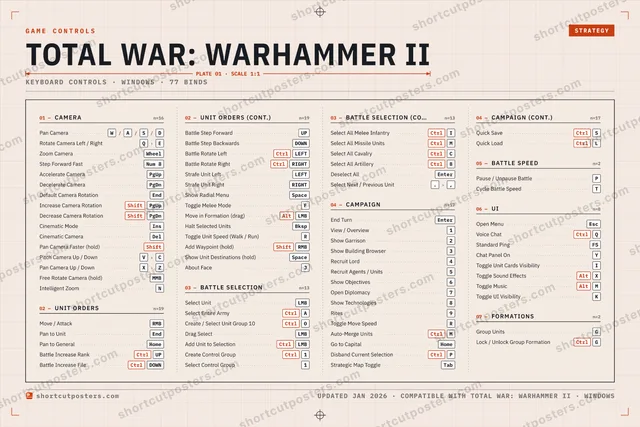
Total War: Warhammer II controls poster preview
Arcade Generative art drawn from the game's genre and colour — pure geometry, zero spoilers.
TOTAL WAR: WARHAMMER IIKEYBOARD SHORTCUTS · WINDOWS · 20 ESSENTIAL1View / Ove…2Show Garri…3Show Buil…4Recruit Lord5Recruit Ag…6Show Obje…7Open Dipl…8Show Tec…9Rites0QRotate Ca…WPan CameraERToggle Mo…TYUIOPPause / Un…ACtrlSelect Enti…SDFGHJKLZXCVBNMCtrlAuto-Merg…MORE SHORTCUTSMove / AttackRMBSelect UnitLMBEnd TurnEnterZoom CameraWheelGo to CapitalHomeshortcutposters.comUPDATED JAN 2026 · COMPATIBLE WITH TOTAL WAR: WARHAMMER II · WINDOWS
Keyboard map Every binding labelled on a realistic QWERTY or AZERTY keyboard.
UNIT ORDERSMove / AttackRMBBATTLE SELECTIONSelect UnitLMBSelect Entire ArmyCtrlABATTLE SPEEDPause / Unpause BattlePCAMERAPan CameraW/A/S/DRotate Camera Left / RightQ›EZoom CameraWheelCAMPAIGNEnd TurnEnterView / Overview1Show Garrison2Show Building Browser3Recruit Lord4Recruit Agents / Units5Show Objectives6Open Diplomacy7Show Technologies8Rites9Toggle Move SpeedRAuto-Merge UnitsCtrlMGo to CapitalHomeTotal War: Warhammer IIKEYBOARD SHORTCUTS · WINDOWS · 20 ESSENTIALBOTH LAYOUTSQWERTYQWERTYAZERTYAZERTYshortcutposters.comUPDATED JAN 2026 · COMPATIBLE WITH TOTAL WAR: WARHAMMER II · WINDOWS
Isometric Shortcuts on a 3D isometric keyboard — bold and poster-like.
UNIT ORDERS01Move / AttackRMBBATTLE SELECTION02Select UnitLMBSelect Entire ArmyCtrlABATTLE SPEED01Pause / Unpause BattlePCAMERA03Pan CameraW/A/S/DRotate Camera Left / RightQ›EZoom CameraWheelCAMPAIGN13End TurnEnterView / Overview1Show Garrison2Show Building Browser3Recruit Lord4Recruit Agents / Units5Show Objectives6Open Diplomacy7Show Technologies8Rites9Toggle Move SpeedRAuto-Merge UnitsCtrlMGo to CapitalHomeTotal War: Warhammer IIKEYBOARD SHORTCUTS · WINDOWS · 20 ESSENTIALBOTH LAYOUTSQWERTYQWERTYAZERTYAZERTYshortcutposters.comUPDATED JAN 2026 · COMPATIBLE WITH TOTAL WAR: WARHAMMER II · WINDOWS
Typewriter A clean printed list, grouped by category — dense and legible.
TOTAL WAR: WARHAMMER II · KEYBOARD SHORTCUTSWindows · 5 SETS · No.01TOTAL WAR: WARHAMMER IITOTAL20SHORTCUTSFOR WINDOWS · SHIPPED COMBOSSETSCAMERA03UNIT ORDERS01BATTLE SELECT02CAMPAIGN13BATTLE SPEED01REF. EDITION · JAN 2026shortcutposters.comPan CameraW›A›S›DRotate Camera Left / RightQ›EZoom CameraWheelMove / AttackRMBSelect UnitLMBSelect Entire ArmyCtrlAEnd TurnEnterView / Overview1Show Garrison2Show Building Browser3Recruit Lord4Recruit Agents / Units5Show Objectives6Open Diplomacy7Show Technologies8Rites9Toggle Move SpeedRAuto-Merge UnitsCtrlMGo to CapitalHomePause / Unpause BattleP
Editorial A bold Swiss-style print: giant wordmark, dense keycap columns, and a totals rail.

Frequently asked questions

Is the Total War: Warhammer II controls poster maker free?

Yes — design your Total War: Warhammer II keybinds poster and download it as a free, watermarked PNG. A print-ready PDF (PC / keyboard edition) is an optional paid upgrade.

Can I choose which Total War: Warhammer II controls appear?

Yes. Toggle any keybind on or off, reorder them, rename categories, and add your own custom binds.

Which styles can I use?

Start from the Arcade style — generative art based on the game's genre — or switch to the isometric, typewriter, keyboard-map or editorial layouts, and pick your accent colour.

Does the poster use official Total War: Warhammer II artwork?

No. The poster is built only from the keybinds, text and abstract generated shapes — never logos, covers, screenshots or key art.