ShortcutPosters

Make your Star Citizen controls poster

Pick the keybinds that matter, add your own, tune the colours and style — then download a free personalized PNG.

Making a poster for:
Style
Accent
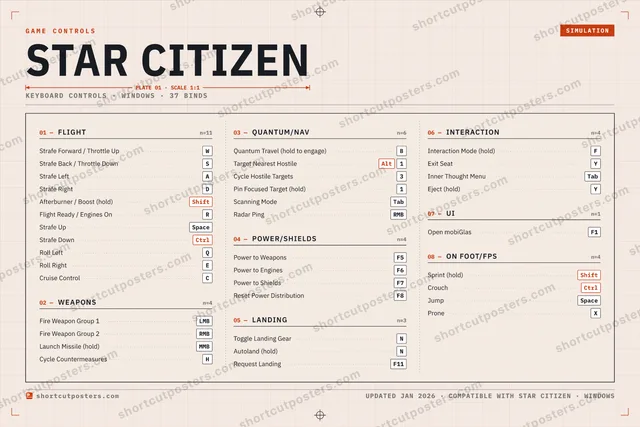
01 —FLIGHTn=11Strafe Forward / Throttle UpWStrafe Back / Throttle DownSStrafe LeftAStrafe RightDAfterburner / Boost (hold)ShiftFlight Ready / Engines OnRStrafe UpSpaceStrafe DownCtrlRoll LeftQRoll RightECruise ControlC02 —WEAPONSn=4Fire Weapon Group 1LMBFire Weapon Group 2RMBLaunch Missile (hold)MMBCycle CountermeasuresH03 —QUANTUM/NAVn=6Quantum Travel (hold to engage)BTarget Nearest HostileAlt1Cycle Hostile Targets3Pin Focused Target (hold)1Scanning ModeTabRadar PingRMB04 —POWER/SHIELDSn=4Power to WeaponsF5Power to EnginesF6Power to ShieldsF7Reset Power DistributionF805 —LANDINGn=3Toggle Landing GearNAutoland (hold)NRequest LandingF1106 —INTERACTIONn=4Interaction Mode (hold)FExit SeatYInner Thought MenuTabEject (hold)Y07 —UIn=1Open mobiGlasF108 —ON FOOT/FPSn=4Sprint (hold)ShiftCrouchCtrlJumpSpaceProneXGAME CONTROLSSIMULATIONSTAR CITIZENPLATE 01 · SCALE 1:1KEYBOARD CONTROLS · WINDOWS · 37 BINDSshortcutposters.comUPDATED JAN 2026 · COMPATIBLE WITH STAR CITIZEN · WINDOWSshortcutposters.comshortcutposters.comshortcutposters.comshortcutposters.comshortcutposters.comshortcutposters.comshortcutposters.comshortcutposters.comshortcutposters.comshortcutposters.comshortcutposters.comshortcutposters.comshortcutposters.comshortcutposters.comshortcutposters.comshortcutposters.comshortcutposters.comshortcutposters.comshortcutposters.comshortcutposters.comshortcutposters.comshortcutposters.comshortcutposters.comshortcutposters.comshortcutposters.comshortcutposters.comshortcutposters.comshortcutposters.comshortcutposters.comshortcutposters.comshortcutposters.comshortcutposters.comshortcutposters.comshortcutposters.comshortcutposters.comshortcutposters.comshortcutposters.comshortcutposters.comshortcutposters.comshortcutposters.comshortcutposters.comshortcutposters.comshortcutposters.comshortcutposters.comshortcutposters.comshortcutposters.comshortcutposters.comshortcutposters.comshortcutposters.comshortcutposters.comshortcutposters.comshortcutposters.comshortcutposters.comshortcutposters.comshortcutposters.comshortcutposters.comshortcutposters.comshortcutposters.comshortcutposters.comshortcutposters.comshortcutposters.comshortcutposters.comshortcutposters.comshortcutposters.comshortcutposters.comshortcutposters.comshortcutposters.comshortcutposters.comshortcutposters.comshortcutposters.comshortcutposters.comshortcutposters.comshortcutposters.comshortcutposters.comshortcutposters.comshortcutposters.comshortcutposters.comshortcutposters.comshortcutposters.comshortcutposters.comshortcutposters.comshortcutposters.comshortcutposters.comshortcutposters.comshortcutposters.comshortcutposters.comshortcutposters.comshortcutposters.comshortcutposters.comshortcutposters.comshortcutposters.comshortcutposters.comshortcutposters.comshortcutposters.comshortcutposters.comshortcutposters.comshortcutposters.comshortcutposters.comshortcutposters.comshortcutposters.comshortcutposters.comshortcutposters.comshortcutposters.comshortcutposters.comshortcutposters.comshortcutposters.comshortcutposters.comshortcutposters.comshortcutposters.comshortcutposters.comshortcutposters.com

Hover to locate · click on the poster to disable · drag to reorder categories & shortcuts · ✎ to rename a category

Free PNG $0
  • Web resolution (1600 px)
  • Light watermark
  • Instant download
Made to order
Custom print-ready PDF $2.99
  • 300 DPI, framed-quality — no watermark
  • Every standard print size
  • Built to order from the poster above — checkout link emailed to you

Trouble ordering? Email business@shortcutposters.com.

How it works

  1. 1

    Choose a style

    Start from the generative Arcade art, or switch to isometric keys, a typewriter list, a keyboard map, or an editorial print.

  2. 2

    Make it yours

    Set the accent colour and palette, rename categories, and reorder anything.

  3. 3

    Pick the controls

    Toggle exactly which keybinds appear — or add your own custom ones.

  4. 4

    Download or print

    Export a free high-resolution PNG instantly, or order a print-ready PDF.

Five styles to choose from
Star Citizen controls poster preview
Arcade Generative art drawn from the game's genre and colour — pure geometry, zero spoilers.
STAR CITIZENKEYBOARD SHORTCUTS · WINDOWS · 20 ESSENTIAL1AltTarget Nea…234567890QRoll LeftWStrafe For…ERFlight Rea…TYUIOPAStrafe LeftSStrafe Bac…DStrafe RightFInteraction…GHJKLZXCVBQuantum…NToggle La…MMORE SHORTCUTSFire Weapon Group 1LMBAfterburner / BoostShiftPower to WeaponsF5Power to EnginesF6Power to ShieldsF7Fire Weapon Group 2RMBOpen mobiGlasF1Sprint (hold)ShiftStrafe UpSpaceStrafe DownCtrlshortcutposters.comUPDATED JAN 2026 · COMPATIBLE WITH STAR CITIZEN · WINDOWS
Keyboard map Every binding labelled on a realistic QWERTY or AZERTY keyboard.
FLIGHTStrafe Forward / Throttle UpWStrafe Back / Throttle DownSStrafe LeftAStrafe RightDAfterburner / Boost (hold)ShiftFlight Ready / Engines OnRStrafe UpSpaceStrafe DownCtrlRoll LeftQLANDINGToggle Landing GearNINTERACTIONInteraction Mode (hold)FON FOOT/FPSSprint (hold)ShiftWEAPONSFire Weapon Group 1LMBFire Weapon Group 2RMBQUANTUM/NAVQuantum Travel (hold to engage)BTarget Nearest HostileAlt1POWER/SHIELDSPower to WeaponsF5Power to EnginesF6Power to ShieldsF7UIOpen mobiGlasF1Star CitizenKEYBOARD SHORTCUTS · WINDOWS · 20 ESSENTIALBOTH LAYOUTSQWERTYQWERTYAZERTYAZERTYshortcutposters.comUPDATED JAN 2026 · COMPATIBLE WITH STAR CITIZEN · WINDOWS
Isometric Shortcuts on a 3D isometric keyboard — bold and poster-like.
WEAPONS02Fire Weapon Group 1LMBFire Weapon Group 2RMBQUANTUM/NAV02Quantum Travel (hold to engage)BTarget Nearest HostileAlt1POWER/SHIELDS03Power to WeaponsF5Power to EnginesF6Power to ShieldsF7INTERACTION01Interaction Mode (hold)FON FOOT/FPS01Sprint (hold)ShiftFLIGHT09Strafe Forward / Throttle UpWStrafe Back / Throttle DownSStrafe LeftAStrafe RightDAfterburner / Boost (hold)ShiftFlight Ready / Engines OnRStrafe UpSpaceStrafe DownCtrlRoll LeftQLANDING01Toggle Landing GearNUI01Open mobiGlasF1Star CitizenKEYBOARD SHORTCUTS · WINDOWS · 20 ESSENTIALBOTH LAYOUTSQWERTYQWERTYAZERTYAZERTYshortcutposters.comUPDATED JAN 2026 · COMPATIBLE WITH STAR CITIZEN · WINDOWS
Typewriter A clean printed list, grouped by category — dense and legible.
STAR CITIZEN · KEYBOARD SHORTCUTSWindows · 8 SETS · No.01STAR CITIZENTOTAL20SHORTCUTSFOR WINDOWS · SHIPPED COMBOSSETSFLIGHT09WEAPONS02QUANTUM/NAV02POWER/SHIELDS03LANDING01INTERACTION01UI01ON FOOT/FPS01REF. EDITION · JAN 2026shortcutposters.comStrafe Forward / Throttle UpWStrafe Back / Throttle DownSStrafe LeftAStrafe RightDAfterburner / Boost (hold)ShiftFlight Ready / Engines OnRStrafe UpSpaceStrafe DownCtrlRoll LeftQFire Weapon Group 1LMBFire Weapon Group 2RMBQuantum Travel (hold to engage)BTarget Nearest HostileAlt1Power to WeaponsF5Power to EnginesF6Power to ShieldsF7Toggle Landing GearNInteraction Mode (hold)FOpen mobiGlasF1Sprint (hold)Shift
Editorial A bold Swiss-style print: giant wordmark, dense keycap columns, and a totals rail.

Frequently asked questions

Is the Star Citizen controls poster maker free?

Yes — design your Star Citizen keybinds poster and download it as a free, watermarked PNG. A print-ready PDF (PC / keyboard edition) is an optional paid upgrade.

Can I choose which Star Citizen controls appear?

Yes. Toggle any keybind on or off, reorder them, rename categories, and add your own custom binds.

Which styles can I use?

Start from the Arcade style — generative art based on the game's genre — or switch to the isometric, typewriter, keyboard-map or editorial layouts, and pick your accent colour.

Does the poster use official Star Citizen artwork?

No. The poster is built only from the keybinds, text and abstract generated shapes — never logos, covers, screenshots or key art.