ShortcutPosters

Make your Jurassic World Evolution 3 controls poster

Pick the keybinds that matter, add your own, tune the colours and style — then download a free personalized PNG.

Making a poster for:
Style
Accent
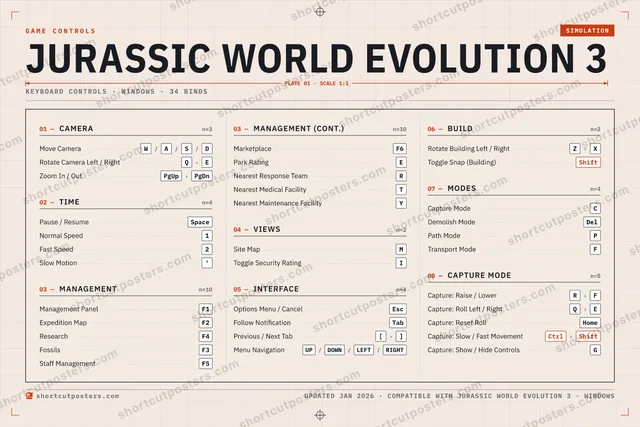
01 —CAMERAn=3Move CameraW/A/S/DRotate Camera Left / RightQ›EZoom In / OutPgUp›PgDn02 —TIMEn=4Pause / ResumeSpaceNormal Speed1Fast Speed2Slow Motion'03 —MANAGEMENTn=10Management PanelF1Expedition MapF2ResearchF4FossilsF3Staff ManagementF503 —MANAGEMENT (CONT.)n=10MarketplaceF6Park RatingENearest Response TeamRNearest Medical FacilityTNearest Maintenance FacilityY04 —VIEWSn=2Site MapMToggle Security RatingI05 —INTERFACEn=4Options Menu / CancelEscFollow NotificationTabPrevious / Next Tab[›]Menu NavigationUP/DOWN/LEFT/RIGHT06 —BUILDn=2Rotate Building Left / RightZ›XToggle Snap (Building)Shift07 —MODESn=4Capture ModeCDemolish ModeDelPath ModePTransport ModeF08 —CAPTURE MODEn=5Capture: Raise / LowerR›FCapture: Roll Left / RightQ›ECapture: Reset RollHomeCapture: Slow / Fast MovementCtrl›ShiftCapture: Show / Hide ControlsGGAME CONTROLSSIMULATIONJURASSIC WORLD EVOLUTION 3PLATE 01 · SCALE 1:1KEYBOARD CONTROLS · WINDOWS · 34 BINDSshortcutposters.comUPDATED JAN 2026 · COMPATIBLE WITH JURASSIC WORLD EVOLUTION 3 · WINDOWSshortcutposters.comshortcutposters.comshortcutposters.comshortcutposters.comshortcutposters.comshortcutposters.comshortcutposters.comshortcutposters.comshortcutposters.comshortcutposters.comshortcutposters.comshortcutposters.comshortcutposters.comshortcutposters.comshortcutposters.comshortcutposters.comshortcutposters.comshortcutposters.comshortcutposters.comshortcutposters.comshortcutposters.comshortcutposters.comshortcutposters.comshortcutposters.comshortcutposters.comshortcutposters.comshortcutposters.comshortcutposters.comshortcutposters.comshortcutposters.comshortcutposters.comshortcutposters.comshortcutposters.comshortcutposters.comshortcutposters.comshortcutposters.comshortcutposters.comshortcutposters.comshortcutposters.comshortcutposters.comshortcutposters.comshortcutposters.comshortcutposters.comshortcutposters.comshortcutposters.comshortcutposters.comshortcutposters.comshortcutposters.comshortcutposters.comshortcutposters.comshortcutposters.comshortcutposters.comshortcutposters.comshortcutposters.comshortcutposters.comshortcutposters.comshortcutposters.comshortcutposters.comshortcutposters.comshortcutposters.comshortcutposters.comshortcutposters.comshortcutposters.comshortcutposters.comshortcutposters.comshortcutposters.comshortcutposters.comshortcutposters.comshortcutposters.comshortcutposters.comshortcutposters.comshortcutposters.comshortcutposters.comshortcutposters.comshortcutposters.comshortcutposters.comshortcutposters.comshortcutposters.comshortcutposters.comshortcutposters.comshortcutposters.comshortcutposters.comshortcutposters.comshortcutposters.comshortcutposters.comshortcutposters.comshortcutposters.comshortcutposters.comshortcutposters.comshortcutposters.comshortcutposters.comshortcutposters.comshortcutposters.comshortcutposters.comshortcutposters.comshortcutposters.comshortcutposters.comshortcutposters.comshortcutposters.comshortcutposters.comshortcutposters.comshortcutposters.comshortcutposters.comshortcutposters.comshortcutposters.comshortcutposters.comshortcutposters.comshortcutposters.comshortcutposters.comshortcutposters.comshortcutposters.com

Hover to locate · click on the poster to disable · drag to reorder categories & shortcuts · ✎ to rename a category

Free PNG $0
  • Web resolution (1600 px)
  • Light watermark
  • Instant download
Made to order
Custom print-ready PDF $2.99
  • 300 DPI, framed-quality — no watermark
  • Every standard print size
  • Built to order from the poster above — checkout link emailed to you

Trouble ordering? Email business@shortcutposters.com.

How it works

  1. 1

    Choose a style

    Start from the generative Arcade art, or switch to isometric keys, a typewriter list, a keyboard map, or an editorial print.

  2. 2

    Make it yours

    Set the accent colour and palette, rename categories, and reorder anything.

  3. 3

    Pick the controls

    Toggle exactly which keybinds appear — or add your own custom ones.

  4. 4

    Download or print

    Export a free high-resolution PNG instantly, or order a print-ready PDF.

Five styles to choose from
Jurassic World Evolution 3 controls poster preview
Arcade Generative art drawn from the game's genre and colour — pure geometry, zero spoilers.
JURASSIC WORLD EVOLUTION 3KEYBOARD SHORTCUTS · WINDOWS · 20 ESSENTIAL1Normal Sp…2Fast Speed34567890QRotate Ca…WMove Cam…EPark RatingRTYUIOPPath ModeASDFGHJKLZRotate Buil…XCCapture M…VBNMSite MapMORE SHORTCUTSPause / ResumeSpaceManagement PanelF1Zoom In / OutPgUp›PgDnExpedition MapF2ResearchF4Options Menu / CancelEscFossilsF3Staff ManagementF5MarketplaceF6Demolish ModeDelToggle Snap (Building)Shiftshortcutposters.comUPDATED JAN 2026 · COMPATIBLE WITH JURASSIC WORLD EVOLUTION 3 · WINDOWS
Keyboard map Every binding labelled on a realistic QWERTY or AZERTY keyboard.
TIMEPause / ResumeSpaceNormal Speed1Fast Speed2MANAGEMENTManagement PanelF1Expedition MapF2ResearchF4FossilsF3Staff ManagementF5MarketplaceF6Park RatingEMODESCapture ModeCDemolish ModeDelPath ModePCAMERAMove CameraW/A/S/DRotate Camera Left / RightQ›EZoom In / OutPgUp›PgDnVIEWSSite MapMINTERFACEOptions Menu / CancelEscBUILDRotate Building Left / RightZ›XToggle Snap (Building)ShiftJurassic World Evolution 3KEYBOARD SHORTCUTS · WINDOWS · 20 ESSENTIALBOTH LAYOUTSQWERTYQWERTYAZERTYAZERTYshortcutposters.comUPDATED JAN 2026 · COMPATIBLE WITH JURASSIC WORLD EVOLUTION 3 · WINDOWS
Isometric Shortcuts on a 3D isometric keyboard — bold and poster-like.
TIME03Pause / ResumeSpaceNormal Speed1Fast Speed2MANAGEMENT07Management PanelF1Expedition MapF2ResearchF4FossilsF3Staff ManagementF5MarketplaceF6Park RatingEMODES03Capture ModeCDemolish ModeDelPath ModePCAMERA03Move CameraW/A/S/DRotate Camera Left / RightQ›EZoom In / OutPgUp›PgDnVIEWS01Site MapMINTERFACE01Options Menu / CancelEscBUILD02Rotate Building Left / RightZ›XToggle Snap (Building)ShiftJurassic World Evolution 3KEYBOARD SHORTCUTS · WINDOWS · 20 ESSENTIALBOTH LAYOUTSQWERTYQWERTYAZERTYAZERTYshortcutposters.comUPDATED JAN 2026 · COMPATIBLE WITH JURASSIC WORLD EVOLUTION 3 · WINDOWS
Typewriter A clean printed list, grouped by category — dense and legible.
JURASSIC WORLD EVOLUTION 3 · KEYBOARD SHORTCUTSWindows · 7 SETS · No.01JURASSIC WORLD EVOLUTION 3TOTAL20SHORTCUTSFOR WINDOWS · SHIPPED COMBOSSETSCAMERA03TIME03MANAGEMENT07VIEWS01INTERFACE01BUILD02MODES03REF. EDITION · JAN 2026shortcutposters.comMove CameraW›A›S›DRotate Camera Left / RightQ›EZoom In / OutPgUp›PgDnPause / ResumeSpaceNormal Speed1Fast Speed2Management PanelF1Expedition MapF2ResearchF4FossilsF3Staff ManagementF5MarketplaceF6Park RatingESite MapMOptions Menu / CancelEscRotate Building Left / RightZ›XToggle Snap (Building)ShiftCapture ModeCDemolish ModeDelPath ModeP
Editorial A bold Swiss-style print: giant wordmark, dense keycap columns, and a totals rail.

Frequently asked questions

Is the Jurassic World Evolution 3 controls poster maker free?

Yes — design your Jurassic World Evolution 3 keybinds poster and download it as a free, watermarked PNG. A print-ready PDF (PC / keyboard edition) is an optional paid upgrade.

Can I choose which Jurassic World Evolution 3 controls appear?

Yes. Toggle any keybind on or off, reorder them, rename categories, and add your own custom binds.

Which styles can I use?

Start from the Arcade style — generative art based on the game's genre — or switch to the isometric, typewriter, keyboard-map or editorial layouts, and pick your accent colour.

Does the poster use official Jurassic World Evolution 3 artwork?

No. The poster is built only from the keybinds, text and abstract generated shapes — never logos, covers, screenshots or key art.