Star Wars: Galactic Racer Keyboard controls
- Windows
- 27 default keybinds
- Racing →
Cover art © its publisher — for identification only. Cover © its publisher. Details
Star Wars: Galactic Racer is an arcade racer set in the Outer Rim, where landspeeders, speeder bikes and podracers fight for position as much as they race. On a keyboard it plays from either of two built-in presets — WASD with the arrows picking abilities, or the arrows with WASD picking them — and the controls cannot be rebound.
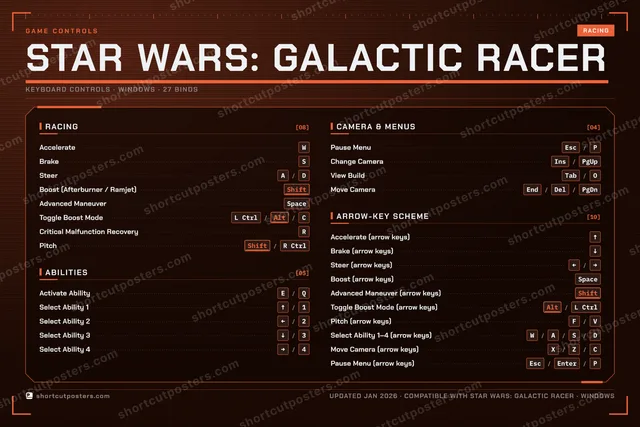
All Star Wars: Galactic Racer keyboard controls
+ 2 more controls in the table below
+ 2 more controls in the table below
Tip Hover or tap a key to see what it does. Most of these 27 keybinds can be reassigned in Star Wars: Galactic Racer's control settings.
27 shortcuts
Arrow-Key Scheme 10
| Action | Shortcut |
|---|---|
| Accelerate (arrow keys) | ↑ |
| Brake (arrow keys) | ↓ |
| Steer (arrow keys) | ←then/then→ |
| Boost (arrow keys) | Space |
| Advanced Maneuver (arrow keys) | Shift |
| Toggle Boost Mode (arrow keys) | Altthen/thenL Ctrl |
| Pitch (arrow keys) | Fthen/thenV |
| Select Ability 1–4 (arrow keys) | Wthen/thenAthen/thenSthen/thenD |
| Move Camera (arrow keys) | Xthen/thenZthen/thenC |
| Pause Menu (arrow keys) | Escthen/thenEnterthen/thenP |
Racing 8
| Action | Shortcut |
|---|---|
| Accelerate | W |
| Brake | S |
| Steer | Athen/thenD |
| Boost (Afterburner / Ramjet) | Shift |
| Advanced Maneuver | Space |
| Toggle Boost Mode | L Ctrlthen/thenAltthen/thenC |
| Critical Malfunction Recovery | R |
| Pitch | Shiftthen/thenR Ctrl |
Abilities 5
| Action | Shortcut |
|---|---|
| Activate Ability | Ethen/thenQ |
| Select Ability 1 | ↑then/then1 |
| Select Ability 2 | ←then/then2 |
| Select Ability 3 | ↓then/then3 |
| Select Ability 4 | →then/then4 |
Camera & Menus 4
| Action | Shortcut |
|---|---|
| Pause Menu | Escthen/thenP |
| Change Camera | Insthen/thenPgUp |
| View Build | Tabthen/thenO |
| Move Camera | Endthen/thenDelthen/thenPgDn |
Sourced from starwarsgalacticracer.com Last verified
Unofficial reference. ShortcutPosters is not affiliated with, endorsed by, or sponsored by Star Wars: Galactic Racer. All product names, logos, and trademarks are property of their respective owners. See our licensing & trademark notice.
Shown at scaleNo watermark on your file
Star Wars: Galactic Racer, on your wall.
A file to print yourself, or printed and shipped to your door.Printed and shipped to your door.
No watermark on what you buy. It only protects this preview.
- The keyboard poster
- 10 800 px at 300 DPI, up to 91×61 cm
- PNG + print-ready PDF, instant download
Star Wars: Galactic Racer controls poster
Star Wars: Galactic Racer controls — FAQ
- What are the default controls for Star Wars: Galactic Racer?
- Star Wars: Galactic Racer, a racing game, uses 27 default keybinds across 4 categories. The complete, up-to-date list is free to read on this page.
- Can you remap Star Wars: Galactic Racer controls?
- Yes. These are the game's default bindings — nearly all of them can be reassigned from Star Wars: Galactic Racer's in-game control or key-binding settings.
- Which platforms do these Star Wars: Galactic Racer controls cover?
- These keyboard controls apply on Windows. Most bindings are identical across platforms unless noted.
- Is this an official Star Wars: Galactic Racer resource?
- No. This is an unofficial reference and is not affiliated with or endorsed by Star Wars: Galactic Racer or its publisher. All trademarks belong to their respective owners.
Thanks — your feedback helps us improve.