Risk of Rain 2 Keyboard & controller controls
- Windows
- 16 default keybinds
- ✓ Steam Deck ready
- Roguelike →
Cover art © its publisher — for identification only. Cover © its publisher. Details
A reference to the default keyboard and mouse controls for Risk of Rain 2 on PC. Covers movement, the four skill slots, equipment, pinging, and the info screen so you can survive the run and customize your loadout faster.
All Risk of Rain 2 controls
+ 1 more control in the table below
+ 1 more control in the table below
Tip Hover or tap a key to see what it does. Most of these 16 keybinds can be reassigned in Risk of Rain 2's control settings.
Movement 7
| Action | Shortcut |
|---|---|
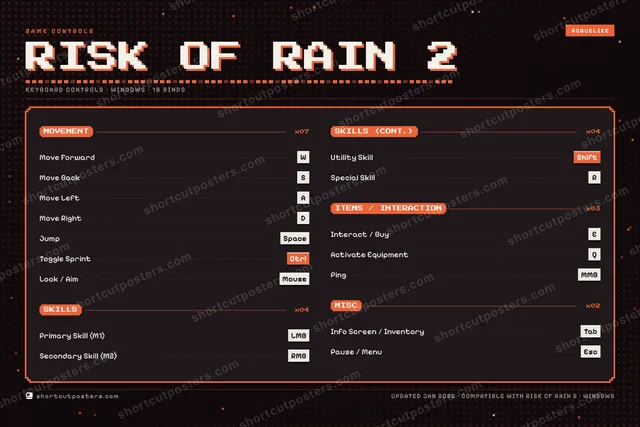
| Move Forward | W |
| Move Back | S |
| Move Left | A |
| Move Right | D |
| Jump | Space |
| Toggle Sprint | Ctrl |
| Look / Aim | Mouse |
Skills 4
| Action | Shortcut |
|---|---|
| Primary Skill (M1) | LMB |
| Secondary Skill (M2) | RMB |
| Utility Skill | Shift |
| Special Skill | R |
Items / Interaction 3
| Action | Shortcut |
|---|---|
| Interact / Buy | E |
| Activate Equipment | Q |
| Ping | MMB |
Misc 2
| Action | Shortcut |
|---|---|
| Info Screen / Inventory | Tab |
| Pause / Menu | Esc |
Sourced from store.steampowered.com, bisecthosting.com, magicgameworld.com Last verified
Tip Hover or tap a button to see what it does; the switch above changes the controller.
Movement 6
| Action | XboxPlayStationSwitchSteam Deck |
|---|---|
| Move Forward | L-Stick |
| Move Back | L-Stick |
| Move Left | L-Stick |
| Move Right | L-Stick |
| Jump | A✕AB |
| Look / Aim | R-Stick |
Skills 4
| Action | XboxPlayStationSwitchSteam Deck |
|---|---|
| Primary Skill (M1) | RTR2R2ZR |
| Secondary Skill (M2) | LTL2L2ZL |
| Utility Skill | LBL1L1L |
| Special Skill | RBR1R1R |
Items / Interaction 3
| Action | XboxPlayStationSwitchSteam Deck |
|---|---|
| Interact / Buy | X■XY |
| Activate Equipment | Y▲YX |
| Ping | RSR3R3RS |
Misc 1
| Action | XboxPlayStationSwitchSteam Deck |
|---|---|
| Info Screen / Inventory | MenuOptionsMenu+ |
Sourced from store.steampowered.com, bisecthosting.com, magicgameworld.com Last verified
Unofficial reference. ShortcutPosters is not affiliated with, endorsed by, or sponsored by Risk of Rain 2. All product names, logos, and trademarks are property of their respective owners. See our licensing & trademark notice.
Shown at scaleNo watermark on your file
Risk of Rain 2, on your wall.
Print-ready 36×24″ at 300 DPI, for your printer or any print shop.Free preview: 1600 px, watermarked.
No watermark on what you buy. It only protects this preview.
- The keyboard poster and the Xbox, PlayStation, Switch and Steam Deck controller posters
- 10 800 px at 300 DPI, up to 91×61 cm
- PNG + print-ready PDF, instant download
Risk of Rain 2 controls poster
Risk of Rain 2 controls — FAQ
- What are the default controls for Risk of Rain 2?
- Risk of Rain 2, a roguelike game, uses 16 default keybinds across 4 categories — on keyboard and controller. The complete, up-to-date list is free to read on this page.
- Can you remap Risk of Rain 2 controls?
- Yes. These are the game's default bindings — nearly all of them can be reassigned from Risk of Rain 2's in-game control or key-binding settings.
- Does Risk of Rain 2 support a controller?
- Yes — Risk of Rain 2 has full gamepad support. The Xbox, PlayStation, Switch and Steam Deck button maps are shown on this page alongside the keyboard controls.
- Which platforms do these Risk of Rain 2 controls cover?
- These keyboard controls apply on Windows. Risk of Rain 2 also released on Xbox, PlayStation and Switch, and this page carries those controller bindings too. Most bindings are identical across platforms unless noted.
- Is this an official Risk of Rain 2 resource?
- No. This is an unofficial reference and is not affiliated with or endorsed by Risk of Rain 2 or its publisher. All trademarks belong to their respective owners.
Thanks — your feedback helps us improve.