Kingdom Come: Deliverance Keyboard & controller controls
- Windows
- 30 default keybinds
- ✓ Steam Deck ready
- RPG →
- Kingdom Come: Deliverance collection →
Cover art © its publisher — for identification only. Cover © its publisher. Details
A reference to the default keyboard and mouse controls for Kingdom Come: Deliverance on PC. Covers movement, melee combat and blocking, weapon drawing, interaction, horse riding, and the inventory and menu screens for 15th-century Bohemia.
All Kingdom Come: Deliverance controls
+ 1 more control in the table below
+ 1 more control in the table below
Tip Hover or tap a key to see what it does. Most of these 30 keybinds can be reassigned in Kingdom Come: Deliverance's control settings.
30 shortcuts
Movement 9
| Action | Shortcut |
|---|---|
| Move Forward | W |
| Move Backward | S |
| Move Left | A |
| Move Right | D |
| Sprint (hold) | Shift |
| Look / Aim Camera | Mouse |
| Jump / Climb | Space |
| Crouch / Sneak (toggle) | C |
| Run / Walk (toggle) | Caps Lock |
Combat 8
| Action | Shortcut |
|---|---|
| Primary Attack | LMB |
| Block / Parry | Q |
| Secondary Attack | RMB |
| Lock On Opponent | Tab |
| Kick / Special Attack | F |
| Abort Attack | E |
| Unlock Target | MMB |
| Surrender | G |
Inventory/Menus 7
| Action | Shortcut |
|---|---|
| Open Inventory | I |
| Open Map | M |
| Pause / Menu / Exit | Esc |
| Player Menu | P |
| Quest Log / Journal | J |
| Horse Menu | B |
| Open Codex | N |
Interaction 3
| Action | Shortcut |
|---|---|
| Interact / Use / Talk / Pick Up | E |
| Call Horse / Mount | X |
| Skip Dialogue | Space |
Weapons 2
| Action | Shortcut |
|---|---|
| Draw Melee Weapon / Shield | 1 |
| Draw Ranged Weapon | 2 |
Misc 1
| Action | Shortcut |
|---|---|
| Screenshot | F12 |
Sourced from nerdsandscoundrels.com, kingdomcomedeliverance-archive.fandom.com, magicgameworld.com Last verified
Tip Hover or tap a button to see what it does; the switch above changes the controller.
Movement 5
| Action | XboxPlayStationSwitchSteam Deck |
|---|---|
| Move Forward | L-Stick |
| Sprint (hold) | B●BA |
| Look / Aim Camera | R-Stick |
| Jump / Climb | X■XY |
| Crouch / Sneak (toggle) | RSR3R3RS |
Combat 8
| Action | XboxPlayStationSwitchSteam Deck |
|---|---|
| Primary Attack | RTR2R2ZR |
| Block / Parry | LBL1L1L |
| Secondary Attack | RBR1R1R |
| Lock On Opponent | RSR3R3RS |
| Kick / Special Attack | LTL2L2ZL |
| Abort Attack | A✕AB |
| Unlock Target | B●BA |
| Surrender | LBL1L1LA✕AB |
Inventory/Menus 3
| Action | XboxPlayStationSwitchSteam Deck |
|---|---|
| Open Inventory | D-Pad ↓ |
| Open Map | D-Pad ↑ |
| Pause / Menu / Exit | MenuOptionsMenu+ |
Interaction 3
| Action | XboxPlayStationSwitchSteam Deck |
|---|---|
| Interact / Use / Talk / Pick Up | A✕AB |
| Call Horse / Mount | Y▲YX |
| Skip Dialogue | ViewShareView− |
Weapons 2
| Action | XboxPlayStationSwitchSteam Deck |
|---|---|
| Draw Melee Weapon / Shield | D-Pad ← |
| Draw Ranged Weapon | D-Pad → |
Sourced from nerdsandscoundrels.com, kingdomcomedeliverance-archive.fandom.com, magicgameworld.com Last verified
Unofficial reference. ShortcutPosters is not affiliated with, endorsed by, or sponsored by Kingdom Come: Deliverance. All product names, logos, and trademarks are property of their respective owners. See our licensing & trademark notice.
Shown at scaleNo watermark on your file
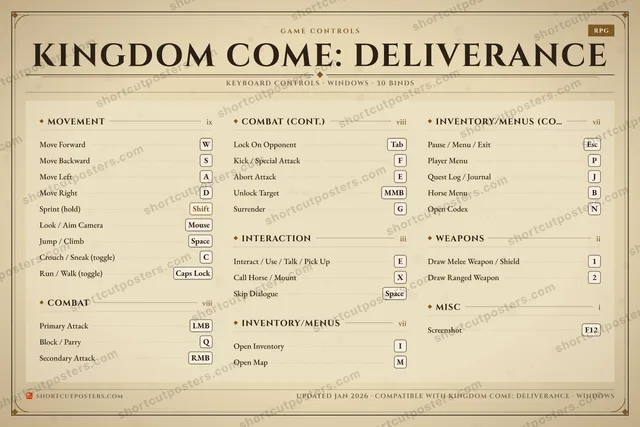
Kingdom Come: Deliverance, on your wall.
Print-ready 36×24″ at 300 DPI, for your printer or any print shop.Free preview: 1600 px, watermarked.
No watermark on what you buy. It only protects this preview.
- The keyboard poster and the Xbox, PlayStation, Switch and Steam Deck controller posters
- 10 800 px at 300 DPI, up to 91×61 cm
- PNG + print-ready PDF, instant download
Kingdom Come: Deliverance controls poster
Kingdom Come: Deliverance controls — FAQ
- What are the default controls for Kingdom Come: Deliverance?
- Kingdom Come: Deliverance, a rpg game, uses 30 default keybinds across 6 categories — on keyboard and controller. The complete, up-to-date list is free to read on this page.
- Can you remap Kingdom Come: Deliverance controls?
- Yes. These are the game's default bindings — nearly all of them can be reassigned from Kingdom Come: Deliverance's in-game control or key-binding settings.
- Does Kingdom Come: Deliverance support a controller?
- Yes — Kingdom Come: Deliverance has full gamepad support. The Xbox, PlayStation, Switch and Steam Deck button maps are shown on this page alongside the keyboard controls.
- Which platforms do these Kingdom Come: Deliverance controls cover?
- These keyboard controls apply on Windows. Kingdom Come: Deliverance also released on Xbox, PlayStation and Switch, and this page carries those controller bindings too. Most bindings are identical across platforms unless noted.
- Is this an official Kingdom Come: Deliverance resource?
- No. This is an unofficial reference and is not affiliated with or endorsed by Kingdom Come: Deliverance or its publisher. All trademarks belong to their respective owners.
Thanks — your feedback helps us improve.
Kingdom Come: Deliverance collection
2 Kingdom Come: Deliverance games in the catalogue, every control scheme free to read.
See all 2 Kingdom Come: Deliverance games →